












The WordPress users (like most bloggers) know how frustrating it is to stumble into an unexpected error and not being able to find a solution for it. Most WordPress problems have a solution; If you run into an error like the typical WordPress white screen of death, don’t worry, because it is most likely that some other WordPress user also had the same problem and had already managed to fix it. If you are a WordPress user who likes to get your hands dirty with the code, or one who loves installing plugins and changing themes, you will understand that finding an error is an inevitable fact. But most common WordPress errors come with easy solutions for you to fix.
In this article, we will take a look at some of the most common WordPress errors that users have encountered and, share the solution to your WordPress errors.
こちらもお読みください: How to optimize a site with WordPress quickly.
Common WordPress Errors with Solutions
Warning: Cannot modify header information – headers already sent by
The Problem:
This error encounters when we get a message as follows in the web browser: “Warning: Cannot modify header information – headers already sent by (output started at /server_path/domain/wp-config.php:44“. This error might happen after updating WordPress or after a new installation. Even it could happen after installing a new theme or plugin.
解決策
Remove spaces, newlines, or other garbage in wp-config.php or the file mentioned in the error message. Please note that file name is for description purposes only. It can be any file. But in such cases, most common errors happen in wp-config.php file.
Detailed Walkthrough:
- Download the error file mentioned in the error message file through FTP. For instance, wp-config.php.
- Open wp-config.php in your favorite text/code editor.
- Remove all spaces before. i.e closing PHP tag.
- Make sure the last characters are ?>, Located on the last line, without spaces in the middle.
This error can occur in other files too. Read the error message carefully, as it sets the specific file name and the path in which the error occurred.
Lost WordPress admin password and the can’t access the recovery email
The Problem:
Have you lost your WordPress administration password and tried to enter your username or email address in the “Forgot your password?” Section but did not receive a link to create a new password by email. This problem can arise for many reasons like your mail server not working or you simply have forgotten your password!
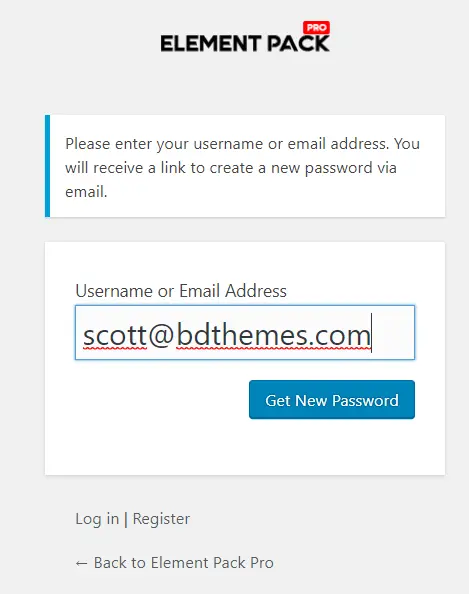
There are 2 ways we can solve this problem. Let’s solve this problem.
Solution 1 – Using PHPMyAdmin:
- Log into cPanel, Go to the Databases section and click on phpMyAdmin in Databases

2. Select the desired WordPress database. For our example: learnwp_freemius.
3. Go to wp_users and click on the browse.
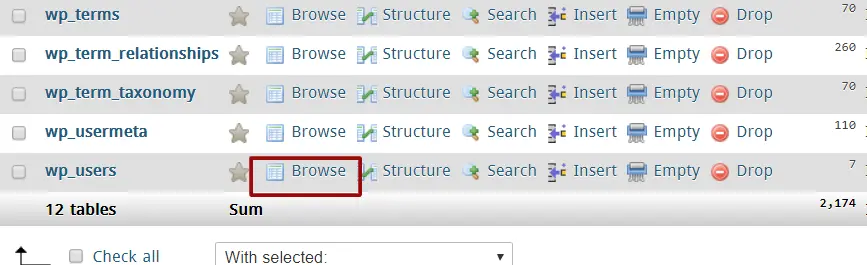
4. Search for your username and click Edit.
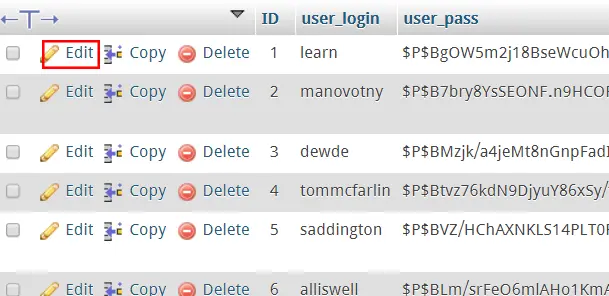
5. Reset the password by inserting a new value in user_pass. Remember that it is case sensitive.

6. Once this is completed, click on the drop-down menu below the function, and choose MD5 from the menu.
7. At the bottom of the page, click on the Go button.
Solution 2 – Via FTP:
- Login to your FTP account.
- Go to ” .. / wp-content / themes / (your active theme) / “, download the functions.php file .
- Open the functions.php file and add the following code after the first <php? :
wp_set_password ('yournewpassword', 1); - Change “yournewpassword” string with your new desired password. The ” 1 ” in the script is the user ID number in the wp_users table.
- Upload the edited “functions.php” file to your FTP.
- Run the WordPress site and check if you can log in or not. ( You will be able to log in for sure)
- Remove the line of code in step 3 and re-upload the file to your FTP, then you will be able to log in to WordPress.
あなたのためのブログ最も人気のあるブログ
ワードプレスについてもっと知る
The WordPress admin panel (Dashboard) does not display correctly
The Problem:
The WordPress administration control panel is showing without CSS. All links are not properly organized. You may encounter a site link the following image:
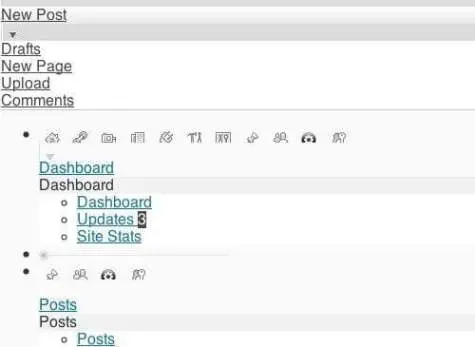
Solution(s):
Solution 1: Proxy and Firewall
Investigate your current Internet Connection. Figure out if your connection is under any proxy or firewall or not. Some of the current firewalls are blocking CSS files, which causes CSS files to not load correctly. Try to configure your proxy or firewall, delete cookies and cache and press Ctrl + F5 to refresh the page. Make sure that your firewall has exception rule for your website and it’s CSS and other files.
Solution 2: Update WordPress Plugins
If you have WordPress plugins installed for the administration menu, such as ” Admin Drop Down Menu ” or ” Lighter Menus “, update it. If this does not work, try to disable these plugin to eliminate this common WordPress Error.
Fatal error: Allowed memory size of 33554432 bytes exhausted
The Problem:
You receive this message ” Fatal error: Allowed memory size of 33554432 bytes exhausted ” when you try to load an image with a relatively large file size. To solve this error, try increasing the memory allocated to PHP. You can set the limit of 32 MB, 64 MB, 128 MB or 256 MB. It depends on your hosting account.
Solution(s):
Solution 1: Edit the php.ini
If you are still authorized i.e able to edit your server’s php.ini file, update your memory_limit in php.ini by modifying the following line
memory_limit = 64M; Maximum amount of memory a script may consume (64MB)
If the line is showing 64M, deal with 128M.
Solution 2 : Edit .htaccess
Add the following script in the .htaccess file
php_value メモリリミット 64M
Save the .htaccess file.
Solution 3: Edit the wp-config.php file
Add the following code in the wp-config.php file
//Increasing memory allocated to PHP
define ('WP_MEMORY_LIMIT', '64M');
Solution 4: Create a php.ini file in the wp-admin folder
Open Notepad.
Insert the following code in Notepad.memory_limit = 64M;
Save as ” php.ini “.
Upload this file to the ” wp-admin ” directory.
あなたのためのブログ最も人気のあるブログ
ワードプレスについてもっと知る
WordPress blog and administrator is showing blank page
The Problem:
This error usually occurs after a new installation of a WordPress theme or an update. The entire blog is displaying a blank page, or it is the WordPress administration login page that becomes blank. There is no way to access the control panel.
解決策
This phenomenon is known as the WordPress White Screen of Death. We have a full detailed article on it. Please read that article. Also, note that we always want you to use a good theme in your WordPress website so you don’t face such issues. We recommend the rooten theme if you are using Elementor Page Builder. Again, for pre-built templates you can use best Elementorアドオン for your site with Element pack. Also, have a look at the themes from BDテーマ.
結論
There are hundreds of common errors in WordPress which are very easy to solve. We have tried to cover the most common but tedious one to solve in our article. We will be covering more Common WordPress Errors with Solutions in this article from time to time. Bookmark this article and keep visiting time to time. Also, comment on any problem that you want us to investigate and solve for your through the comment box below. Please do share any problem with the solution. We will add that to this article and will also mention you in the article. Keep Calm and Solve Problems. Good luck!
WordPressブログをもっと読む
ul > .bdt-post-list-item; delay:350;">

WordPressのホワイト・スクリーン・オブ・デスの修正(すべてカバー)
2019年4月29日 未分類
![WordPress SEO Plugins Compared [update-21]](https://www.elementpack.pro/wp-content/uploads/2020/08/WordPress-SEO-150x150.jpg)
WordPressのSEOプラグイン比較【update-21
2021年4月14日 未分類

WordPressのライブチャットプラグイン:どこで見つけ、どのように追加するには?
2021年4月5日 未分類
WordPress CDNとは何か、メリット、デメリット、いつ使うべきか
2019年8月18日 未分類

WordPressでショートコードが重要な理由
2021年4月14日 Element Pack ヒント, Elementor, ワードプレス

メールキャンペーンを自動化するWordPressのトップメールプラグイン - プロのヒント!
2021年4月11日 未分類

