
Enkel navigering med rika menyalternativ
Visuella produktval ökar försäljningen snabbt
Personanpassat innehåll anpassas i realtid
Sömlös scrollning för bättre UX-flöde
Omedelbar duplicering av innehåll sparar tid
Snabb åtkomst till kraftfulla designelement
Färdiga mallar snabbar upp designen
Avancerade anpassade fält för flexibla data
Klona webbplatser enkelt utan krångel
Skarp, skalbar grafik för alla skärmar
Omprofilera verktygen för ett professionellt utseende
Visa eller dölj innehåll med precision
Engagerande djup med mjuka rörelser
Lägg enkelt till tydliga anteckningar och kommentarer
Hjälpsamma tips förbättrar användarinteraktionen
Animera element med stilfull känsla
Se till att viktiga avsnitt alltid är synliga
Full kontroll med anpassade kodjusteringar
Optimera filer för att öka webbplatsens hastighet
Utformade sidmallar som hjälper dig att komma igång med din landningssida bara genom att släppa en startdesign
Ready Blocks levereras med en mängd olika layouter och designelement, t.ex. sidhuvud, sidfot och widgetar etc.
Fördesignade rubriker med lukrativa stilar som passar för olika nischade webbplatser och designsmaker
En användbar samling av sidfotsmönster som hjälper dig att skapa en attraktiv sidfot på din målsida
Vi står till tjänst 24/7. Vi är glada att kunna hjälpa dig.
Detaljerade riktlinjer finns tillgängliga för alla funktioner på BdThemes
Lär dig något nytt, håll dig informerad om WordPress, webbdesign och mycket mer
Här är några av de viktigaste milstolparna i min utveckling:
Lär dig mer om produktanvändning, WordPress-tips och tricks från våra videor
Tjäna rejäla provisioner genom att gå med oss i kampanjen
Widget Idea Share är ett bra sätt att hitta liknande widgetar som du kan förbättra.
Helt klart! Om du behöver komma i kontakt med oss är du välkommen att höra av dig
Skapa valfritt WordPress-formulär på några minuter med Sigma Forms.
Plugin för sidbyggare för kommande snart och underhållsläge
Gör enkelt webbplatser tillgängliga med One Accessibility
Visa kundutlåtanden för att öka förtroendet och trovärdigheten.
Zoloblocks hjälper dig att skapa fantastiska Gutenberg-baserade webbplatser.
Den mest överlägsna slidern i en tid av Elementor Slider
De enda kompatibla bloggwidgetarna i Elementor för alla bloggar
Bygg en nästa generations WordPress e-handelswebbplats för företag
Organisera dina foton i en ny ängel varje gång med Elementor
Öka engagemanget och öka försäljningen med hjälp av Spin Wheel.
Kraftfull AI Image Generator Plugin för WordPress av ChatGPT
Skaffa 360° Augmented Reality för WooCommerce idag!
Kopiera och klistra in vilken webbdesign du vill bara med 2 klick!
Ett fullt fungerande tema för elementor med obegränsade alternativ
Smart, rent och flexibelt blocktema för Gutenberg
Dark Reader plugin säkerställer ögonvänlig webbläsning.
WooCommerce kassa på en sida för att öka konverteringarna.
Få tillgång till 100+ premiumplugins för WordPress med livstidsuppdateringar och dedikerad support.
 Swedish

Enkel navigering med rika menyalternativ
Visuella produktval ökar försäljningen snabbt
Personanpassat innehåll anpassas i realtid
Sömlös scrollning för bättre UX-flöde
Omedelbar duplicering av innehåll sparar tid
Snabb åtkomst till kraftfulla designelement
Färdiga mallar snabbar upp designen
Avancerade anpassade fält för flexibla data
Klona webbplatser enkelt utan krångel
Skarp, skalbar grafik för alla skärmar
Omprofilera verktygen för ett professionellt utseende
Visa eller dölj innehåll med precision
Engagerande djup med mjuka rörelser
Lägg enkelt till tydliga anteckningar och kommentarer
Hjälpsamma tips förbättrar användarinteraktionen
Animera element med stilfull känsla
Se till att viktiga avsnitt alltid är synliga
Full kontroll med anpassade kodjusteringar
Optimera filer för att öka webbplatsens hastighet
Utformade sidmallar som hjälper dig att komma igång med din landningssida bara genom att släppa en startdesign
Ready Blocks levereras med en mängd olika layouter och designelement, t.ex. sidhuvud, sidfot och widgetar etc.
Fördesignade rubriker med lukrativa stilar som passar för olika nischade webbplatser och designsmaker
En användbar samling av sidfotsmönster som hjälper dig att skapa en attraktiv sidfot på din målsida
Vi står till tjänst 24/7. Vi är glada att kunna hjälpa dig.
Detaljerade riktlinjer finns tillgängliga för alla funktioner på BdThemes
Lär dig något nytt, håll dig informerad om WordPress, webbdesign och mycket mer
Här är några av de viktigaste milstolparna i min utveckling:
Lär dig mer om produktanvändning, WordPress-tips och tricks från våra videor
Tjäna rejäla provisioner genom att gå med oss i kampanjen
Widget Idea Share är ett bra sätt att hitta liknande widgetar som du kan förbättra.
Helt klart! Om du behöver komma i kontakt med oss är du välkommen att höra av dig
Skapa valfritt WordPress-formulär på några minuter med Sigma Forms.
Plugin för sidbyggare för kommande snart och underhållsläge
Gör enkelt webbplatser tillgängliga med One Accessibility
Visa kundutlåtanden för att öka förtroendet och trovärdigheten.
Zoloblocks hjälper dig att skapa fantastiska Gutenberg-baserade webbplatser.
Den mest överlägsna slidern i en tid av Elementor Slider
De enda kompatibla bloggwidgetarna i Elementor för alla bloggar
Bygg en nästa generations WordPress e-handelswebbplats för företag
Organisera dina foton i en ny ängel varje gång med Elementor
Öka engagemanget och öka försäljningen med hjälp av Spin Wheel.
Kraftfull AI Image Generator Plugin för WordPress av ChatGPT
Skaffa 360° Augmented Reality för WooCommerce idag!
Kopiera och klistra in vilken webbdesign du vill bara med 2 klick!
Ett fullt fungerande tema för elementor med obegränsade alternativ
Smart, rent och flexibelt blocktema för Gutenberg
Dark Reader plugin säkerställer ögonvänlig webbläsning.
WooCommerce kassa på en sida för att öka konverteringarna.
Få tillgång till 100+ premiumplugins för WordPress med livstidsuppdateringar och dedikerad support.
Swedish
Hello guys. This is a step-by-step tutorial for creating a perfect portfolio using Elementor for your website. Many times, for different occasions, you may face trouble while designing a portfolio that goes along your theme. To ease your trouble, today I’m gonna show you how to create a portfolio using Elementor that fits every occasion.
Note that the Portfolio Gallery widget that I used in this tutorial is a Product of Element Pack Pro. So, I suggest that you get it before starting.
Before going further, please install Elementor och Element Pack into your dashboard. It’s an easy process as you have to install them from the Plugins menu. Just click Add New and add them by searching their names. This is the first step in creating a portfolio using Elementor page builder.
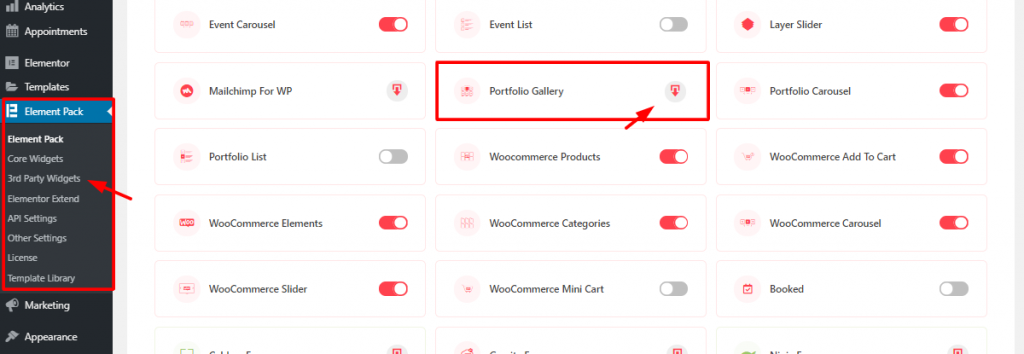
For starters, go to Element Pack plugin menu from WordPress dashboard. There, from the 3rd party widgets, click on the download button to download and install Portföljgalleri widget. Then just activate it with one click on it.
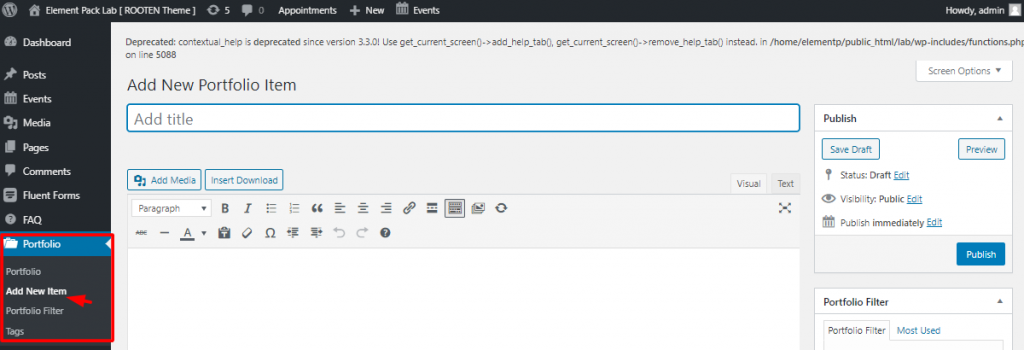
After you install the widget, it will automatically create a menu on your dashboard. To create a portfolio using Elementor and Portfolio Gallery widget, you must have portfolios inserted into your dashboard. To do that, go to Dashboard> Portfolio> Add New Item. Here, you can add your items to the portfolio. In this part, you can add a name for your item.
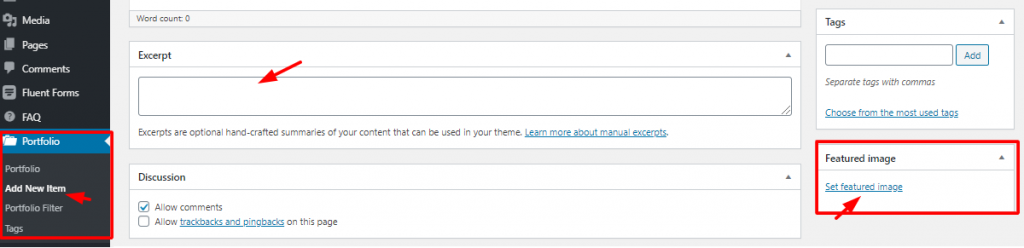
Again, you can write an Utdrag for each of your items and select a Utvalda bilder. That’s it! Hit the Publish button and your items are now on the portfolio. It’s very easy to make a portfolio using Elementor.
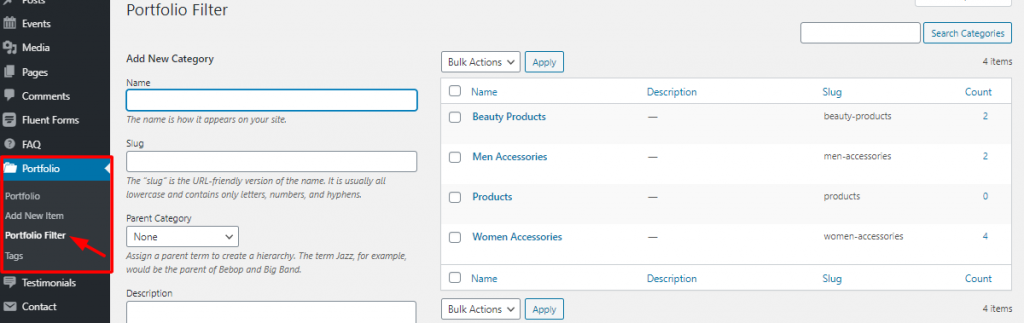
Again, make sure to categorize your items or products for the portfolio. Creating a good category not only makes the portfolio beautiful but also makes it easy to use. Then the next step, for creating a portfolio using Element, is the page editor.
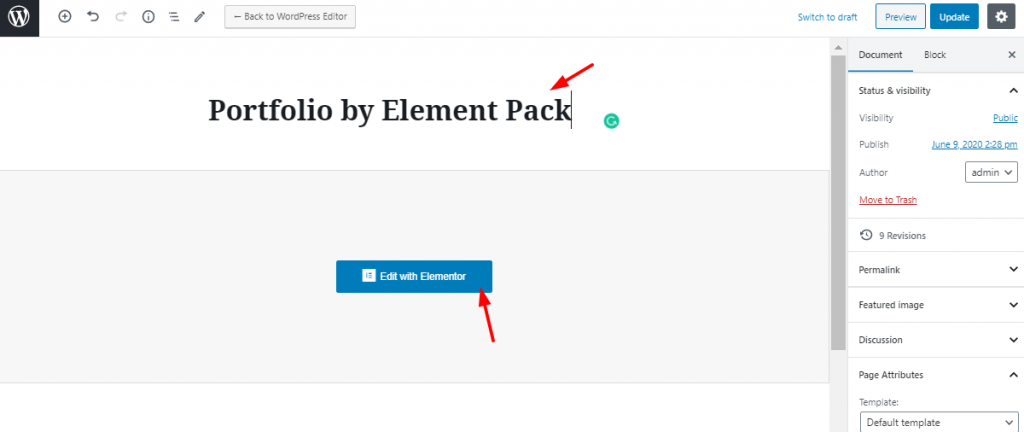
On your dashboard, go to Pages> Add New. You need to put a title for the page as the image shows. Then click on Redigera med Elementor.
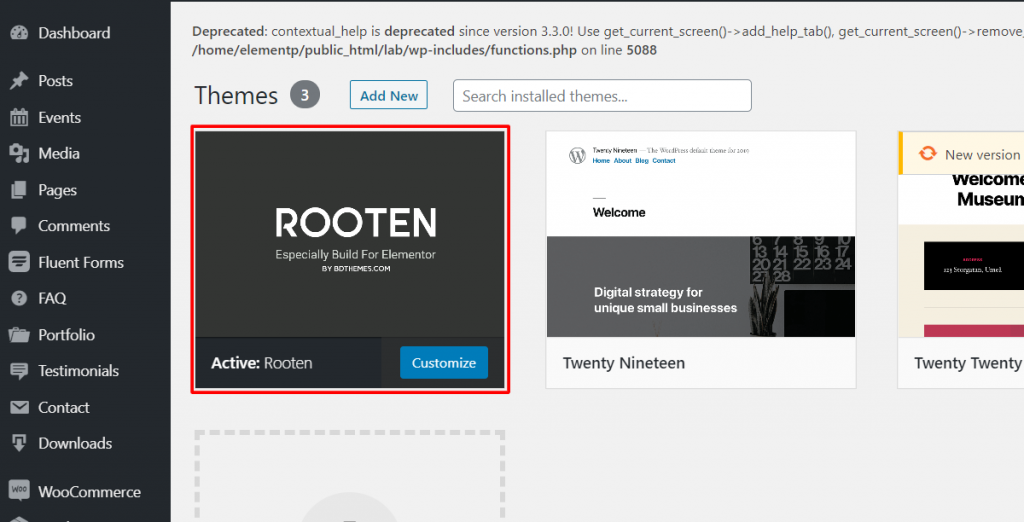
Note that, I’m using Rooten theme for this tutorial. It’s a premium product with a large potential. This is the lightest and fastest theme optimized for WordPress. Rooten theme is offering a huge range of customizable content with stylish artworks. This theme makes it easy and simple for users. It’s an easy-to-use theme for creating a portfolio using Elementor.
Creating a Portfolio Using Elementor and Portfolio Gallery Widget
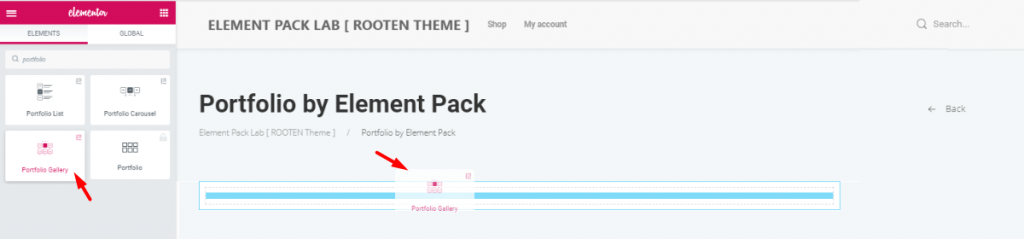
First, you have to drag and drop the widget from the widget menu. Although, this task is nothing to be mentioned. But since many are new to Elementor, this step may help them a bit.
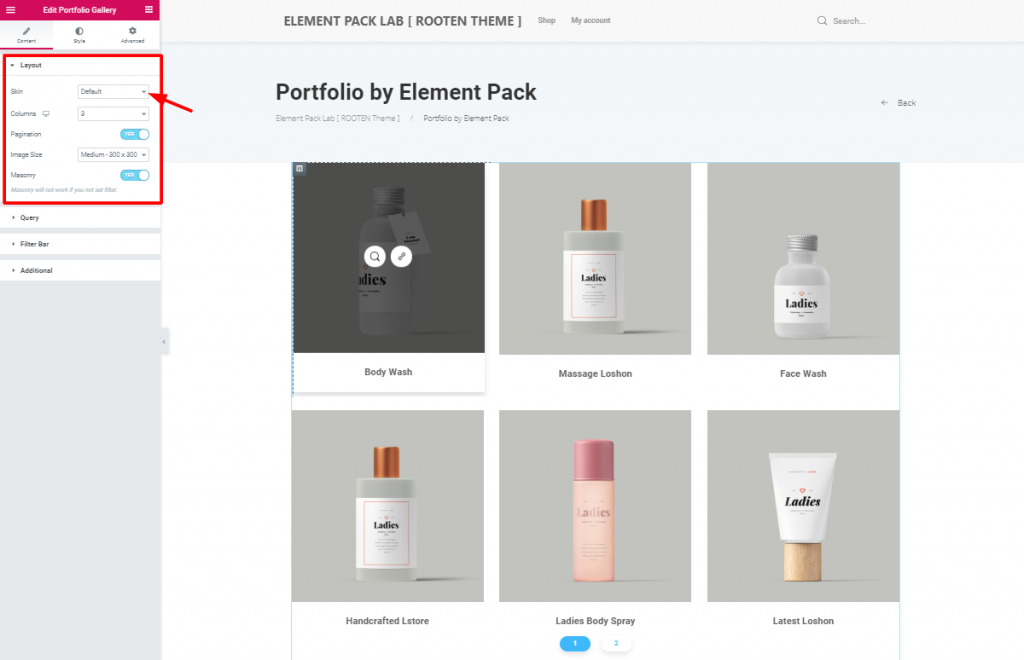
After you insert the widget, you will see the Layout section opened from the Innehåll tab. This tab holds the base settings of the portfolio widget. As you can see, the Hud is set to Default. The first image has a bit blacken out due to mouse hovering on it.
However, you can change the image size and enable pagination or masonry from this section. The Hud option helps you create your unique portfolio using Elementor.
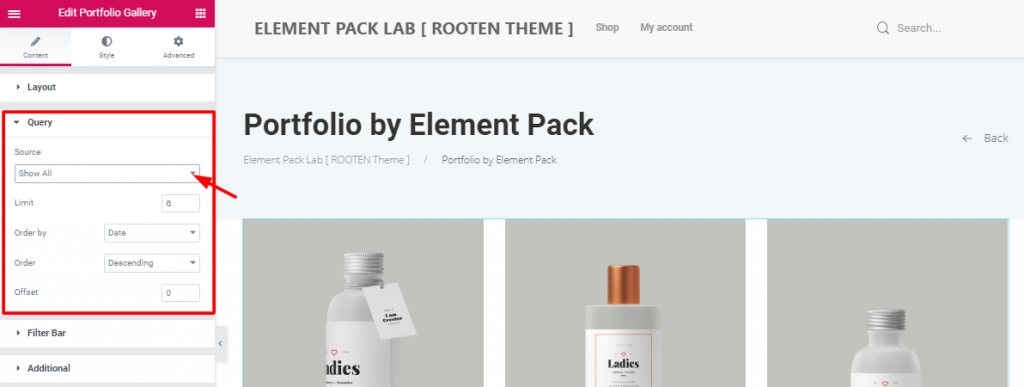
This is where you specify the category of products or items you want to show on the portfolio. If you choose Manual Selection in the Källa option, you can select a category. It’s the category you have made in the dashboard while creating this portfolio using Elementor.
You can also determine the number of products shown on one page. Also, you can set the order and offset it. These are the basic functions of your portfolio.
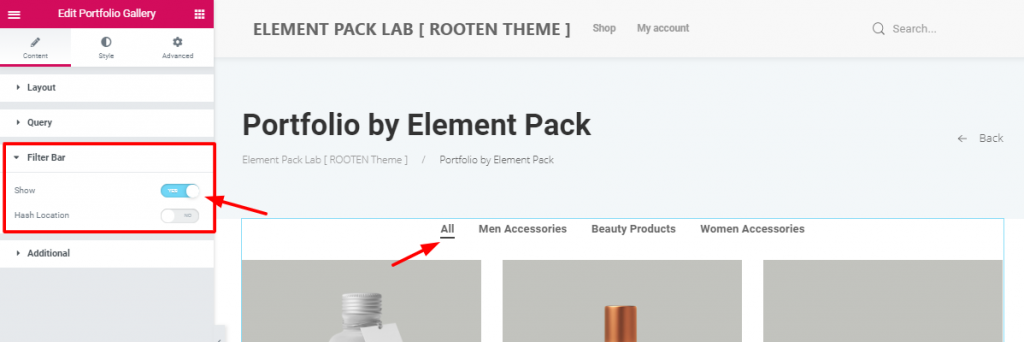
After setting the query, you can see the switcher to turn on the filter bar. It shows how many categories you have inserted in the portfolio. It’s handy and informative towards the visitors. Moreover, the filter bar option makes it easy for customers to choose their products. You need it to create a good portfolio using Elementor.
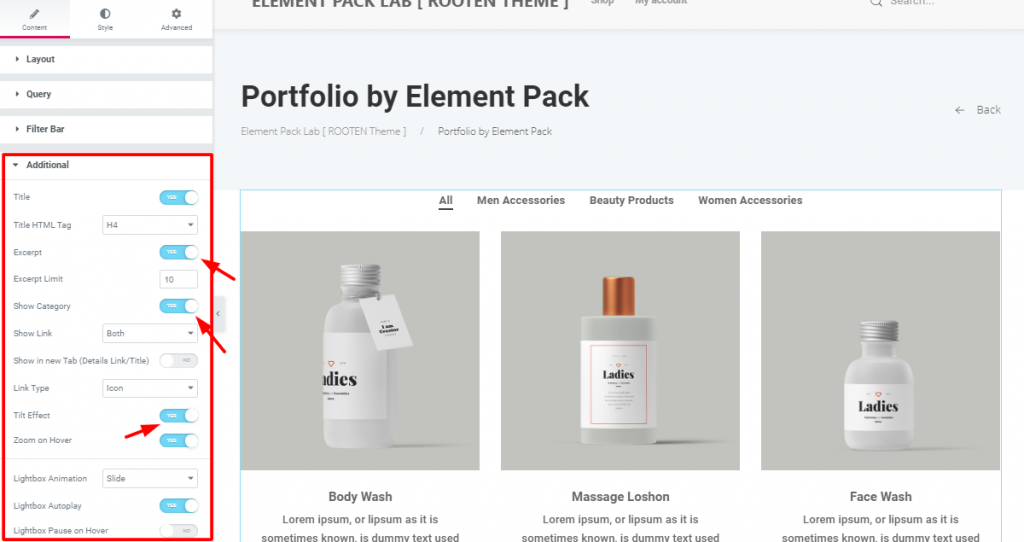
I Ytterligare section, you have some more switchers and drop-down controllers. You can actually show/hide the title, excerpt, or categories. However, turning on/off these switchers will do the job. Look carefully at the Tilt Effect och Zoom on Hover switchers.
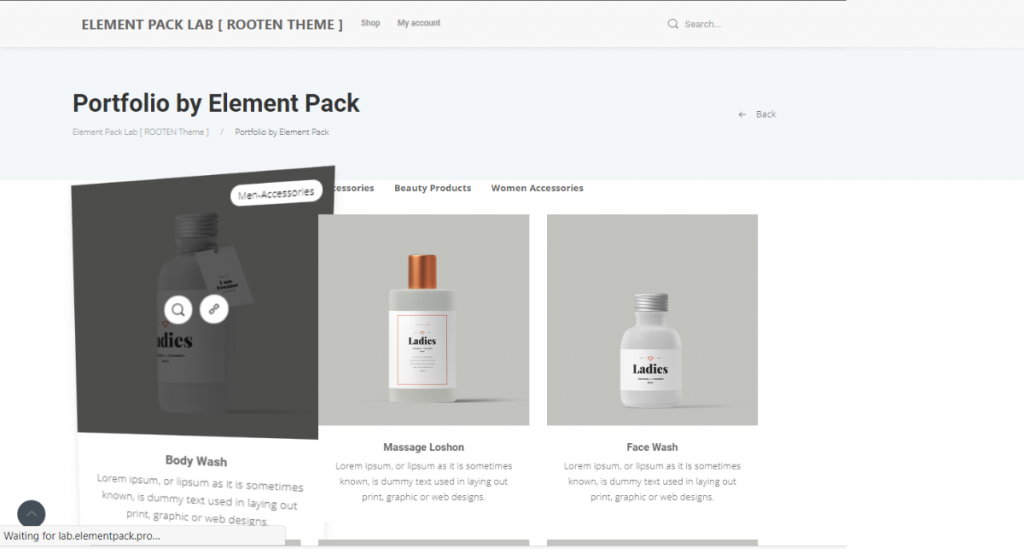
This is the Förhandsgranskning mode, showing the action of the two switchers. Adding these effects will not only make your portfolio rich but also make the visitors satisfied.
Now that you have completed the basics, it’s time to add some pepper on the dish. Let’s move on to the Stil tab.
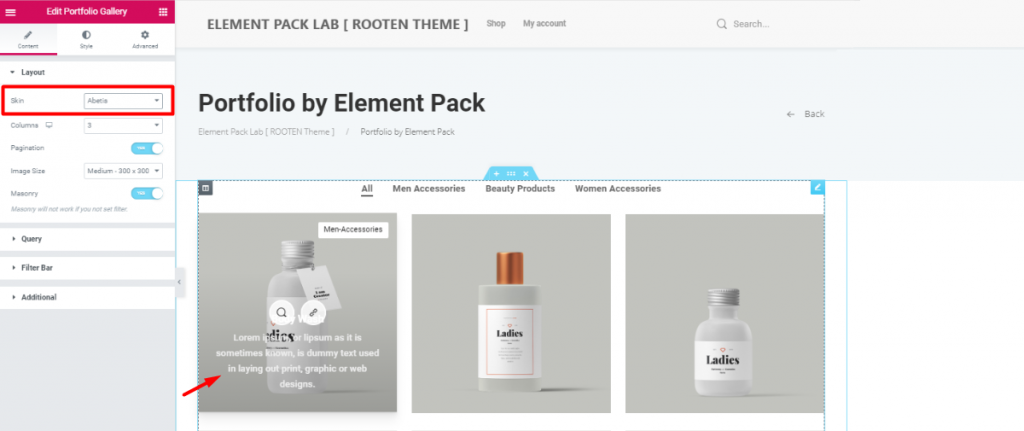
Before moving on, I’m going to change the Hud till Abetis. Doing this will bring the title and excerpt into the image. The reason is, it will give you more visible ground and will take less space.
However, all the previous settings still remained attached. So, make sure to give another look at the Hud alternativ.
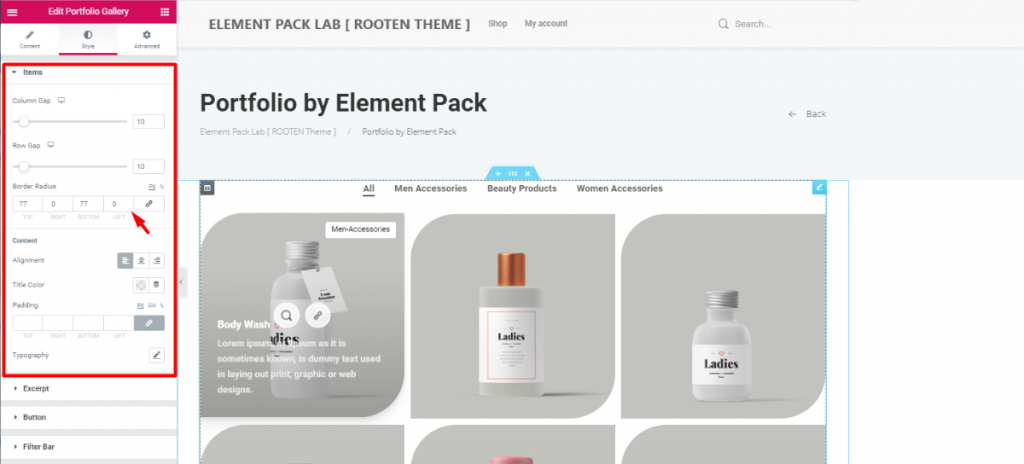
The first section Items lets you adjust the items column and row gaps. The more you increase the gaps, the more their size decreases. This happens because they are in a limited space. So, make sure to maintain the optimum gaps.
Moreover, you can adjust their border-radius from here. As the image shows, I’ve given them unique shapes with Border Radius. Just put 77 numbers in the Top och Bottom fields.
Again, you can change the color and alignment of the Titles of all the items at the same time. However, be sure to choose unique typography that represents your brand. You can also change the typography and color of the excerpt in the next section.
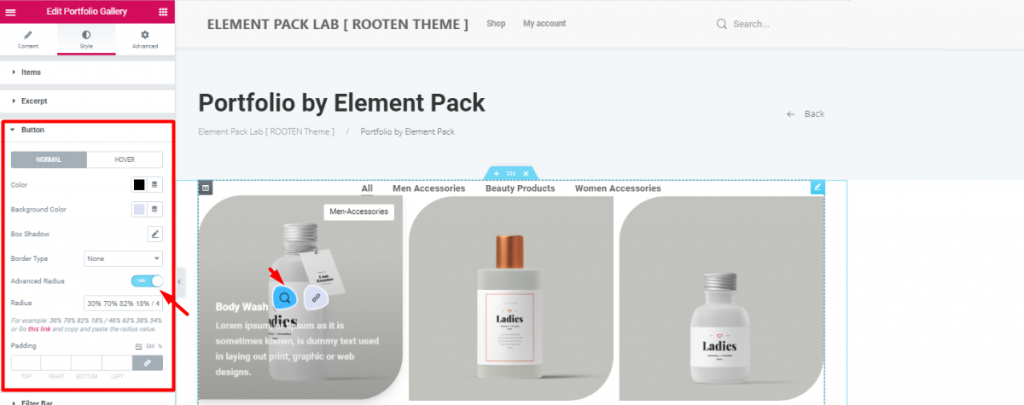
Let’s make things a bit spicier. Turn on the Advanced Radius switcher and have a look. Therefore, you will see the icons appearing in a cool weird shape. This can be done from the Knapp section in the style tab. However, be sure to change the color as you like.
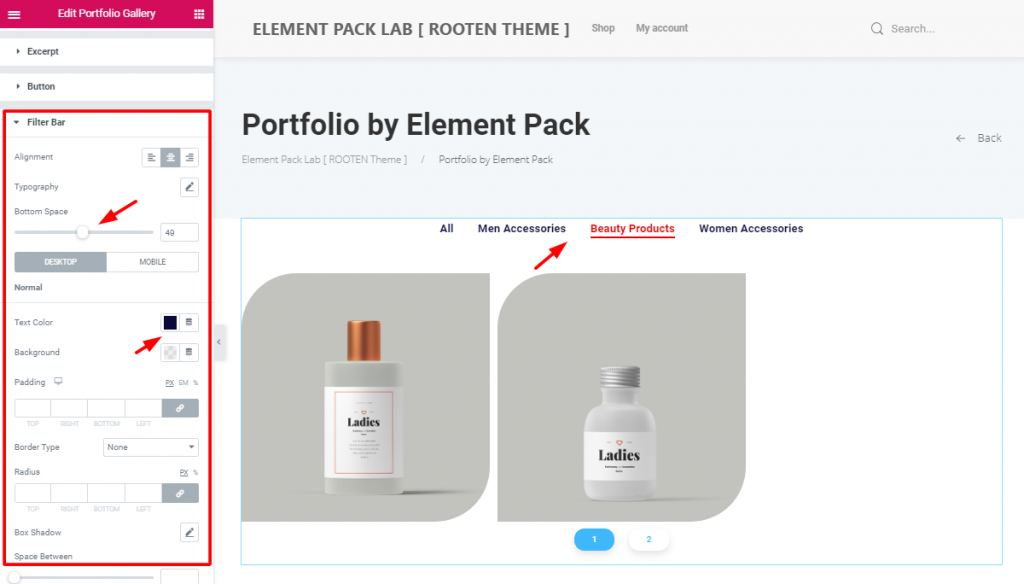
After that, change the alignment and bottom space of the filter bar to match your taste. Don’t forget to change the color and typography. The more refined look your portfolio has, the more it will attract visitors. So, keep that in mind.
Furthermore, changing the appearance of the pagination form the last section is also a good bargain.
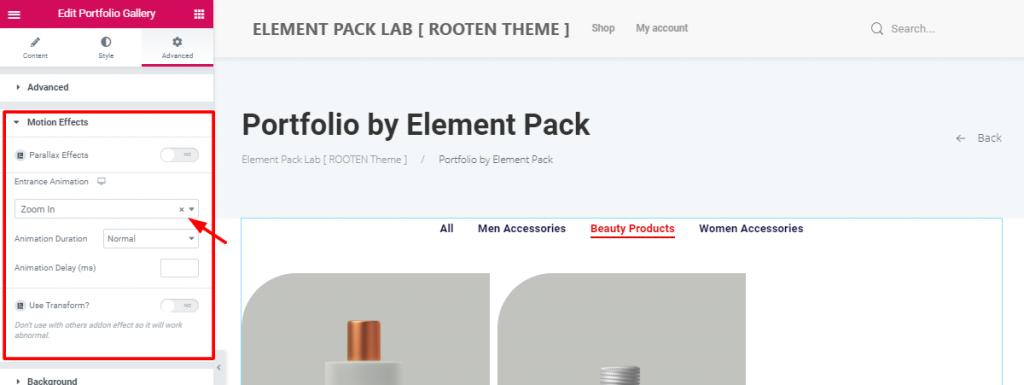
After all these customizations, there’s still something off. Let’s throw in animation and make it complete. From the Avancerad tab, go to the Rörelseeffekter section. Just like above, choose an entrance animation to the portfolio.
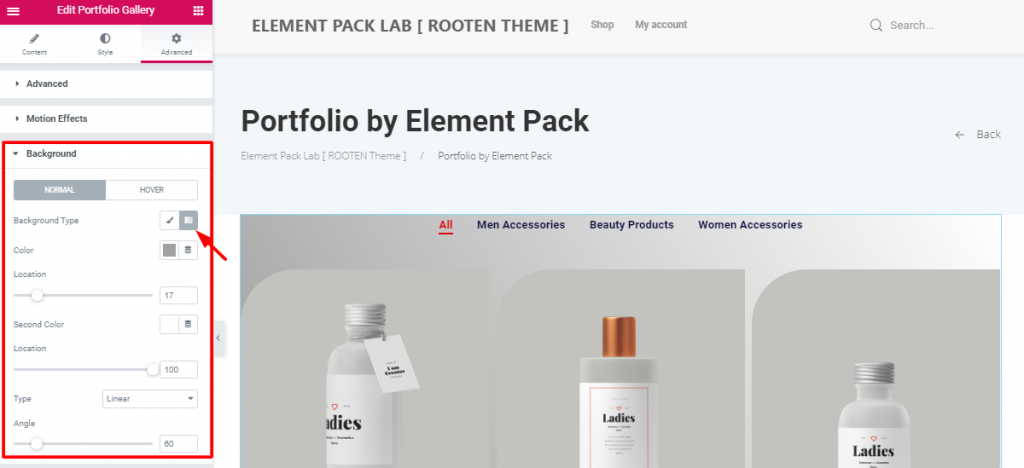
After that, put a gradient color on the background to make a light-dark shade. You can do this in the Bakgrund section. Simply, go to Style tab> Background.
All done! Have a look at the finished product.
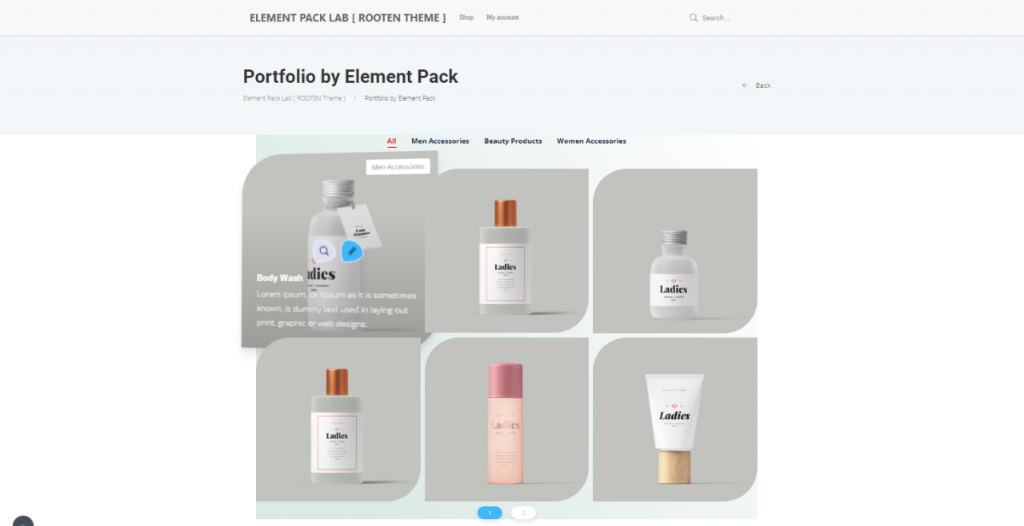
Hence, The portfolio is complete. No need to thank me. However, follow these steps carefully. Make yourself a unique and stunning portfolio using Elementor.
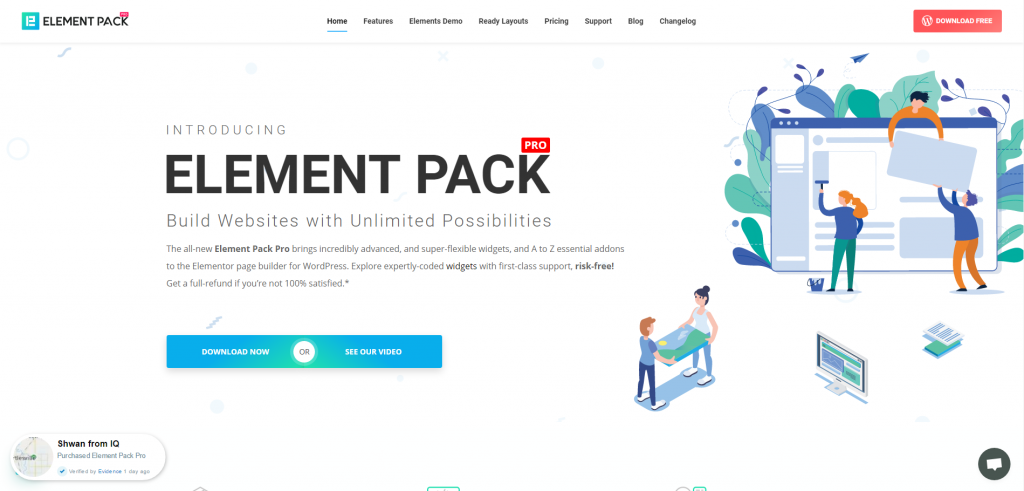
Element Pack is the most optimized add-on based on the WordPress Elementor plugin for creating your premium website.
Detta plugin har ett stort lager som är redo att distribueras på din webbplats. Även med 190+ insticksprogram, 270+ sidor som är färdiga att använda, över 1800 unika blockhar Element Pack tagit sig till positionen som Topp 5 över hela världen.
Vi kör ett give-away-program till våra älskade konsumenter och prenumeranter som är anslutna till vår officiella webbplats BDthemes.com
Besök Element Pack eller Prime Slider och dela dina tankar med oss. Lyckliga vinnare kommer att få en livstidslicens värd $100. Det tar bara en minut att delta.
Det som alla framgångsrika webbplatsdesigners önskar sig är förstklassiga och optimerade verktyg. Och Element Pack responds confidently to that wish. So, don’t hesitate too much and make a run for it!
Tack för att du läser den här bloggen. Ha en riktigt bra dag!
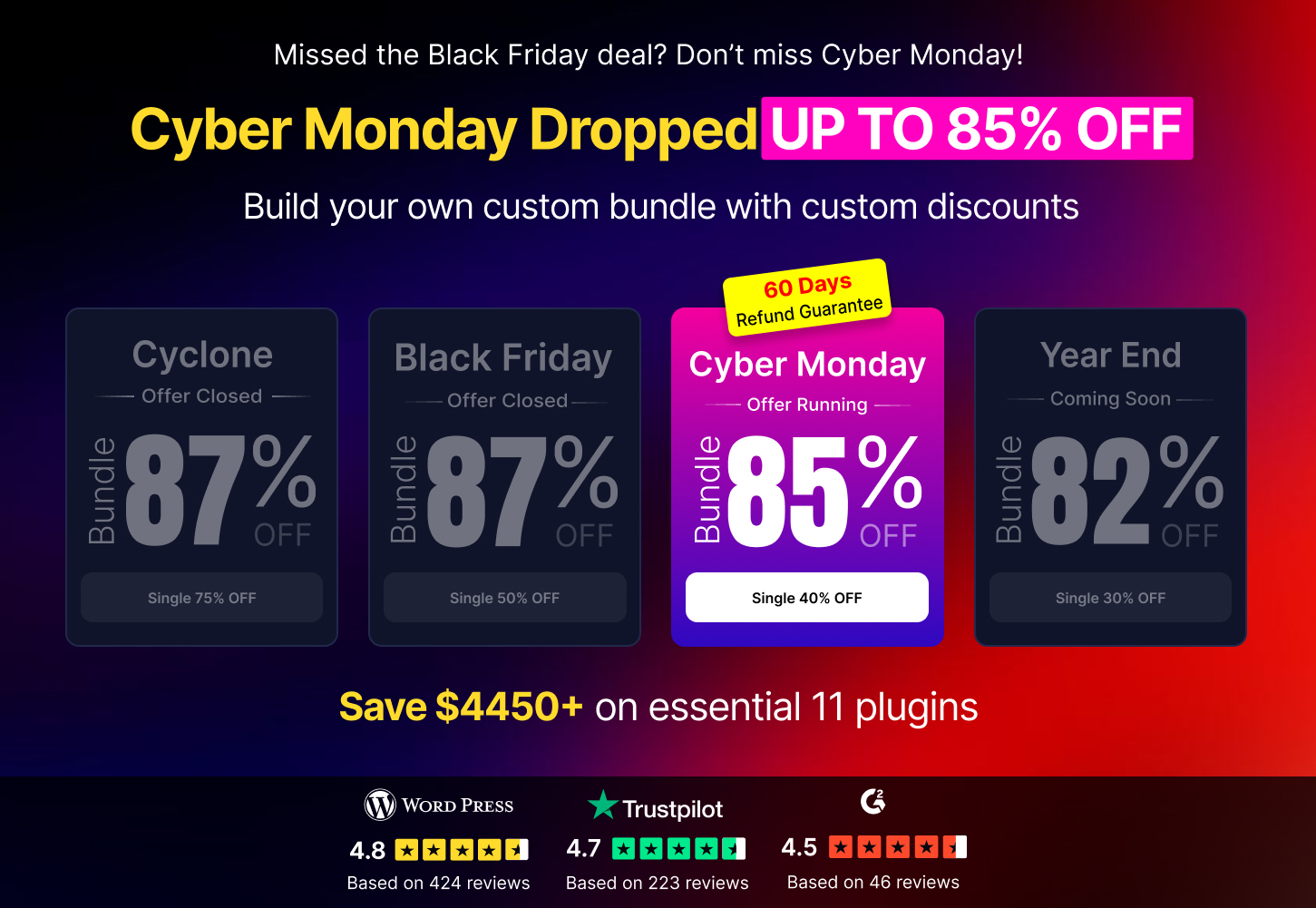

Största paketet med Elementor-mallar med det mest användarvänliga gränssnittet och 300+ användbara Elementor widgets. Bygg webbplatser från noll till 100% perfektion på nolltid.
Denna webbplats drivs av Element Pack Pro och Rooten Tema.
Upphovsrätt © 2025 BdTema. Alla rättigheter reserverade.









