Ubesværet navigation med rige menupunkter
Visuelle produktvalg øger salget hurtigt
Personligt indhold tilpasser sig i realtid
Sømløs scrolling for bedre UX-flow
Øjeblikkelig duplikering af indhold sparer tid
Hurtig adgang til kraftfulde designelementer
Færdige skabeloner gør designet hurtigere
Avancerede brugerdefinerede felter til fleksible data
Klon sites nemt uden besvær
Skarp, skalerbar grafik til alle skærme
Rebrand værktøjer til et professionelt look
Vis eller skjul indhold med præcision
Engagerende dybde med jævn bevægelse
Tilføj nemt tydelige noter og anmærkninger
Nyttige hints forbedrer brugernes interaktion
Animer elementer med stilfuld flair
Hold vigtige sektioner altid synlige
Fuld kontrol med brugerdefinerede kodejusteringer
Optimer filer for at øge sidens hastighed
Udarbejdede sideskabeloner, der hjælper dig med at komme i gang med din landingsside bare ved at droppe et startdesign
Ready Blocks leveres med en række forskellige layouts og designelementer, f.eks. overskrifter, sidefødder og widgets osv.
Foruddesignede overskrifter med lukrative stilarter, der passer til forskellige nichewebsteder og designsmag
En nyttig samling af footer-designs, der hjælper dig med at skabe en attraktiv footer på din landingsside.
Find os 24/7 til din rådighed. Vi er glade for at kunne hjælpe.
Detaljerede retningslinjer tilgængelige for alle funktioner på BdThemes
Lær noget nyt, bliv informeret om WordPress, webdesign og meget mere
Her er nogle af de vigtigste milepæle i min udvikling:
Lær produktbrug, WordPress-tips og -tricks fra vores videoer
Tjen store provisioner ved at deltage i kampagnen.
Widget Idea Share er en god måde at finde lignende widgets på, som du kan forbedre.
Helt sikkert! Hvis du har brug for at komme i kontakt med os, er du velkommen til at kontakte os
Byg enhver WordPress-formular på få minutter med Sigma Forms.
Coming Soon & Maintenance Mode Page Builder Plugin
Gør nemt hjemmesider tilgængelige med One Accessibility
Vis kundeudtalelser for at øge tilliden og troværdigheden.
Zoloblocks hjælper med at skabe fantastiske Gutenberg-baserede hjemmesider.
Den mest overlegne slider i Elementor-sliderens æra
De eneste kompatible blogging-widgets i Elementor til enhver blog
Byg et next-gen WordPress eCommerce-website til virksomheder
Organiser dine fotos i en ny engel hver gang med Elementor
Styrk engagementet og øg salget ved hjælp af Spin Wheel.
Kraftfuld AI-billedgenerator-plugin til WordPress af ChatGPT
Få 360° Augmented Reality til WooCommerce i dag!
Kopier og indsæt ethvert webdesign, du kan lide, bare med 2 klik!
Et fuldt fungerende tema til elementor med ubegrænsede muligheder
Smart, rent og fleksibelt bloktema til Gutenberg
Dark Reader-plugin sikrer øjenvenlig weblæsning.
WooCommerce one-page checkout for at øge konverteringer.
Find Nearby Stores Instantly with Sigma Store Locator
The Ultimate WordPress Media Library Organizer

Få adgang til 100+ premium WordPress-plugins med livstidsopdateringer og dedikeret support.
 Danish

Ubesværet navigation med rige menupunkter
Visuelle produktvalg øger salget hurtigt
Personligt indhold tilpasser sig i realtid
Sømløs scrolling for bedre UX-flow
Øjeblikkelig duplikering af indhold sparer tid
Hurtig adgang til kraftfulde designelementer
Færdige skabeloner gør designet hurtigere
Avancerede brugerdefinerede felter til fleksible data
Klon sites nemt uden besvær
Skarp, skalerbar grafik til alle skærme
Rebrand værktøjer til et professionelt look
Vis eller skjul indhold med præcision
Engagerende dybde med jævn bevægelse
Tilføj nemt tydelige noter og anmærkninger
Nyttige hints forbedrer brugernes interaktion
Animer elementer med stilfuld flair
Hold vigtige sektioner altid synlige
Fuld kontrol med brugerdefinerede kodejusteringer
Optimer filer for at øge sidens hastighed
Udarbejdede sideskabeloner, der hjælper dig med at komme i gang med din landingsside bare ved at droppe et startdesign
Ready Blocks leveres med en række forskellige layouts og designelementer, f.eks. overskrifter, sidefødder og widgets osv.
Foruddesignede overskrifter med lukrative stilarter, der passer til forskellige nichewebsteder og designsmag
En nyttig samling af footer-designs, der hjælper dig med at skabe en attraktiv footer på din landingsside.
Find os 24/7 til din rådighed. Vi er glade for at kunne hjælpe.
Detaljerede retningslinjer tilgængelige for alle funktioner på BdThemes
Lær noget nyt, bliv informeret om WordPress, webdesign og meget mere
Her er nogle af de vigtigste milepæle i min udvikling:
Lær produktbrug, WordPress-tips og -tricks fra vores videoer
Tjen store provisioner ved at deltage i kampagnen.
Widget Idea Share er en god måde at finde lignende widgets på, som du kan forbedre.
Helt sikkert! Hvis du har brug for at komme i kontakt med os, er du velkommen til at kontakte os
Byg enhver WordPress-formular på få minutter med Sigma Forms.
Coming Soon & Maintenance Mode Page Builder Plugin
Gør nemt hjemmesider tilgængelige med One Accessibility
Vis kundeudtalelser for at øge tilliden og troværdigheden.
Zoloblocks hjælper med at skabe fantastiske Gutenberg-baserede hjemmesider.
Den mest overlegne slider i Elementor-sliderens æra
De eneste kompatible blogging-widgets i Elementor til enhver blog
Byg et next-gen WordPress eCommerce-website til virksomheder
Organiser dine fotos i en ny engel hver gang med Elementor
Styrk engagementet og øg salget ved hjælp af Spin Wheel.
Kraftfuld AI-billedgenerator-plugin til WordPress af ChatGPT
Få 360° Augmented Reality til WooCommerce i dag!
Kopier og indsæt ethvert webdesign, du kan lide, bare med 2 klik!
Et fuldt fungerende tema til elementor med ubegrænsede muligheder
Smart, rent og fleksibelt bloktema til Gutenberg
Dark Reader-plugin sikrer øjenvenlig weblæsning.
WooCommerce one-page checkout for at øge konverteringer.
Find Nearby Stores Instantly with Sigma Store Locator
The Ultimate WordPress Media Library Organizer
Få adgang til 100+ premium WordPress-plugins med livstidsopdateringer og dedikeret support.
Danish
Do you know about Gmail search operators? A large number of experts all over the world are currently using this feature.
It’s a simple thing like command lines that work on your Gmail app. We know you are a busy person and probably your inbox is more flooded than Japan itself. But hey, it happens and it’s more normal for people in the marketing departments.
So, what you are going to do? Simple, just use Gmail Search Operators to filter the specific email that you are looking for. These operators identify emails from hints like keywords, dates, sender/receiver, and separate them from the huge stack of emails in your inbox.
In this article, you are going to learn what Gmail Search Operators are and how they work. Let’s start!
Gmail Search Operator (aka Gmail Search Command) is a text string line made of words and symbols that projects the email filtering option.
It is a search option that runs through the internal coding structure by the Gmail itself. You can use single operators as well as combine them to gain more specific results. Just make use of the tool by boosting its efficiency.

Read Gmail’s official document on this topic to learn more. Klik her.
Why would you use Gmail search operators
Your email list mainly determines whether you need to use search operators or not.
If what you have is a small list of personal/professional email lists, your inbox should not be flooded so quickly. So, in this case, you can maintain your inbox yourself.
Now, what about someone who has, maybe, a thousand or a hundred emails on the email list? He/she should be dealing with 100+ emails a day. Chances are, you will lose important emails inside the pile of emails.
Statistics show that there are almost 4 billion people using emails as their contact method. Among them, a stunning 30% uses Gmail. Guess how many emails travel in the world every day!
Now, Gmail Search Operators make it easy for you to find your specific email instead of going through piles.
That does make sense, right?
While the GSO makes it easy for you to filter emails and saving a lot of time, it does not work so well with SMPT ports.
For example, you can freely use GSO on your personal/business Gmail account however you want.
But, if you are using an IMAP account that is configured with a Gmail account, the GSO may not work accurately.
This is the only limitation that you may or may not face using GSO. So, take your time to choose between emailing methods.
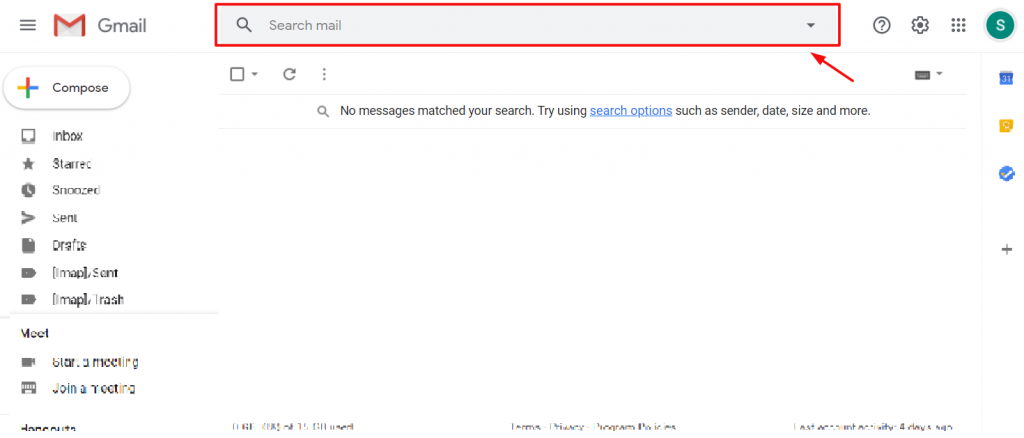
Your Gmail dashboard has a fixed search bar on the top middle position. This is where you will insert Gmail Search Operators. Just like google (who shows whatever on earth you are searching for), it will search the input text among all the emails (in/out) inside your inbox.
Let’s move on to the main topic.
Without further delay, here they are:

to:me from:[email]View emails that were sent to you from a specific person by using two operators in a combination, the Til og From. When you are typing in the name of a person, suggestions will automatically pop up and you can choose the specific person’s mail from google contacts. Just click it and hit the search button.

from:me to:[email]View emails that you have sent to someone specific. Just start typing the name and the process follows the same as before. Simple yet effective Gmail Search Operators.

subject:wordIf you remember what was written inside the email you are looking for, go ahead and type Subject: operator and write the Word. This operator filter emails having the word in the subject line.

from:someone OR from:somebody
{from:someone from:somebody}
Let’s assume that you want to find emails from a few different specific people. So, by inserting this Gmail Search Operators, you can find multiple terms together in a list.

word1 -word2You can view emails having the first keyword and not having the second keyword inside. This operator is basically used where multiple emails may have similar keywords in the subject line. the symbol – is the operator here.

"word word"This operator filters the emails having the exact keyword mentioned. It is a pretty handy Gmail search operator.

word AROUND number word
"word AROUND number word"
This operator searches emails that have these two words close by each other with a probable word gap. Using the quote will make sure that the first word put inside the search field stays first in the results.

label:wordNow, emails can be labeled. Maybe it’s in your contact list and you labeled it but forgot somehow. So, using this Gmail search operator, you can filter emails under a specific label.

has:attachmentDo you have emails with attachments? Great! It’s very easy to find those emails with just two words. Insert this operator and every email containing attachments will show up on the list.

has:drive
has:document
has:spreadsheet
has:presentation
Emails having specific attachments can be filtered with these operators.

has:youtube You can find emails containing YouTube links by using this operator.

list:[email]You can find all the mail from a specific mail list with this Gmail Search Operator.

filename:wordFor more specific results, you can filter emails by filename operator i.e. filename:pdf, filename:mydoc.txt, etc.

in:anywhere wordIn case you want to search for an email all across your mailbox, maybe inbox, spam, sent, draft, whatever, you can filter it using this operator.

is:importantDid you have important emails and you can’t find them anymore? Type is:important and boom! All important emails will be listed on the screen.

has:yellow-star
has:blue-info
Emails that have special marks or colors can be found with this Gmail Search Operator.

after:mm/dd/yyyy
before:mm/dd/yyyy
older:mm/dd/yyyy
newer:mm/dd/yyyy
You can search emails by specified time period using this operator. Easy right?

older_than:number d or m or y
newer_than:number d or m or y
If you are looking for emails before or after a certain time period, then you can use this Gmail Search Operator easily.
d is for the day, m is for the month, y is for the year. i.e. older_than:4d

is:chats wordFilter any message from the chat.

size:numberActually, you can filter email based on their content size using search operators. The number will represent how many bytes the email should weight at least.

Of course, you can mix up the operators and use them to filter out emails with multiple conditions. Sweet, isn’t it?
Well, that’s how you can use Gmail Search Operators to easily find your lost piece of email easily and effectively.
Denne blog er sponsoreret af Element Pack, the most advanced widget pack for Elementor Page builder.
Thanks for reading this blog. Have a good day.


Største Elementor-skabelonpakke med den mest brugervenlige brugergrænseflade og 300+ nyttige Elementor-widgets. Byg hjemmesider fra nul til 100% Perfektion på ingen tid.
Denne hjemmeside er drevet af Element Pack Pro og Rooten Tema.
Copyright © 2026 BdTemaer. Alle rettigheder forbeholdes.