Enkel navigering med rika menyalternativ
Visuella produktval ökar försäljningen snabbt
Personanpassat innehåll anpassas i realtid
Sömlös scrollning för bättre UX-flöde
Omedelbar duplicering av innehåll sparar tid
Snabb åtkomst till kraftfulla designelement
Färdiga mallar snabbar upp designen
Avancerade anpassade fält för flexibla data
Klona webbplatser enkelt utan krångel
Skarp, skalbar grafik för alla skärmar
Omprofilera verktygen för ett professionellt utseende
Visa eller dölj innehåll med precision
Engagerande djup med mjuka rörelser
Lägg enkelt till tydliga anteckningar och kommentarer
Hjälpsamma tips förbättrar användarinteraktionen
Animera element med stilfull känsla
Se till att viktiga avsnitt alltid är synliga
Full kontroll med anpassade kodjusteringar
Optimera filer för att öka webbplatsens hastighet
Utformade sidmallar som hjälper dig att komma igång med din landningssida bara genom att släppa en startdesign
Ready Blocks levereras med en mängd olika layouter och designelement, t.ex. sidhuvud, sidfot och widgetar etc.
Fördesignade rubriker med lukrativa stilar som passar för olika nischade webbplatser och designsmaker
En användbar samling av sidfotsmönster som hjälper dig att skapa en attraktiv sidfot på din målsida
Vi står till tjänst 24/7. Vi är glada att kunna hjälpa dig.
Detaljerade riktlinjer finns tillgängliga för alla funktioner på BdThemes
Lär dig något nytt, håll dig informerad om WordPress, webbdesign och mycket mer
Här är några av de viktigaste milstolparna i min utveckling:
Lär dig mer om produktanvändning, WordPress-tips och tricks från våra videor
Tjäna rejäla provisioner genom att gå med oss i kampanjen
Widget Idea Share är ett bra sätt att hitta liknande widgetar som du kan förbättra.
Helt klart! Om du behöver komma i kontakt med oss är du välkommen att höra av dig
Skapa valfritt WordPress-formulär på några minuter med Sigma Forms.
Plugin för sidbyggare för kommande snart och underhållsläge
Gör enkelt webbplatser tillgängliga med One Accessibility
Visa kundutlåtanden för att öka förtroendet och trovärdigheten.
Zoloblocks hjälper dig att skapa fantastiska Gutenberg-baserade webbplatser.
Den mest överlägsna slidern i en tid av Elementor Slider
De enda kompatibla bloggwidgetarna i Elementor för alla bloggar
Bygg en nästa generations WordPress e-handelswebbplats för företag
Organisera dina foton i en ny ängel varje gång med Elementor
Öka engagemanget och öka försäljningen med hjälp av Spin Wheel.
Kraftfull AI Image Generator Plugin för WordPress av ChatGPT
Skaffa 360° Augmented Reality för WooCommerce idag!
Kopiera och klistra in vilken webbdesign du vill bara med 2 klick!
Ett fullt fungerande tema för elementor med obegränsade alternativ
Smart, rent och flexibelt blocktema för Gutenberg
Dark Reader plugin säkerställer ögonvänlig webbläsning.
WooCommerce kassa på en sida för att öka konverteringarna.
Find Nearby Stores Instantly with Sigma Store Locator
The Ultimate WordPress Media Library Organizer

Få tillgång till 100+ premiumplugins för WordPress med livstidsuppdateringar och dedikerad support.
 Swedish

Enkel navigering med rika menyalternativ
Visuella produktval ökar försäljningen snabbt
Personanpassat innehåll anpassas i realtid
Sömlös scrollning för bättre UX-flöde
Omedelbar duplicering av innehåll sparar tid
Snabb åtkomst till kraftfulla designelement
Färdiga mallar snabbar upp designen
Avancerade anpassade fält för flexibla data
Klona webbplatser enkelt utan krångel
Skarp, skalbar grafik för alla skärmar
Omprofilera verktygen för ett professionellt utseende
Visa eller dölj innehåll med precision
Engagerande djup med mjuka rörelser
Lägg enkelt till tydliga anteckningar och kommentarer
Hjälpsamma tips förbättrar användarinteraktionen
Animera element med stilfull känsla
Se till att viktiga avsnitt alltid är synliga
Full kontroll med anpassade kodjusteringar
Optimera filer för att öka webbplatsens hastighet
Utformade sidmallar som hjälper dig att komma igång med din landningssida bara genom att släppa en startdesign
Ready Blocks levereras med en mängd olika layouter och designelement, t.ex. sidhuvud, sidfot och widgetar etc.
Fördesignade rubriker med lukrativa stilar som passar för olika nischade webbplatser och designsmaker
En användbar samling av sidfotsmönster som hjälper dig att skapa en attraktiv sidfot på din målsida
Vi står till tjänst 24/7. Vi är glada att kunna hjälpa dig.
Detaljerade riktlinjer finns tillgängliga för alla funktioner på BdThemes
Lär dig något nytt, håll dig informerad om WordPress, webbdesign och mycket mer
Här är några av de viktigaste milstolparna i min utveckling:
Lär dig mer om produktanvändning, WordPress-tips och tricks från våra videor
Tjäna rejäla provisioner genom att gå med oss i kampanjen
Widget Idea Share är ett bra sätt att hitta liknande widgetar som du kan förbättra.
Helt klart! Om du behöver komma i kontakt med oss är du välkommen att höra av dig
Skapa valfritt WordPress-formulär på några minuter med Sigma Forms.
Plugin för sidbyggare för kommande snart och underhållsläge
Gör enkelt webbplatser tillgängliga med One Accessibility
Visa kundutlåtanden för att öka förtroendet och trovärdigheten.
Zoloblocks hjälper dig att skapa fantastiska Gutenberg-baserade webbplatser.
Den mest överlägsna slidern i en tid av Elementor Slider
De enda kompatibla bloggwidgetarna i Elementor för alla bloggar
Bygg en nästa generations WordPress e-handelswebbplats för företag
Organisera dina foton i en ny ängel varje gång med Elementor
Öka engagemanget och öka försäljningen med hjälp av Spin Wheel.
Kraftfull AI Image Generator Plugin för WordPress av ChatGPT
Skaffa 360° Augmented Reality för WooCommerce idag!
Kopiera och klistra in vilken webbdesign du vill bara med 2 klick!
Ett fullt fungerande tema för elementor med obegränsade alternativ
Smart, rent och flexibelt blocktema för Gutenberg
Dark Reader plugin säkerställer ögonvänlig webbläsning.
WooCommerce kassa på en sida för att öka konverteringarna.
Find Nearby Stores Instantly with Sigma Store Locator
The Ultimate WordPress Media Library Organizer
Få tillgång till 100+ premiumplugins för WordPress med livstidsuppdateringar och dedikerad support.
Swedish
Have you ever wonder how to Edit Footer in WordPress? Or have you been struggling with the best approach to add code or items to the footer? If your answer is yes, and you are overwhelmed by the many tools available to make such changes – read this article. It has all the possible solutions and the best approaches to solve this issue.
In this article, I am going to show easiest, dirtiest ( in terms of getting hand dirty with codes), and the coolest way of editing footer in WordPress. I will mention the easiest method which involves the use of the plugin and recommended for most users. However, for the coolest advanced user, I will demonstrate the code method that you can use to edit the footer.
Let’s begin.
You might be wondering why I have included this section. Some people still don’t have an idea about footer – what actually is a footer in WordPress. If you already know, please skip this paragraph and go to the next section.
The footer is the area at the bottom of your site, it is generally used to indicate for how long your site exists, shows that it is regularly updated indicating the date of the current year and makes the statement of any copyrights e.g. “All rights reserved”.
Take the time to learn about the copyright of your website because, depending on the country- the laws are not the same.
The footer can also highlight the agency or the person who created the website, this is what we found in most cases- actually is the credits of the company that developed the theme.
I am going to start with the easiest and recommended way of editing footer. Normally, the footer is part of the theme. Whenever we update a theme, it changes any editing that has been made to the file of it. If we edit the footer using plugin then it won’t change even if we update the theme.
Elementor is one of the best available page builder plugins in the market. It just not only helps to build a page or plugin but also helps us to create popup and custom page templates. We can also create custom blocks. It also allows building custom header and footer. This can be used in any page or specific pages based on your conditional settings. Elementor needs a pro version in most cases to build such a thing. If you want to have more flexibility of add-ons, widgets, and ready-made pages, then you can consider buying the best elementor addons in the market – Element Pack. It has more than 100+ widgets and 100+ ready pages also. Footer is also including. You can try the Element Pack Lite version in WordPress.Org before you purchase.
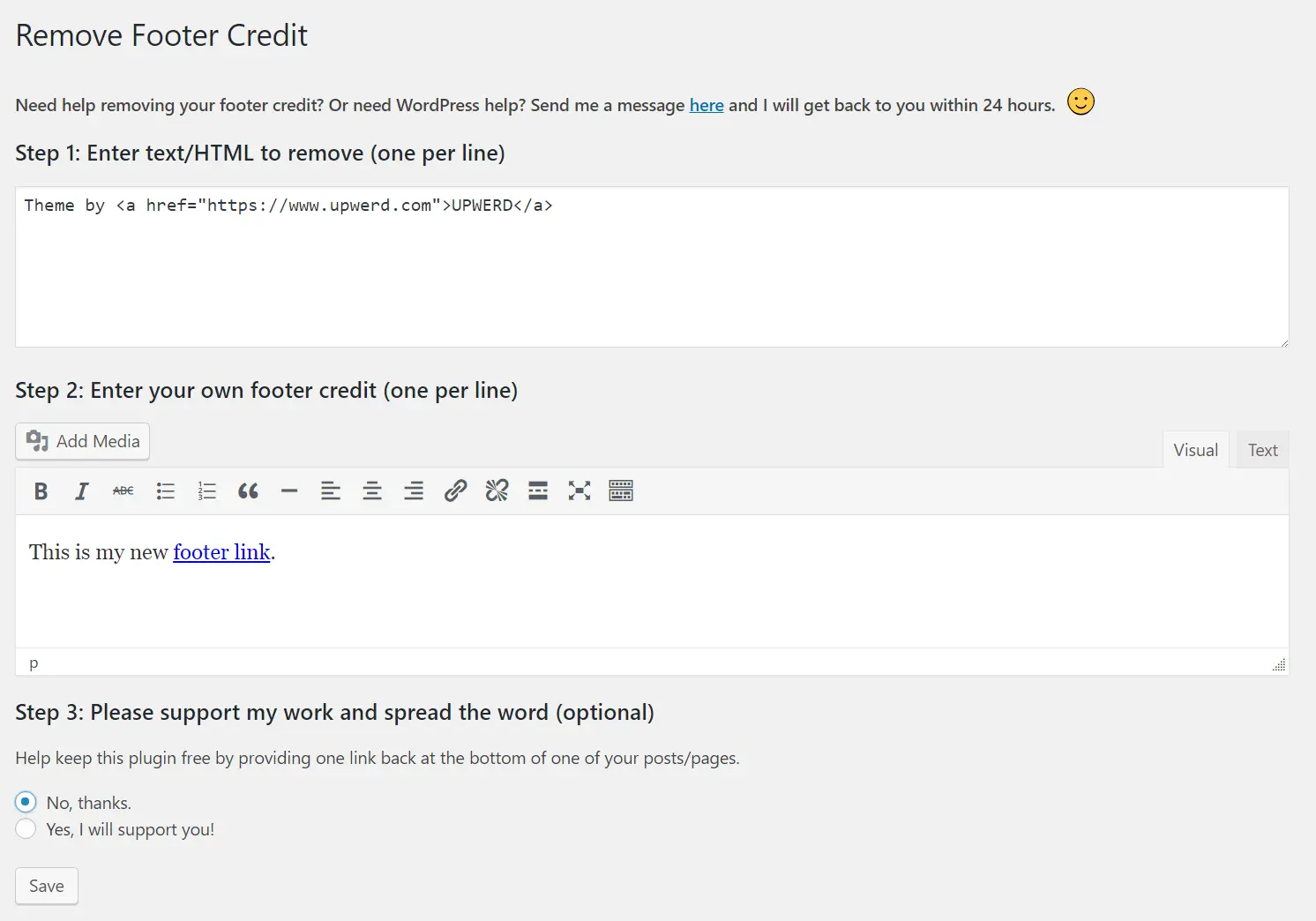
Remove footer credit is a standalone plugin that helps to remove theme credit and add any message that you want to put in your website.
If you do not want to use a plugin you can always use PHP to achieve the same goal. The first thing you will have to do is locate in which file of your template the footer is located. It will usually be in the footer.php and will be in the root directory of the topic.
Once located we will open it, we will look for the text we want to change and replace it with the following line of code.
<? php echo date ('Y'). "©". bloginfo ('name'); ?>
The disadvantage of this method is, if you change the theme then it will remove the code that you have added. It is better to add a child theme and then add the footer.php in the child theme folder. If you don’t know how to create a child theme properly, please check this aritcle from OptimizerWP.
We have learned that, if we change the theme then it will change the edited code. It is a problem. But upon releasing WordPress Customizer API, WordPress has forced and recommended to include customizer settings which help us to change theme settings using customizer. It keeps all the changes even after we update the current theme. Most of the theme has customizer nowadays. You can try iBlogger lite for such option.
Once you have the right theme, you have to go to the Appearance and Customize from the WordPress Admin Dashbaord:

From there click on the Footer ( or any similar setting from the theme):
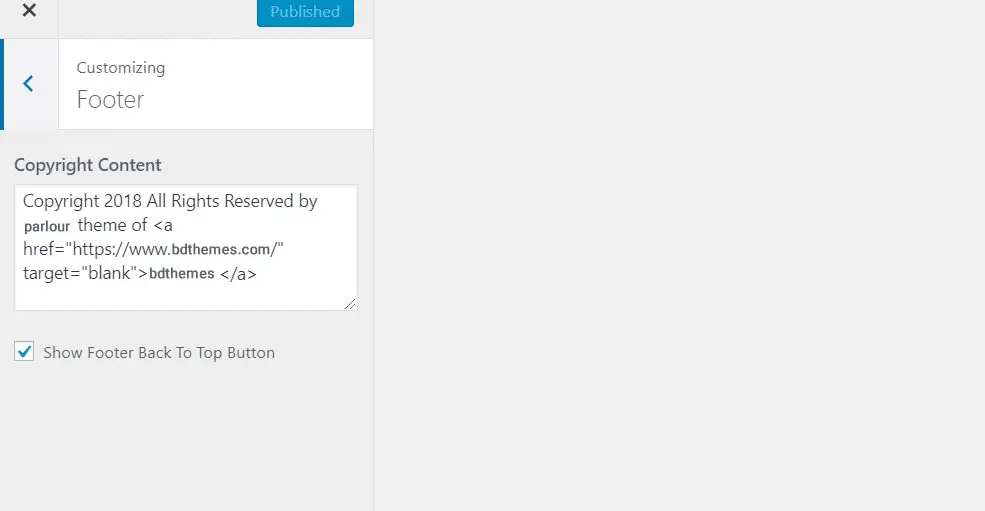
Finally, edit the code as you want.
You are done.
These are the most common way you can edit footer in WordPress. We will add more methods if we encounter any of them. If you know more ways to modify the footer in WordPress or have any questions, you can tell me through the comments.

Största paketet med Elementor-mallar med det mest användarvänliga gränssnittet och 300+ användbara Elementor widgets. Bygg webbplatser från noll till 100% perfektion på nolltid.
Denna webbplats drivs av Element Pack Pro och Rooten Tema.
Copyright © 2026 BdTema. Alla rättigheter reserverade.