豊富なメニューオプションによる容易なナビゲーション
視覚的な商品選択が売上を加速させる
パーソナライズされたコンテンツがリアルタイムで適応
UXフローを改善するシームレススクロール
瞬時にコンテンツを複製し、時間を節約
パワフルなデザイン要素に素早くアクセス
既製のテンプレートがデザインをスピードアップ
柔軟なデータのための高度なカスタムフィールド
手間をかけずに簡単にサイトをクローン
あらゆるスクリーンに対応する、鮮明でスケーラブルなグラフィック
ツールをリブランドしてプロフェッショナルな外観に
正確なコンテンツの表示・非表示
滑らかな動きで奥行きを魅せる
明確なメモや注釈を簡単に追加
役立つヒントがユーザーとのインタラクションを向上
スタイリッシュなアニメーション
重要なセクションは常に見えるようにしておく
カスタム・コードの微調整によるフル・コントロール
ファイルを最適化してサイトのスピードを上げる
年中無休で対応いたします。喜んでお手伝いいたします。
BdThemesで各機能の詳細なガイドラインをご覧いただけます。
ワードプレス、ウェブデザイン、その他について新しいことを学び、情報を得る。
私の成長における重要なマイルストーンをいくつか紹介しよう:
ビデオで製品の使い方、WordPressのヒントとコツを学ぶ
プロモーションに参加することで、高額なコミッションを得ることができます。
Widget Idea Shareは、あなたが改善できる類似ウィジェットを見つける素晴らしい方法です。
確かに!私たちと連絡を取る必要がある場合は、お気軽にご連絡ください。
Sigma Forms を使って WordPress のフォームを数分で作成しましょう。.
ページ・ビルダー・プラグイン
One Accessibilityでウェブサイトを簡単にアクセシブルに
信頼と信用を高めるために、顧客の声を表示する。.
Zoloblocksは、Gutenbergベースの魅力的なウェブサイトを作成するのに役立ちます。.
Elementorスライダー時代の最も優れたスライダー
Elementorで唯一互換性のあるブログ用ウィジェット
ビジネス向け次世代型WordPress eコマースサイトの構築
Elementorで毎回違うエンジェルで写真を整理する
スピンホイールを使ってエンゲージメントを高め、売上を増加させましょう。.
WordPress用AI画像生成プラグイン ChatGPT
WooCommerce用の360°拡張現実を今すぐ入手しましょう!
好きなウェブデザインを2クリックでコピー&ペースト!
無制限のオプションを備えたelementorのための完全に機能するテーマ
スマート、クリーン、フレキシブルなGutenberg用ブロックテーマ
Dark Readerプラグインは、目に優しいウェブ閲覧を保証します。.
コンバージョンを高めるWooCommerceのワンページチェックアウト。
Find Nearby Stores Instantly with Sigma Store Locator
The Ultimate WordPress Media Library Organizer
 Japanese

豊富なメニューオプションによる容易なナビゲーション
視覚的な商品選択が売上を加速させる
パーソナライズされたコンテンツがリアルタイムで適応
UXフローを改善するシームレススクロール
瞬時にコンテンツを複製し、時間を節約
パワフルなデザイン要素に素早くアクセス
既製のテンプレートがデザインをスピードアップ
柔軟なデータのための高度なカスタムフィールド
手間をかけずに簡単にサイトをクローン
あらゆるスクリーンに対応する、鮮明でスケーラブルなグラフィック
ツールをリブランドしてプロフェッショナルな外観に
正確なコンテンツの表示・非表示
滑らかな動きで奥行きを魅せる
明確なメモや注釈を簡単に追加
役立つヒントがユーザーとのインタラクションを向上
スタイリッシュなアニメーション
重要なセクションは常に見えるようにしておく
カスタム・コードの微調整によるフル・コントロール
ファイルを最適化してサイトのスピードを上げる
年中無休で対応いたします。喜んでお手伝いいたします。
BdThemesで各機能の詳細なガイドラインをご覧いただけます。
ワードプレス、ウェブデザイン、その他について新しいことを学び、情報を得る。
私の成長における重要なマイルストーンをいくつか紹介しよう:
ビデオで製品の使い方、WordPressのヒントとコツを学ぶ
プロモーションに参加することで、高額なコミッションを得ることができます。
Widget Idea Shareは、あなたが改善できる類似ウィジェットを見つける素晴らしい方法です。
確かに!私たちと連絡を取る必要がある場合は、お気軽にご連絡ください。
Sigma Forms を使って WordPress のフォームを数分で作成しましょう。.
ページ・ビルダー・プラグイン
One Accessibilityでウェブサイトを簡単にアクセシブルに
信頼と信用を高めるために、顧客の声を表示する。.
Zoloblocksは、Gutenbergベースの魅力的なウェブサイトを作成するのに役立ちます。.
Elementorスライダー時代の最も優れたスライダー
Elementorで唯一互換性のあるブログ用ウィジェット
ビジネス向け次世代型WordPress eコマースサイトの構築
Elementorで毎回違うエンジェルで写真を整理する
スピンホイールを使ってエンゲージメントを高め、売上を増加させましょう。.
WordPress用AI画像生成プラグイン ChatGPT
WooCommerce用の360°拡張現実を今すぐ入手しましょう!
好きなウェブデザインを2クリックでコピー&ペースト!
無制限のオプションを備えたelementorのための完全に機能するテーマ
スマート、クリーン、フレキシブルなGutenberg用ブロックテーマ
Dark Readerプラグインは、目に優しいウェブ閲覧を保証します。.
コンバージョンを高めるWooCommerceのワンページチェックアウト。
Find Nearby Stores Instantly with Sigma Store Locator
The Ultimate WordPress Media Library Organizer
Japanese
Have you ever wonder how to Edit Footer in WordPress? Or have you been struggling with the best approach to add code or items to the footer? If your answer is yes, and you are overwhelmed by the many tools available to make such changes – read this article. It has all the possible solutions and the best approaches to solve this issue.
In this article, I am going to show easiest, dirtiest ( in terms of getting hand dirty with codes), and the coolest way of editing footer in WordPress. I will mention the easiest method which involves the use of the plugin and recommended for most users. However, for the coolest advanced user, I will demonstrate the code method that you can use to edit the footer.
Let’s begin.
You might be wondering why I have included this section. Some people still don’t have an idea about footer – what actually is a footer in WordPress. If you already know, please skip this paragraph and go to the next section.
The footer is the area at the bottom of your site, it is generally used to indicate for how long your site exists, shows that it is regularly updated indicating the date of the current year and makes the statement of any copyrights e.g. “All rights reserved”.
Take the time to learn about the copyright of your website because, depending on the country- the laws are not the same.
The footer can also highlight the agency or the person who created the website, this is what we found in most cases- actually is the credits of the company that developed the theme.
I am going to start with the easiest and recommended way of editing footer. Normally, the footer is part of the theme. Whenever we update a theme, it changes any editing that has been made to the file of it. If we edit the footer using plugin then it won’t change even if we update the theme.
Elementor is one of the best available page builder plugins in the market. It just not only helps to build a page or plugin but also helps us to create popup and custom page templates. We can also create custom blocks. It also allows building custom header and footer. This can be used in any page or specific pages based on your conditional settings. Elementor needs a pro version in most cases to build such a thing. If you want to have more flexibility of add-ons, widgets, and ready-made pages, then you can consider buying the best elementor addons in the market – Element Pack. It has more than 100+ widgets and 100+ ready pages also. Footer is also including. You can try the Element Pack Lite version in WordPress.Org before you purchase.
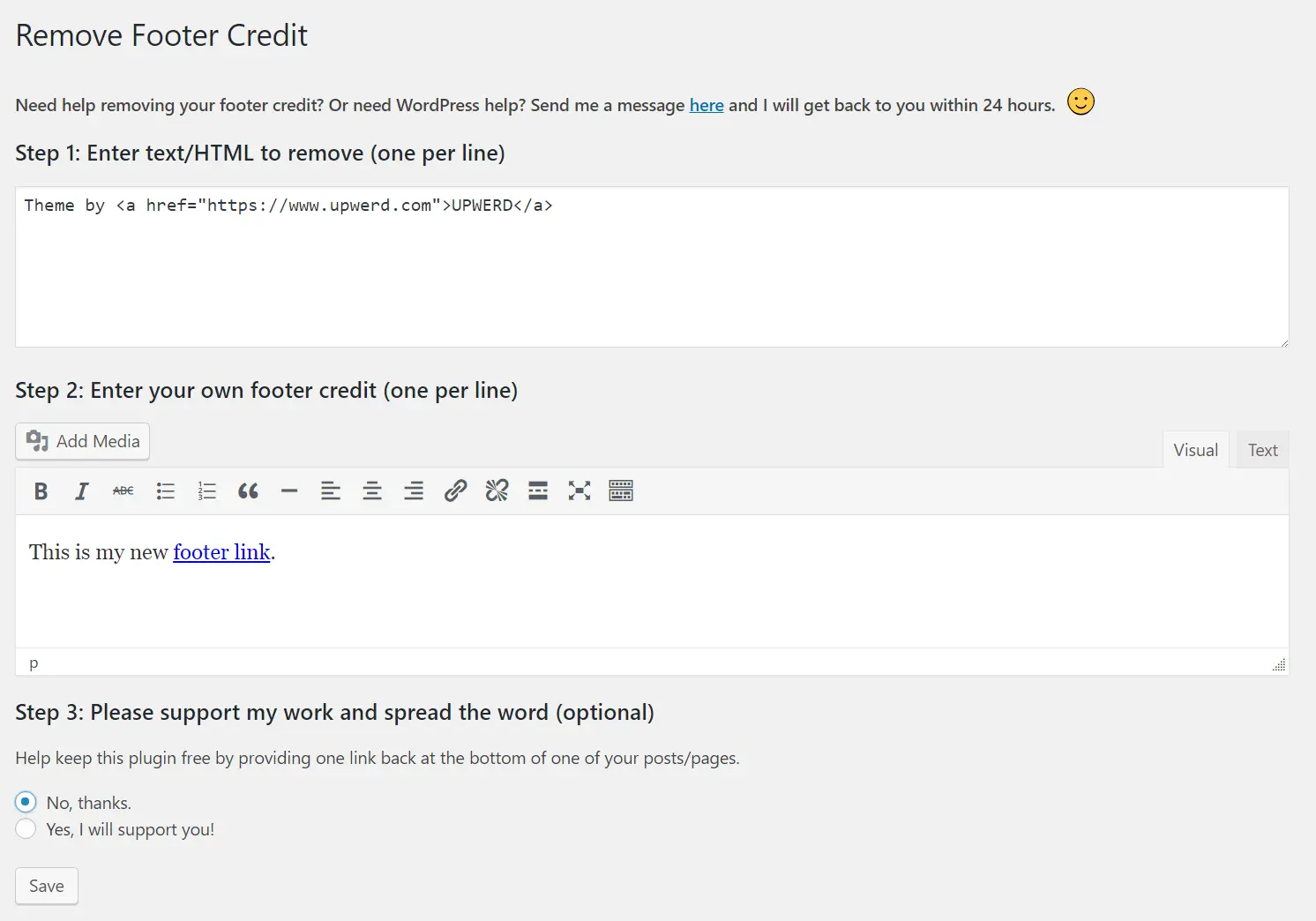
Remove footer credit is a standalone plugin that helps to remove theme credit and add any message that you want to put in your website.
If you do not want to use a plugin you can always use PHP to achieve the same goal. The first thing you will have to do is locate in which file of your template the footer is located. It will usually be in the footer.php and will be in the root directory of the topic.
Once located we will open it, we will look for the text we want to change and replace it with the following line of code.
<? php echo date ('Y'). "©". bloginfo ('name'); ?>
The disadvantage of this method is, if you change the theme then it will remove the code that you have added. It is better to add a child theme and then add the footer.php in the child theme folder. If you don’t know how to create a child theme properly, please check this aritcle from OptimizerWP.
We have learned that, if we change the theme then it will change the edited code. It is a problem. But upon releasing WordPress Customizer API, WordPress has forced and recommended to include customizer settings which help us to change theme settings using customizer. It keeps all the changes even after we update the current theme. Most of the theme has customizer nowadays. You can try iBlogger lite for such option.
Once you have the right theme, you have to go to the Appearance and Customize from the WordPress Admin Dashbaord:

From there click on the Footer ( or any similar setting from the theme):
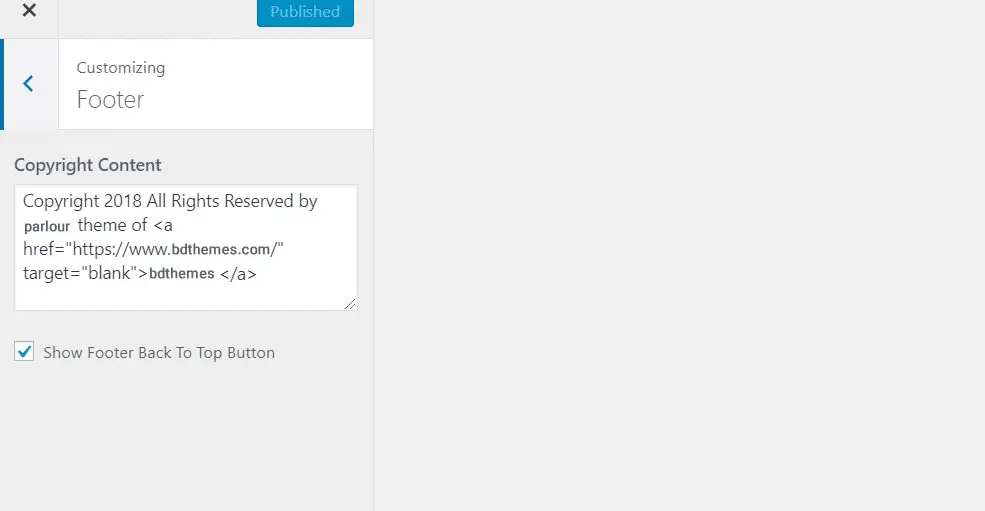
Finally, edit the code as you want.
You are done.
These are the most common way you can edit footer in WordPress. We will add more methods if we encounter any of them. If you know more ways to modify the footer in WordPress or have any questions, you can tell me through the comments.

最大のElementorテンプレートパックは、最もユーザーフレンドリーなUIと 300+ 便利なElementorウィジェット。ゼロからウェブサイトを構築 100% あっという間に完璧になる。
このウェブサイトは Element Pack Pro そして ルーテンのテーマ
Copyright © 2026 Bdテーマ. 無断複写・転載を禁じます。