












Trying to figure out a way to disable comments in WordPress? In most cases, comments play a significant role in attracting more visitors to your site. But many site owners don’t want comment section on their website.
Although comments are essential, some pages like introduction type, about us, or any specific pages don’t need a comment section. For ease of access, WordPress has made it easy to disable comments or comment section on WordPress.
Today, we will show you how you can disable comments in your page using WordPress. Hang tight, because this will be a long talk.
Reasons to keep comments enabled/disabled
On the internet, most of the websites are created for small businesses. As a result, most of these sites don’t have any sections for blogs or knowledge base. Other than blogs, all the pages like contact us, services, announcements, pricing; don’t need a comment section. So, you need to disable it for those pages.
Also, for specific posts or blogs, you may need to disable comments in WordPress. Some posts or blogs that contain vital information may be a good target of spamming. In that case, you must disable comments on that page.
Let’s get into the main thing. From this point on, we will show you methods of disabling comments on pages, future pages, and deleting all comments. Let’s get started!
How to disable comments in WordPress for new/future posts?
To stop comments on future posts, you need to change some settings on your WordPress dashboard. To do that, go to your WP Dashboard> Settings> Discussion.
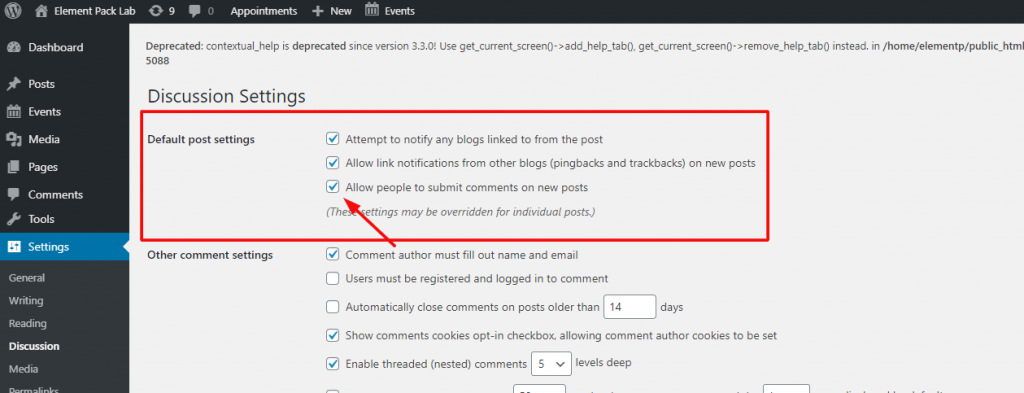
Now, you can see a checkbox named ‘Allow people to submit comments on new post’. Just click on it, leave the checkbox empty and save changes.
That’s it! Now all of your new posts will have their comment option disabled.
How to disable comments for individual post or page?
Every page, by default, has their comment turned off. So, you need to manually activate it from the page settings in your dashboard to disable comments on WordPress.
For that, go to WP dashboard> Pages> Select your page.
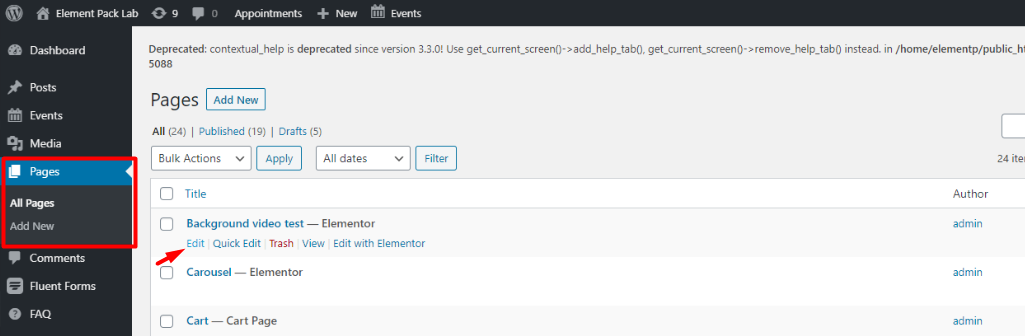
You will get a list of the pages on your dashboard. Form there, click on Editar.
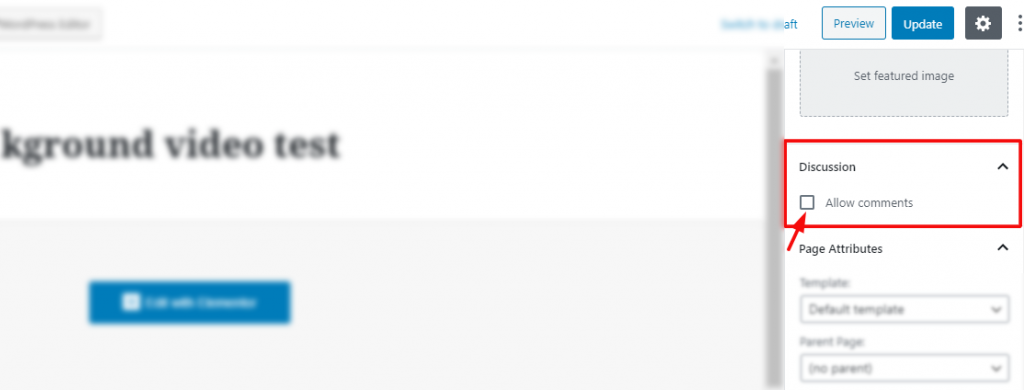
Now, from the settings panel on the right side of the page editor, you will find the option Discussion. Here, you need to uncheck the “Allow comment” option to disable comments on your specific page.
Blog popular
Como usar o widget Iframe no Elementor pelo Element Pack
How to disable comments on bulk pages
If you want to disable comments on all of your pages or posts, you don’t have to do it one by one. We have a bulk selection method on WordPress. Using it, you can easily edit any amount of your posts or pages at a time.
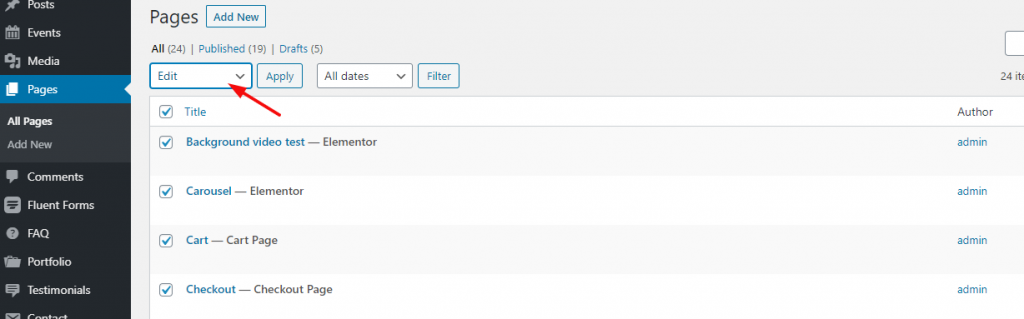
To work it out, you need to go to your Dashboard> Pages> All Pages. You just need to click on the Título checkbox to select all of them. It’s a pretty easy-to-use method to disable comments on WordPress. From the drop-down menu, choose Editar and hit the Apply botão.
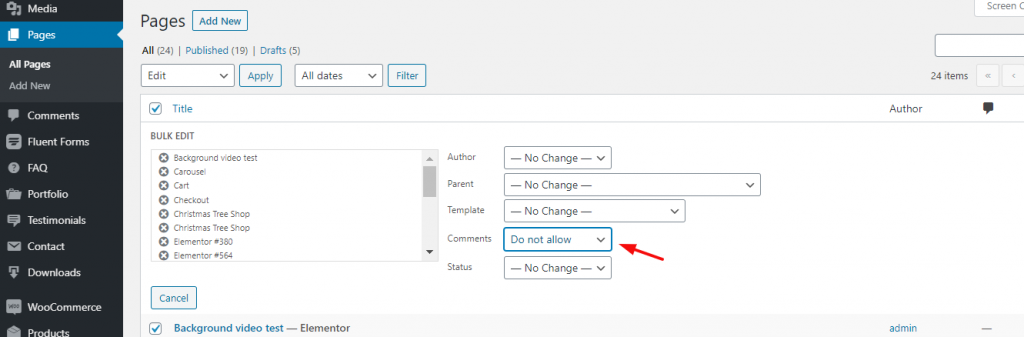
Next, you will see this page with a lot of options. From there, choose “Do not allow” on the Comments option. Then hit the Salvar button. That’s it!
Delete all existing comments
Even though you have disabled comments on WordPress, if there were some of them before, they will remain on the server. So, you can solve this quickly by deleting all those comments from your dashboard.
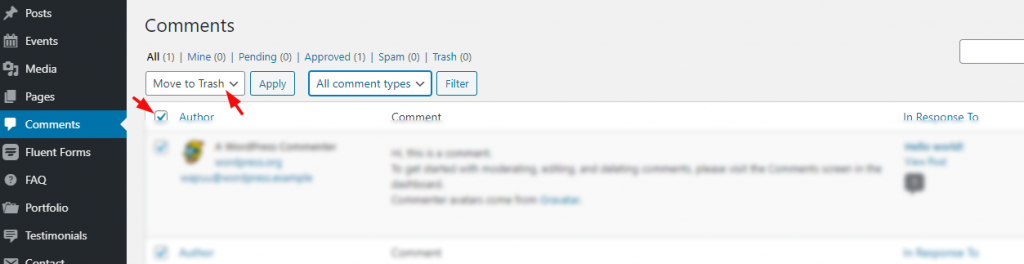
Basta acessar seu Dashboard> Comments. Click on the checkbox “Autor” to select all comments. Then from the drop-down option, choose ‘Move to Trash‘ and hit ‘Apply.’
In case, the number of comments exceeds the current page, just repeat this step as long as you need.
Disable comments automatically using a plugin
If you find disabling the comments on WordPress manually, a very troublesome job; no need to bother anymore. You can do this automatically by using the “Disable Comments” plugin.
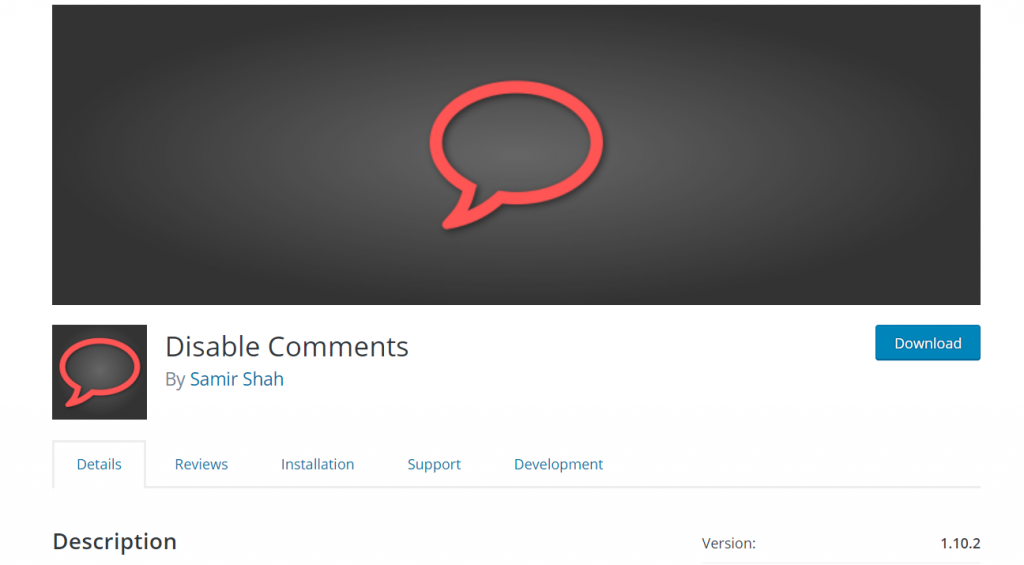
This plugin can disable the comments automatically. However, you need to select if you want to disable all comments or particular comment types from its settings. You can find the settings in the dashboard.
Blog para vocêBlogs mais populares
Saiba mais sobre o WordPress
Solving comment spamming with a plugin
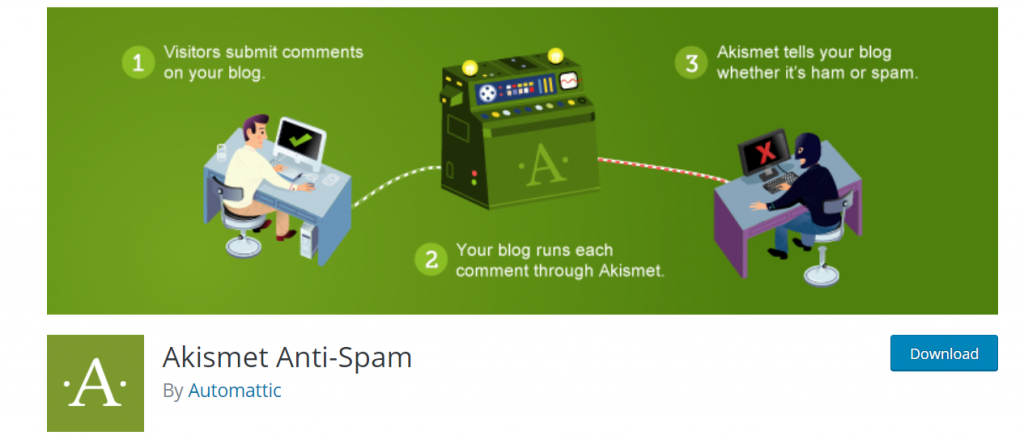
This plugin checks every comment on your site and filters out spamming. The plugin has a pretty good deal with $59 per year for one website. It prevents cyber-attacks through spamming and secures your website.
Moreover, there are a lot plugins on the market for spamming security. No need to worry about spamming anymore.
Again, you can separate your comment section from your site using a 3rd party Formulários plugin. That way, your comment box won’t be directly linked with your site, and you don’t need to disable comments on WordPress again. (i.e., WP forms, Everest forms…).
That’s it. I hope you have found the blog helpful. This blog is sponsored by Element Pack, the leading widget pack solution for Elementor page builder.
Thank you for reading this blog. Have a great day.
Melhor solução da web
Deseja impulsionar seu site com nosso produto?
Compartilhe este blog:
Facebook
Twitter
Pinterest
WhatsApp
Vkontakte
Telegrama

