












• Recursos
  • Modelos
  • Preços
  • Portuguese
  • Recursos
  • Modelos
  • Preços
  • Portuguese

Third-Party Plugins (44)

Estatísticas do bbPress
Profissional
Formulário de resposta do bbPress
Profissional
Índice do fórum do bbPress
Profissional
Formulário de fórum do bbPress
Profissional
Tags de tópico do bbPress
Profissional
Formulário de tópico do bbPress
Profissional
Fórum único do bbPress
Profissional
Tópico único do bbPress
Profissional
bbPress Resposta única
Profissional
Tag única do bbPress
Profissional
Carrossel do LearnPress
Profissional
Grade do LearnPress
Profissional
EDD Product Review Carousel
Profissional
Avaliações de produtos EDD
Profissional
Mini carrinho EDD
Profissional
Carrinho EDD
Profissional
Grade de categorias EDD
Profissional
Produto EDD
Profissional
Grade de cursos do Tutor LMS
Grátis
Totais de doações
Profissional
Dar Meta
Profissional
Give Histórico de doações
Profissional
Give Donor Wall
Profissional
Grade do formulário de doação
Profissional
Dar recibo
Profissional
Editor de portfólio do EDD
Profissional
Histórico do EDD
Profissional
Grade do calendário de eventos
Grátis
Grade de depoimentos
Grátis
Download do Monitor
Profissional
Galeria de portfólio / Grade
Profissional Popular
Perfil filantrópico
Profissional
Estatuto de caridade
Profissional
Registro de caridade
Profissional
Login beneficente
Profissional
Formulário de doação beneficente
Profissional
Doações filantrópicas
Profissional
Doadores filantrópicos
Profissional
Campanhas beneficentes
Profissional
Calendly
Grátis
Grupo BuddyPress
Profissional
Amigos do BuddyPress
Profissional
Membro do BuddyPress
Profissional
bbPress
Profissional
Ops! Seu widget pesquisado não foi encontrado! Você tem alguma ideia? Se sim, Enviar aqui

Como alterar a cor do botão do Elementor

How to change Elementor button color

Are you not satisfied with the Elementor button color, and thinking about how to change Elementor button color?

As you know, when you work in Elementor, you get a default button color for the screen. If the color doesn’t suit your choice, you can change it as you wish. We will discuss this point in this article.

Let’s start!

What is Elementor button color?

Elementor button color is the default color for the button used in Elementor, allowing your visitors to interact with your website. The button color affects the visitor’s mind.

Why change Elementor button color?

The Elementor button color is a vital point to drive the visitors to your website. The more appropriate and pleasant color, the more visitors. If you choose an elegant button color, more and more visitors will rush in towards your website.

So, there is a good reason to change Elementor button color. You can promote your website by changing the default color to a pleasant and mind-refreshing color to attract more visitors.

How to change Elementor button color?

If you want to change Elementor button color, you have to follow these steps below:

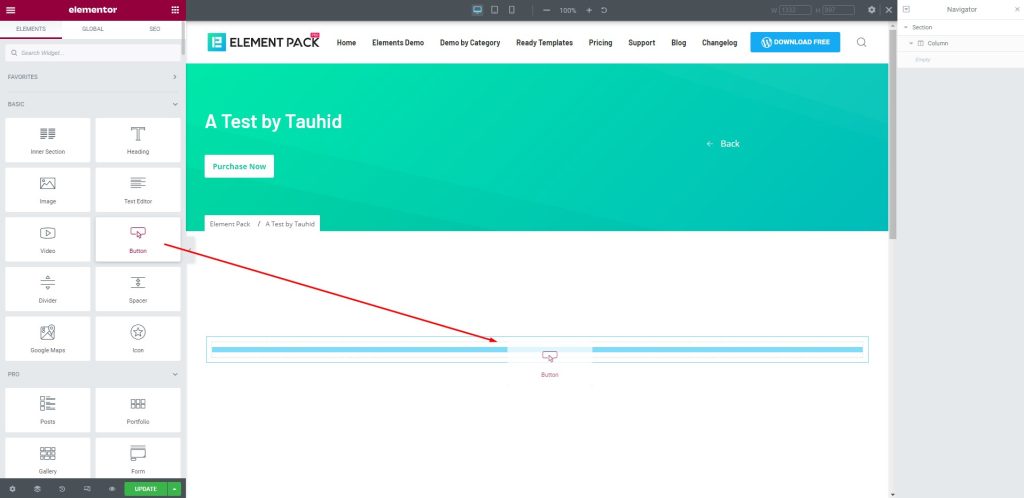
Step 1: Insert a button
How to change Elementor button color

First, go to the widget menu in Elementor. After that, drag and drop the Button widget into the text area.

Step 2: Change the button color
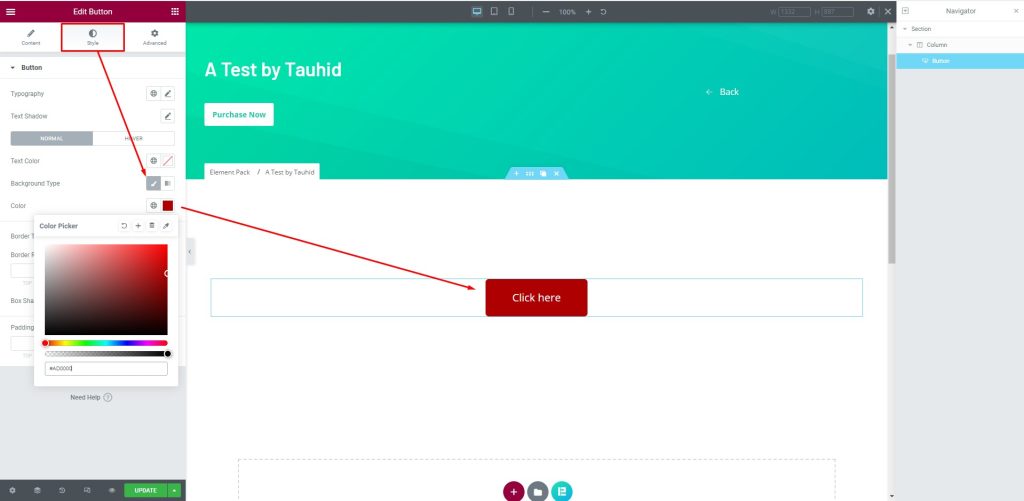
Next, select the button, then go to the Style tab. After that, change the button color from the Color option as you wish.

Congratulations! You have successfully changed Elementor button color very easily.

Conclusão

We have shown you the process of how to change Elementor button color above. Hope this will help you a lot and you can use it on your website for yourself.

Well, you can do other customizations on your site with Elementor, but the better way is to add Complementos do Elementor on your site and get advanced widgets, templates with complete customization.

Thank you to read the article patiently. Have a nice day.

Deixe uma resposta

Tabela de conteúdo

Copyright © 2026 BdThemes. Todos os direitos reservados.

Money Transfer Logo
