Navegação sem esforço com opções de menu avançadas
Opções visuais de produtos aumentam as vendas rapidamente
O conteúdo personalizado se adapta em tempo real
Rolagem contínua para um melhor fluxo de experiência do usuário
A duplicação instantânea de conteúdo economiza tempo
Acesso rápido a elementos de design avançados
Modelos prontos agilizam o design
Campos personalizados avançados para dados flexíveis
Clone sites facilmente, sem complicações
Gráficos nítidos e dimensionáveis para todas as telas
Renove a marca das ferramentas para obter uma aparência profissional
Mostrar ou ocultar conteúdo com precisão
Envolvendo a profundidade com movimentos suaves
Adicione facilmente notas e anotações claras
As dicas úteis melhoram a interação com o usuário
Animar elementos com um toque de estilo
Mantenha as seções importantes sempre visíveis
Controle total com ajustes de código personalizados
Otimize os arquivos para aumentar a velocidade do site
Modelos de página elaborados para ajudá-lo a começar a criar sua página de destino apenas com um design inicial
O Ready Blocks vem com uma variedade de layouts e elementos de design, como cabeçalhos, rodapés, widgets etc.
Cabeçalhos pré-projetados com estilos lucrativos que são adequados para vários sites de nicho e gostos de design
Uma coleção útil de designs de rodapé para ajudá-lo a criar um rodapé instantaneamente atraente em sua página de destino
Encontre-nos 24 horas por dia, 7 dias por semana, à sua disposição. Teremos prazer em ajudar.
Diretrizes detalhadas disponíveis para cada recurso na BdThemes
Aprenda algo novo, mantenha-se informado sobre WordPress, Web Design e muito mais
Aqui estão alguns dos principais marcos em meu desenvolvimento:
Aprenda a usar o produto, dicas e truques do WordPress com nossos vídeos
Ganhe comissões pesadas ao se juntar a nós na promoção
O Widget Idea Share é uma ótima maneira de encontrar widgets semelhantes que você pode melhorar.
Com certeza! Se precisar entrar em contato conosco, sinta-se à vontade para falar conosco
Crie qualquer formulário do WordPress em minutos com o Sigma Forms.
Plug-in do Page Builder para o modo de manutenção e em breve
Torne os sites acessíveis facilmente com o One Accessibility
Exiba depoimentos de clientes para aumentar a confiança e a credibilidade.
O Zoloblocks ajuda a criar sites incríveis baseados em Gutenberg.
O controle deslizante mais avançado na era do controle deslizante Elementor
Os únicos widgets de blog compatíveis com o Elementor para qualquer blog
Crie um site de comércio eletrônico WordPress de última geração para empresas
Organize suas fotos em um anjo diferente a cada vez com o Elementor
Impulsione o engajamento e aumente as vendas usando o Spin Wheel.
Poderoso plug-in de gerador de imagens de IA para WordPress por ChatGPT
Obtenha 360° Augmented Reality para WooCommerce hoje mesmo!
Copie e cole qualquer design da Web de sua preferência com apenas 2 cliques!
Um tema totalmente funcional para o elementor com opções ilimitadas
Tema de bloco inteligente, limpo e flexível para Gutenberg
O plug-in Dark Reader garante uma leitura da Web agradável aos olhos.
Checkout de uma página do WooCommerce para aumentar as conversões.
Find Nearby Stores Instantly with Sigma Store Locator
The Ultimate WordPress Media Library Organizer

Acesse mais de 100 plug-ins premium do WordPress com atualizações vitalícias e suporte dedicado.
 Portuguese

Navegação sem esforço com opções de menu avançadas
Opções visuais de produtos aumentam as vendas rapidamente
O conteúdo personalizado se adapta em tempo real
Rolagem contínua para um melhor fluxo de experiência do usuário
A duplicação instantânea de conteúdo economiza tempo
Acesso rápido a elementos de design avançados
Modelos prontos agilizam o design
Campos personalizados avançados para dados flexíveis
Clone sites facilmente, sem complicações
Gráficos nítidos e dimensionáveis para todas as telas
Renove a marca das ferramentas para obter uma aparência profissional
Mostrar ou ocultar conteúdo com precisão
Envolvendo a profundidade com movimentos suaves
Adicione facilmente notas e anotações claras
As dicas úteis melhoram a interação com o usuário
Animar elementos com um toque de estilo
Mantenha as seções importantes sempre visíveis
Controle total com ajustes de código personalizados
Otimize os arquivos para aumentar a velocidade do site
Modelos de página elaborados para ajudá-lo a começar a criar sua página de destino apenas com um design inicial
O Ready Blocks vem com uma variedade de layouts e elementos de design, como cabeçalhos, rodapés, widgets etc.
Cabeçalhos pré-projetados com estilos lucrativos que são adequados para vários sites de nicho e gostos de design
Uma coleção útil de designs de rodapé para ajudá-lo a criar um rodapé instantaneamente atraente em sua página de destino
Encontre-nos 24 horas por dia, 7 dias por semana, à sua disposição. Teremos prazer em ajudar.
Diretrizes detalhadas disponíveis para cada recurso na BdThemes
Aprenda algo novo, mantenha-se informado sobre WordPress, Web Design e muito mais
Aqui estão alguns dos principais marcos em meu desenvolvimento:
Aprenda a usar o produto, dicas e truques do WordPress com nossos vídeos
Ganhe comissões pesadas ao se juntar a nós na promoção
O Widget Idea Share é uma ótima maneira de encontrar widgets semelhantes que você pode melhorar.
Com certeza! Se precisar entrar em contato conosco, sinta-se à vontade para falar conosco
Crie qualquer formulário do WordPress em minutos com o Sigma Forms.
Plug-in do Page Builder para o modo de manutenção e em breve
Torne os sites acessíveis facilmente com o One Accessibility
Exiba depoimentos de clientes para aumentar a confiança e a credibilidade.
O Zoloblocks ajuda a criar sites incríveis baseados em Gutenberg.
O controle deslizante mais avançado na era do controle deslizante Elementor
Os únicos widgets de blog compatíveis com o Elementor para qualquer blog
Crie um site de comércio eletrônico WordPress de última geração para empresas
Organize suas fotos em um anjo diferente a cada vez com o Elementor
Impulsione o engajamento e aumente as vendas usando o Spin Wheel.
Poderoso plug-in de gerador de imagens de IA para WordPress por ChatGPT
Obtenha 360° Augmented Reality para WooCommerce hoje mesmo!
Copie e cole qualquer design da Web de sua preferência com apenas 2 cliques!
Um tema totalmente funcional para o elementor com opções ilimitadas
Tema de bloco inteligente, limpo e flexível para Gutenberg
O plug-in Dark Reader garante uma leitura da Web agradável aos olhos.
Checkout de uma página do WooCommerce para aumentar as conversões.
Find Nearby Stores Instantly with Sigma Store Locator
The Ultimate WordPress Media Library Organizer
Acesse mais de 100 plug-ins premium do WordPress com atualizações vitalícias e suporte dedicado.
Portuguese
Designing a Pet Shop website is super fun. As a lover of the mother nature, we love pets as much as you do. And love should be shared.
That’s why we designed a page just for making it into an online pet shop anytime. But, we won’t keep it to ourselves.
Be ready, cause this blog will be about a step-by-step construction of our ideal pet shop website. Let’s begin!
Designing any website using Elementor is easy. As you don’t have to deal with codes, you can stay relaxed.
But the thing is, the more feature you want to add to your page, the more complicated things become. Elementor doesn’t offer a variety of widgets. That’s why you might want to take a 3rd party widget pack.
Anyway, we are going to use the free version of Elementor e Element Pack to design our pet shop. Now, the cause of using the Element Pack plugin is:
Unlike bloated costly plugin with limited features, Element Pack is cheap and full of features. Get it from here.
A website consists of several segments that you can consider as sections. The homepage contains the maximum number of sections to display the whole purpose of the website.
To keep your visitors engaged with your content, you have to design a decent information flow on your pet shop website.
An ideal website has these sections on their homepage:
So, if you design a Pet Shop website in this manner, you will hit the perfect score. Now, let us begin.
First of all, make sure you have Elementor e Element Pack plugin installed on your dashboard.
Then, access your WordPress Dashboard> Pages> Add New and create a new page. We named our website ‘Loja de animais‘.
Estamos realizando um programa de brindes para nossos amados consumidores e assinantes que estão conectados ao nosso site oficial BDthemes.com
Visitar Element Pack ou Controle deslizante principal e compartilhe conosco suas ideias. Os vencedores sortudos receberão uma licença vitalícia no valor de $100. Você só precisa de um minuto para participar.
The hero section has two parts, the header and the body.
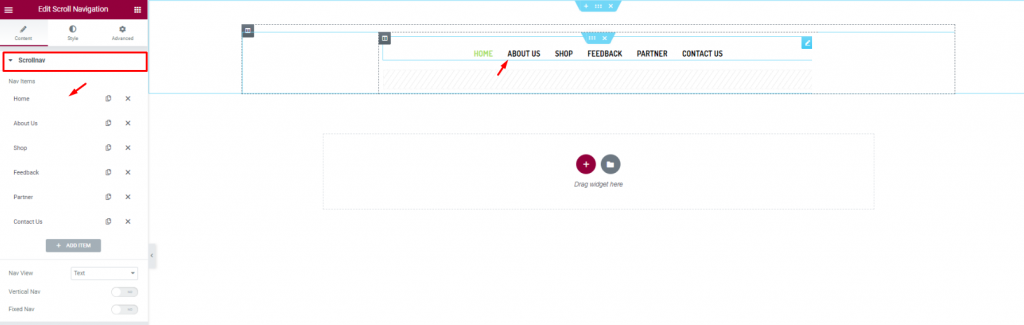
Let’s first insert the Scroll Navigation widget por Element Pack on our page. This will be the front navigation system for our website. Change the name of the menu items as you prefer from the content tab.
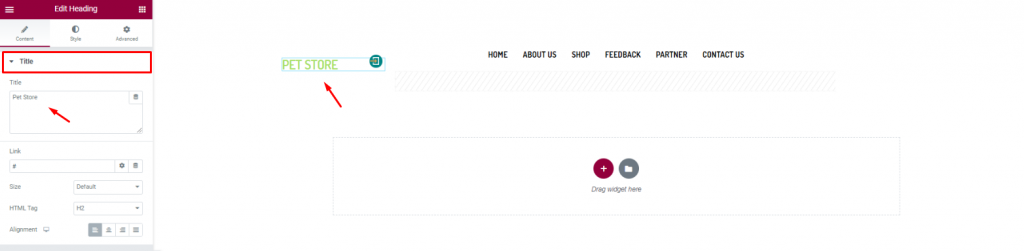
Insert the shop name/logo on the top left corner of the header. We inserted the Título widget por Elementor and put the shop name in texts.
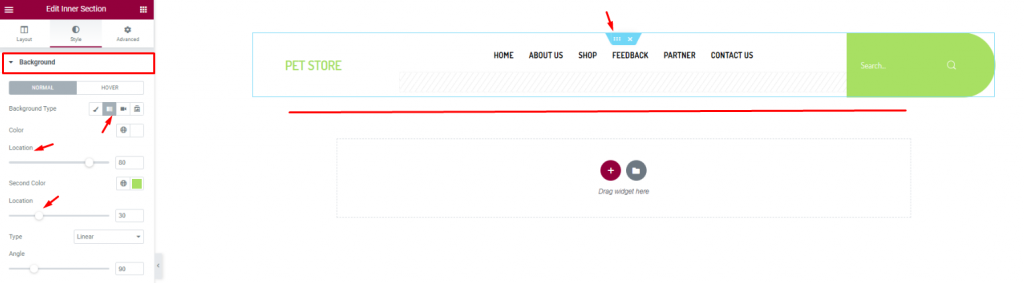
Finish the header design of the pet shop website by using a gradient background color from the section settings. Don’t forget to put a Pesquisa widget on the top-right corner.
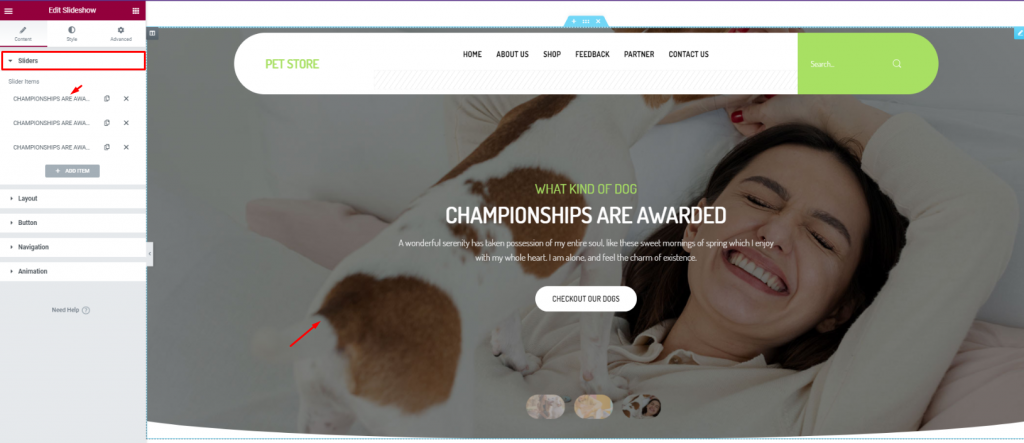
For the body of the hero section, simply insert the Apresentação de slides widget. The widget lets you combine stunning background images, texts, and a CTA.
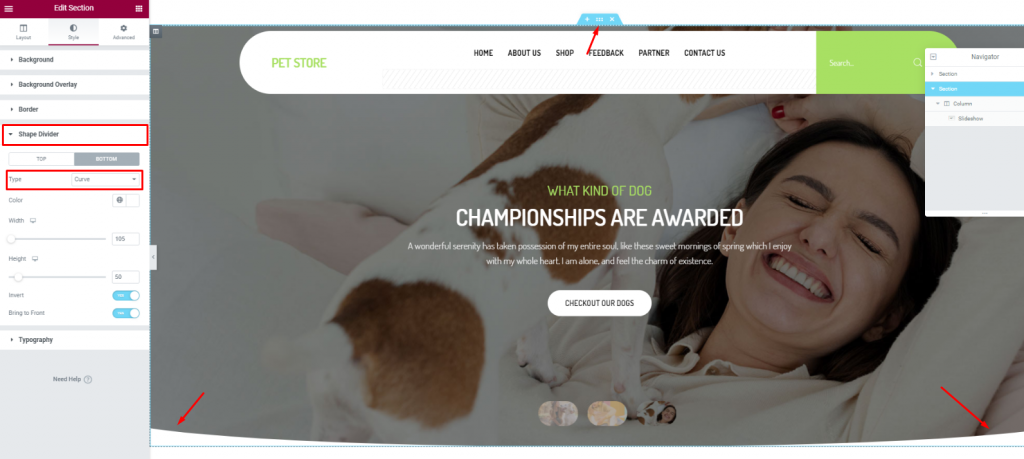
To add more style to the slider image, you can try to curl up the edges. To do that, you need to go to the section settings> Shape divider> and choose Curve from the Option Tipo.
After the hero section, we need to design the features section. This part will highlight our service capabilities and deliver deeper info about our pet shop website.
Now, more features will bring out more info spontaneously. But no need to overdo it. So, we will stick to 2 sections for displaying features.
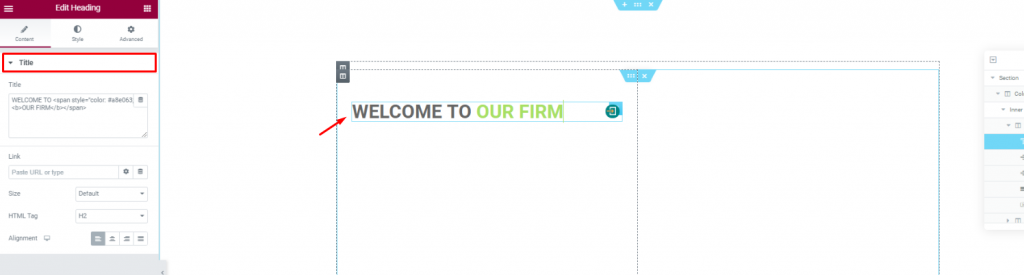
Create a double-column section. Insert the Título widget on the left column.
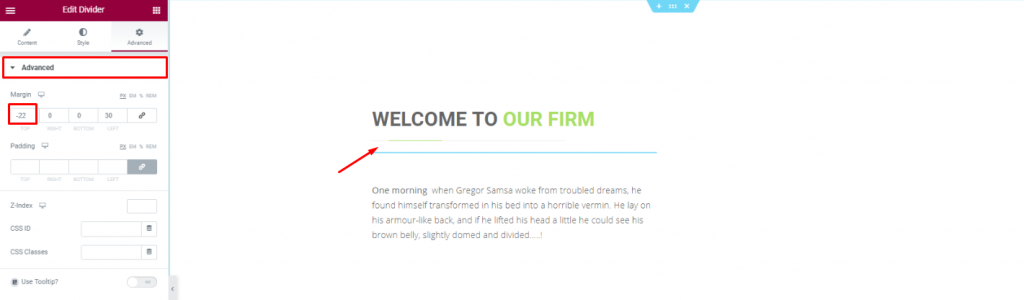
Put a Divider widget under the title to boost its look. Place a short description of the company below.
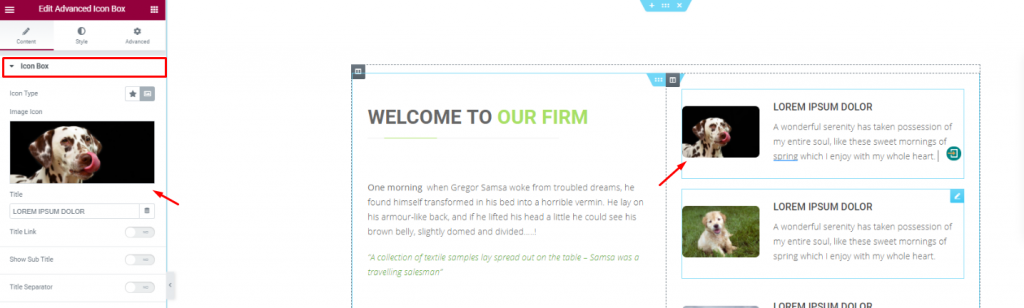
Placing the Caixa de ícones avançada widget on the right side of the column for pet descriptions.
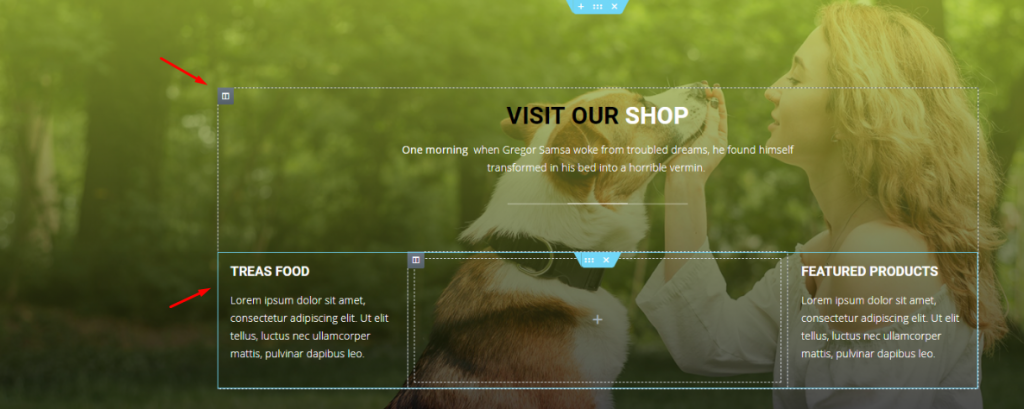
With a decent background image, create a multi-column section and fill it with more shop related details. You can do that much simply using a Cabeçalho widget and the Editor de texto widget.
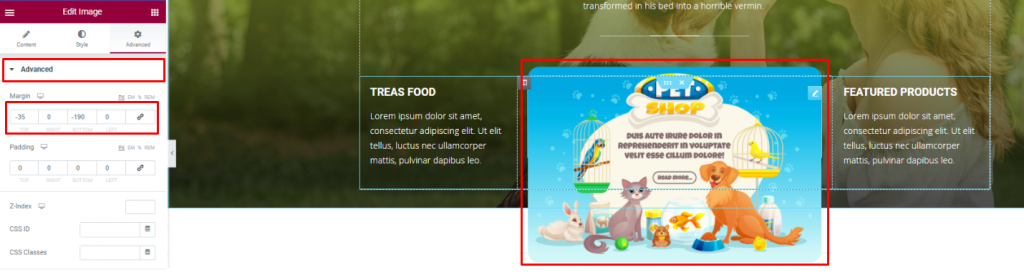
Insert an Imagem widget and displace its position using the Avançado guia.
You can not design a pet shop website without a pet gallery, right? To make it look decent, you can cover an entire section with an image gallery or merge it with the features.
We did the later but in a more creative way.
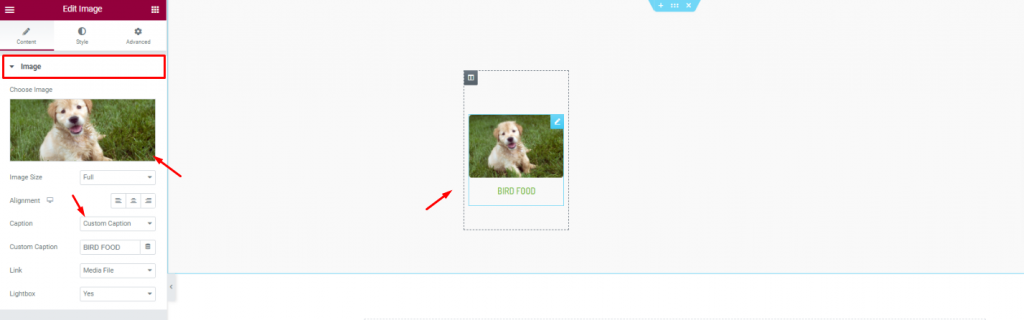
First, create a 6 column section and insert the Imagem widget in them.
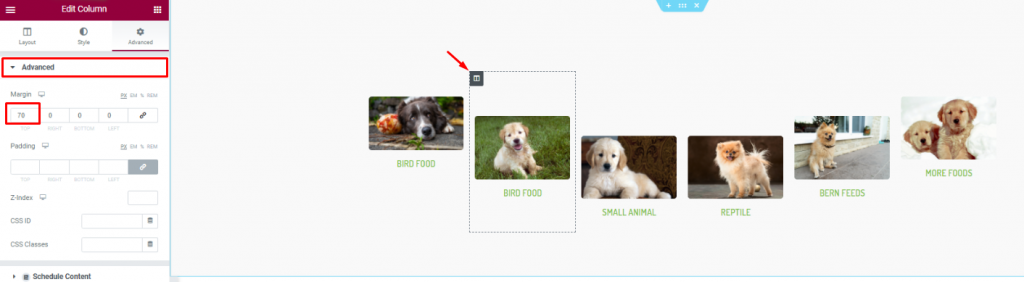
Second, go to column settings and in the Avançado tab, consecutively adjust their margin. Just then, you will get a nice curved pet image gallery.
Positive reviews from customers is always a good addition to your website. A pet website is not different. As your customer will put more trust upon seeing those good reviews, it’s best to put a testimonial section on your website.
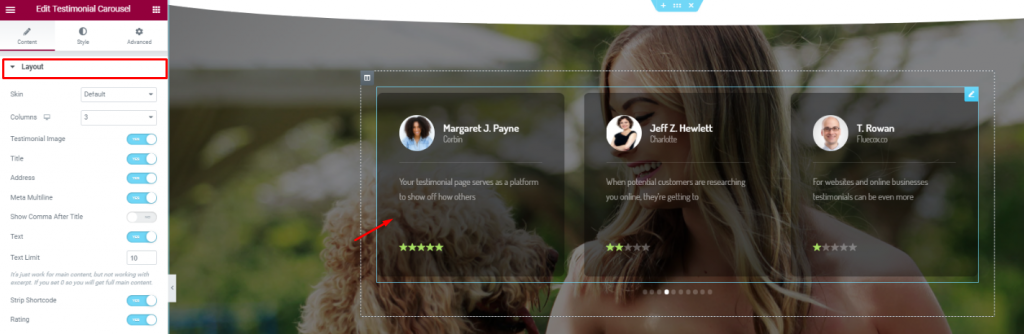
On a new section, insert the Carrossel de depoimentos widget in the middle of the section. Make the color a bit transparent from the Style tab.
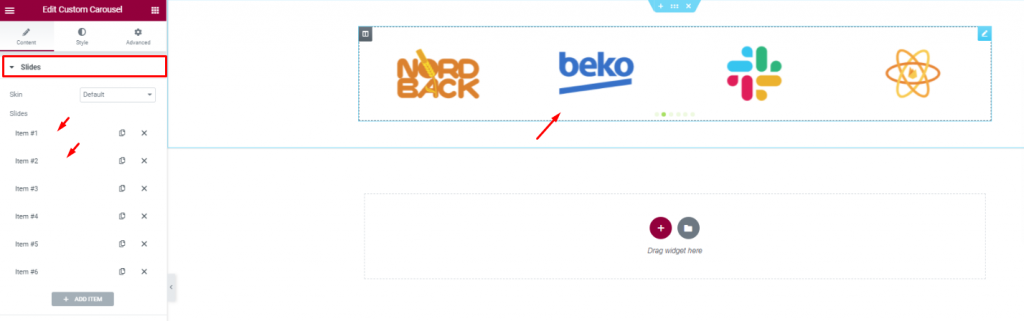
Insert all affiliate websites, partners, sponsors through the Carrossel personalizado widget. And, that covers up for the testimonials.
In this part, we will create a section to display events/offers related to our pet shop.
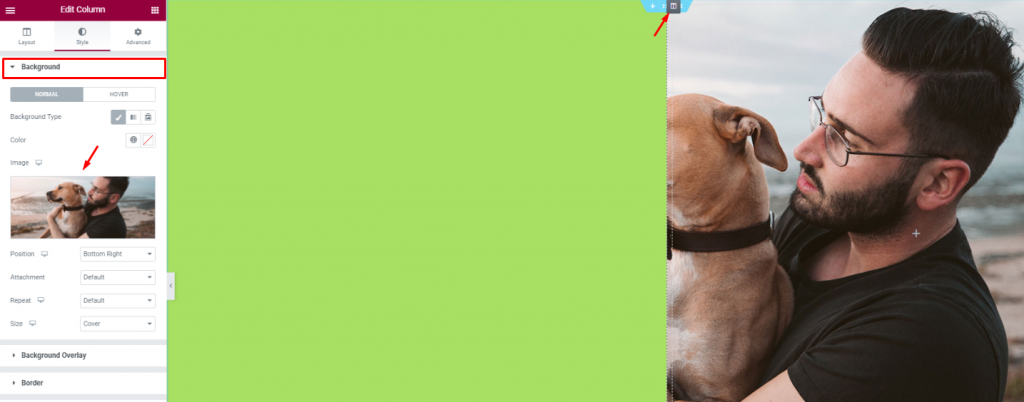
Create 2 column section and add a decent image as a background on the right column. Put a light-green color on the left column.
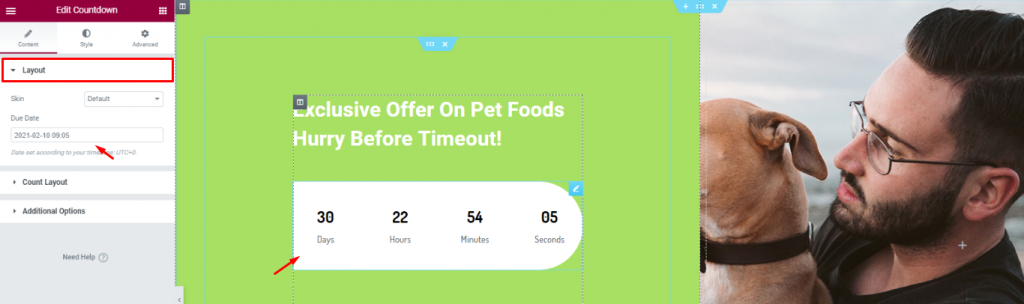
Add a title and the Contagem regressiva widget to show remaining time for your offer.
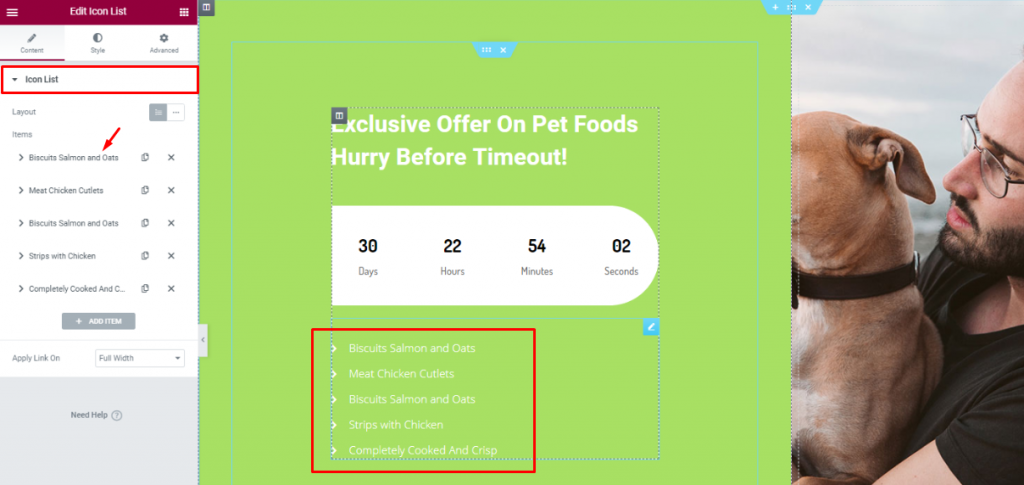
Insira o Lista de ícones widget below the counter to show the offer contents.
Lastly, you need to design a footer part containing contact info, locations, social media links, etc.
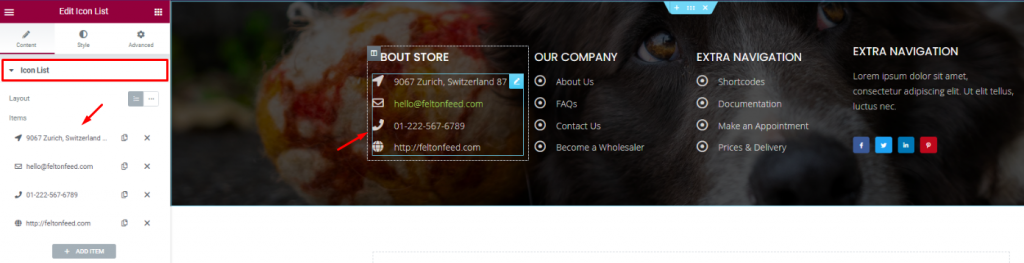
For the footer, make a section with a decent background and divide it into 3 or 4 columns. You can use the Cabeçalho and the Lista de ícones widgets for the footer.
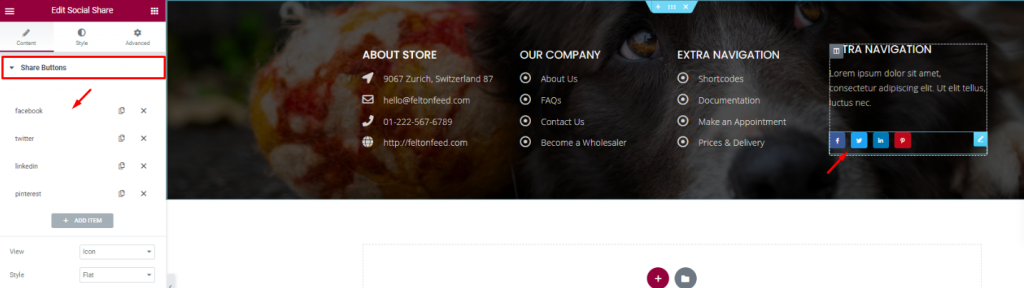
Put your social media links using the Compartilhamento social widget at the end of the footer. That’s it!
Like that, you can design a unique pet shop website and start your new business today.
Thank you for staying with us.

O maior pacote de modelos Elementor com a interface de usuário mais fácil de usar e 300+ widgets úteis do Elementor. Crie sites de zero a 100% perfeição em pouco tempo.
Este site é alimentado por Element Pack Pro e Tema Rooten.
Copyright © 2026 BdThemes. Todos os direitos reservados.