
豊富なメニューオプションによる容易なナビゲーション
視覚的な商品選択が売上を加速させる
パーソナライズされたコンテンツがリアルタイムで適応
UXフローを改善するシームレススクロール
瞬時にコンテンツを複製し、時間を節約
パワフルなデザイン要素に素早くアクセス
既製のテンプレートがデザインをスピードアップ
柔軟なデータのための高度なカスタムフィールド
手間をかけずに簡単にサイトをクローン
あらゆるスクリーンに対応する、鮮明でスケーラブルなグラフィック
ツールをリブランドしてプロフェッショナルな外観に
正確なコンテンツの表示・非表示
滑らかな動きで奥行きを魅せる
明確なメモや注釈を簡単に追加
役立つヒントがユーザーとのインタラクションを向上
スタイリッシュなアニメーション
重要なセクションは常に見えるようにしておく
カスタム・コードの微調整によるフル・コントロール
ファイルを最適化してサイトのスピードを上げる
年中無休で対応いたします。喜んでお手伝いいたします。
BdThemesで各機能の詳細なガイドラインをご覧いただけます。
ワードプレス、ウェブデザイン、その他について新しいことを学び、情報を得る。
私の成長における重要なマイルストーンをいくつか紹介しよう:
ビデオで製品の使い方、WordPressのヒントとコツを学ぶ
プロモーションに参加することで、高額なコミッションを得ることができます。
Widget Idea Shareは、あなたが改善できる類似ウィジェットを見つける素晴らしい方法です。
確かに!私たちと連絡を取る必要がある場合は、お気軽にご連絡ください。
Sigma Forms を使って WordPress のフォームを数分で作成しましょう。.
ページ・ビルダー・プラグイン
One Accessibilityでウェブサイトを簡単にアクセシブルに
信頼と信用を高めるために、顧客の声を表示する。.
Zoloblocksは、Gutenbergベースの魅力的なウェブサイトを作成するのに役立ちます。.
Elementorスライダー時代の最も優れたスライダー
Elementorで唯一互換性のあるブログ用ウィジェット
ビジネス向け次世代型WordPress eコマースサイトの構築
Elementorで毎回違うエンジェルで写真を整理する
スピンホイールを使ってエンゲージメントを高め、売上を増加させましょう。.
WordPress用AI画像生成プラグイン ChatGPT
WooCommerce用の360°拡張現実を今すぐ入手しましょう!
好きなウェブデザインを2クリックでコピー&ペースト!
無制限のオプションを備えたelementorのための完全に機能するテーマ
スマート、クリーン、フレキシブルなGutenberg用ブロックテーマ
Dark Readerプラグインは、目に優しいウェブ閲覧を保証します。.
コンバージョンを高めるWooCommerceのワンページチェックアウト。
Find Nearby Stores Instantly with Sigma Store Locator
The Ultimate WordPress Media Library Organizer
 Japanese

豊富なメニューオプションによる容易なナビゲーション
視覚的な商品選択が売上を加速させる
パーソナライズされたコンテンツがリアルタイムで適応
UXフローを改善するシームレススクロール
瞬時にコンテンツを複製し、時間を節約
パワフルなデザイン要素に素早くアクセス
既製のテンプレートがデザインをスピードアップ
柔軟なデータのための高度なカスタムフィールド
手間をかけずに簡単にサイトをクローン
あらゆるスクリーンに対応する、鮮明でスケーラブルなグラフィック
ツールをリブランドしてプロフェッショナルな外観に
正確なコンテンツの表示・非表示
滑らかな動きで奥行きを魅せる
明確なメモや注釈を簡単に追加
役立つヒントがユーザーとのインタラクションを向上
スタイリッシュなアニメーション
重要なセクションは常に見えるようにしておく
カスタム・コードの微調整によるフル・コントロール
ファイルを最適化してサイトのスピードを上げる
年中無休で対応いたします。喜んでお手伝いいたします。
BdThemesで各機能の詳細なガイドラインをご覧いただけます。
ワードプレス、ウェブデザイン、その他について新しいことを学び、情報を得る。
私の成長における重要なマイルストーンをいくつか紹介しよう:
ビデオで製品の使い方、WordPressのヒントとコツを学ぶ
プロモーションに参加することで、高額なコミッションを得ることができます。
Widget Idea Shareは、あなたが改善できる類似ウィジェットを見つける素晴らしい方法です。
確かに!私たちと連絡を取る必要がある場合は、お気軽にご連絡ください。
Sigma Forms を使って WordPress のフォームを数分で作成しましょう。.
ページ・ビルダー・プラグイン
One Accessibilityでウェブサイトを簡単にアクセシブルに
信頼と信用を高めるために、顧客の声を表示する。.
Zoloblocksは、Gutenbergベースの魅力的なウェブサイトを作成するのに役立ちます。.
Elementorスライダー時代の最も優れたスライダー
Elementorで唯一互換性のあるブログ用ウィジェット
ビジネス向け次世代型WordPress eコマースサイトの構築
Elementorで毎回違うエンジェルで写真を整理する
スピンホイールを使ってエンゲージメントを高め、売上を増加させましょう。.
WordPress用AI画像生成プラグイン ChatGPT
WooCommerce用の360°拡張現実を今すぐ入手しましょう!
好きなウェブデザインを2クリックでコピー&ペースト!
無制限のオプションを備えたelementorのための完全に機能するテーマ
スマート、クリーン、フレキシブルなGutenberg用ブロックテーマ
Dark Readerプラグインは、目に優しいウェブ閲覧を保証します。.
コンバージョンを高めるWooCommerceのワンページチェックアウト。
Find Nearby Stores Instantly with Sigma Store Locator
The Ultimate WordPress Media Library Organizer
Japanese
Hello everyone, in this piece of article, we are going to learn about how to create a landing page in WordPress using Element Pack and Elementor Page builder. This is not about examples but a walk-through with tips and tricks to build the perfect page of your desire.
There are several ways you can create a landing page. Such as:
One extra plugin means extra overhead while elementor with Element Pack can bring the feature of 100’s of the plugin just in 2 plugins. The third-party solution can bring some extra features yet again can limit you with unlimited possibilities that can be achieved through Element Pack and Elementor. In this article, we are going to describe the easiest way to create landing pages, extra design from element pack that makes a landing page even better. We will walk you through the process.
Nothing is better, to start building your Landing Page than quickly review its main objectives and features.
Landing Page: the key element for conversion on your website
The landing page is a web page that the user lands to enter a website. In terms of action, this is different from a website, a blog or an article because these pages are normally linked from external sites and are almost never the home page of a website.
Landing pages clearly differ in their function from other types of web pages, since they have a very simple objective, usually oriented to a single action. When a user notices the home page or home page of a website, they can see that there are too many links and there are different actions to perform on the page. The home pages of the websites are not designed for the user to perform a single specific action. Even many corporate websites are more like a brochure focused on one-way communication. On the other hand, blogs are designed to give information on various topics that interest users. Blogs also have different links and there are different ways by which a user can move through it.
The landing pages usually have a goal: to achieve a conversion or lead. These pages are usually effective when traffic is conducted from ads or specific areas of a web page or blog related to what the user is looking for.
It could be defined simply as a single web page that appears in response to clicking on an optimized search result in a search engine or an online ad.
When you get the traffic on your landing page, you can promote:
In fact, the goal of the landing page is to convert your visitors, providing them with proof that your offer presents value to them. If your website is working well, your visitors will leave information about them by filling out the form there.
Even though all the Landing Pages are different, we still notice some elements that appear in an inevitable way. A landing page, most cases, don’t have any navigation bar or footer. The purpose of this page is to keep your visitor on it, without distracting it from the rest of the site, to fill out your form or click on your call to action. In some cases, we may have a header or footer or both of them. It depends upon the requirement/objectives of the website.
A landing page also presents a clearly established value proposition. In the form of blocks of text, and possibly tables that present their prices, you explain to your visitors what is in the key if they fill out your form or buy your offer.
Another key element of a Landing Page: the presence of a form or a call to action, depending on the format of the promoted offer.
So, the landing page we will build will have the following segments.
The landing page that we are going to create will have:
To make the landing page successfully, you will need:
Let’s build the Landing Page using Element Pack and Elementor
Prior to the actual design of our landing page, we need to set up the defaults for our landing page. By default, I mean the primary and secondary colors, fonts, etc.
To do so, we have to choose the elementor canvas page layout.
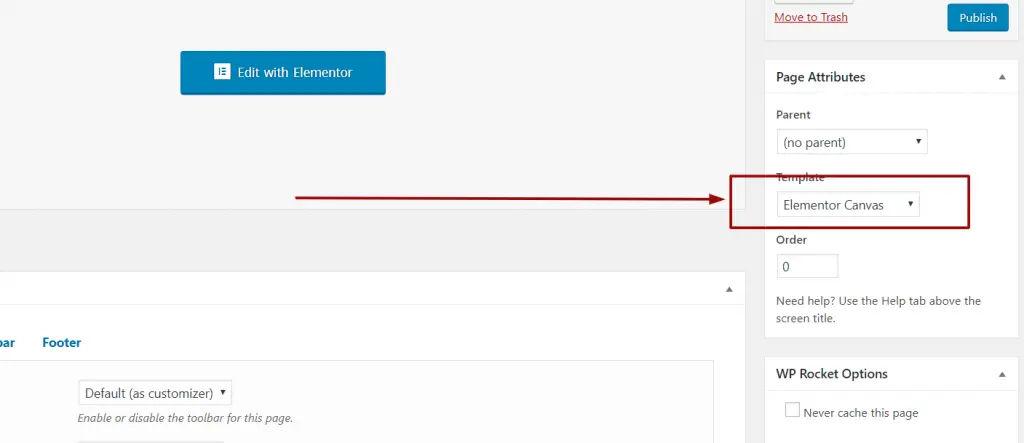
Canvas layout gives us a very clean structure for our content. Once selecting the canvas, click on the save draft button. Then click on the “Edit with Elementor” button.
Now from the primary settings, we will set up the colors and fonts for our landing page. You can select whatever fonts and color that suits your requirements.
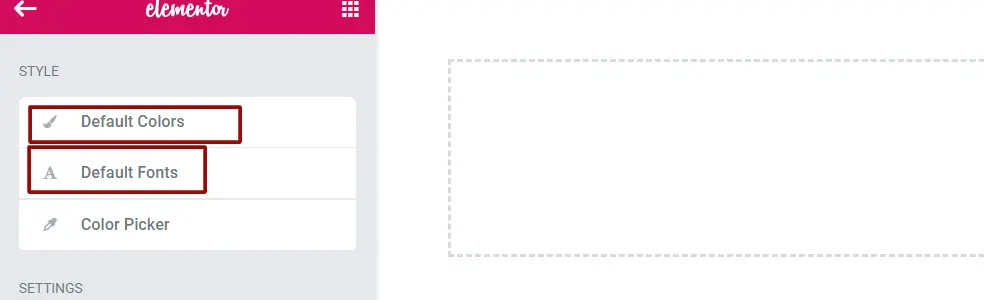
You can select your desired color through the Color Picker settings. By doing so, you can quickly select your desired color whenever you need it on your landing page.
Our top hero section will contain background image, text, icons and buttons to attract visitor’s attention.
The specialty of this section will be a full section background image, SVG icons/image for the section with a heading. And a nice description with 2 call-to-action buttons.
We will take a section with 3 columns 25/50/25
Then we will give a background to the section.
In the middle column, we will put some inner columns to match our design as follows.
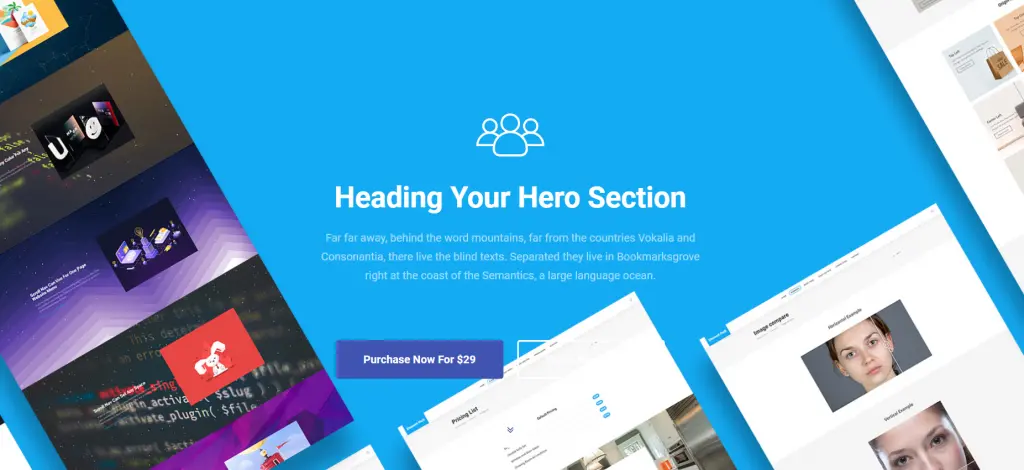
This whole design is available as a ready block in element pack pro plugin. Have a look at here:
Once you have purchased and downloaded. Check the demo content folder. Then go to the ready blocks folder. Go to the hero block and import the desired block into our elementor template.
If you don’t know how to import a template, please watch this video.
Our About us section will contain 2 columns. One of them will have a heading with a paragraph and button to the contact form. The next column will have an image.
We will take a section with 2 columns 50/50
In the first column, we will take a heading and a content block.
In the final column, we will put an image to make it look nice. The image should reflect teamwork.
Our final design will look like the following:
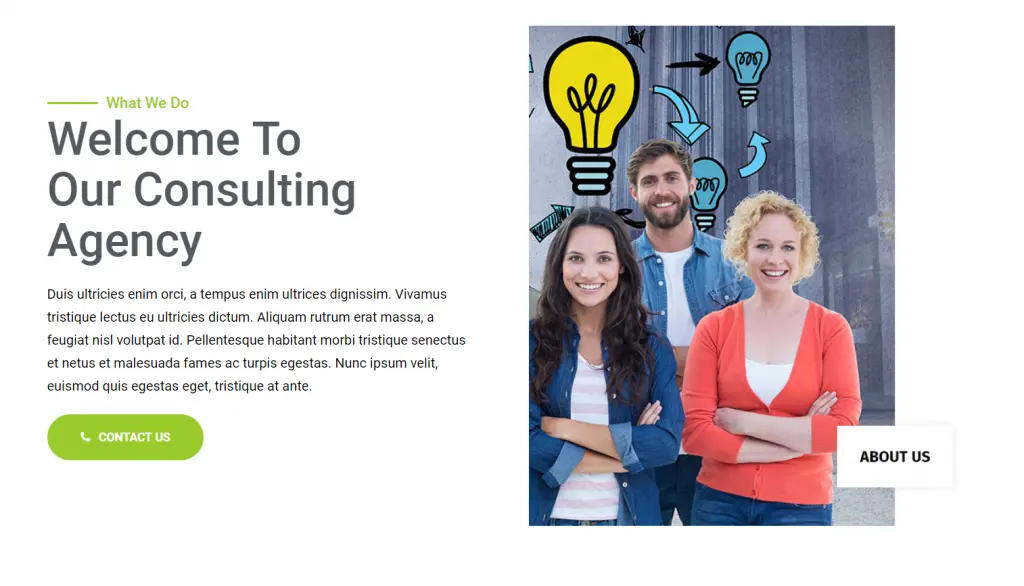
This design along with some other cool attractive design is available in Element Pack Pro ready blocks. Get it now. Look at the demo here:
Our feature section will contain 2 columns. First Column will have progress bar based design and the next Colum will have features with icons and simple description
We will take a section with 24 columns 50/50
Our final design will look like the following:
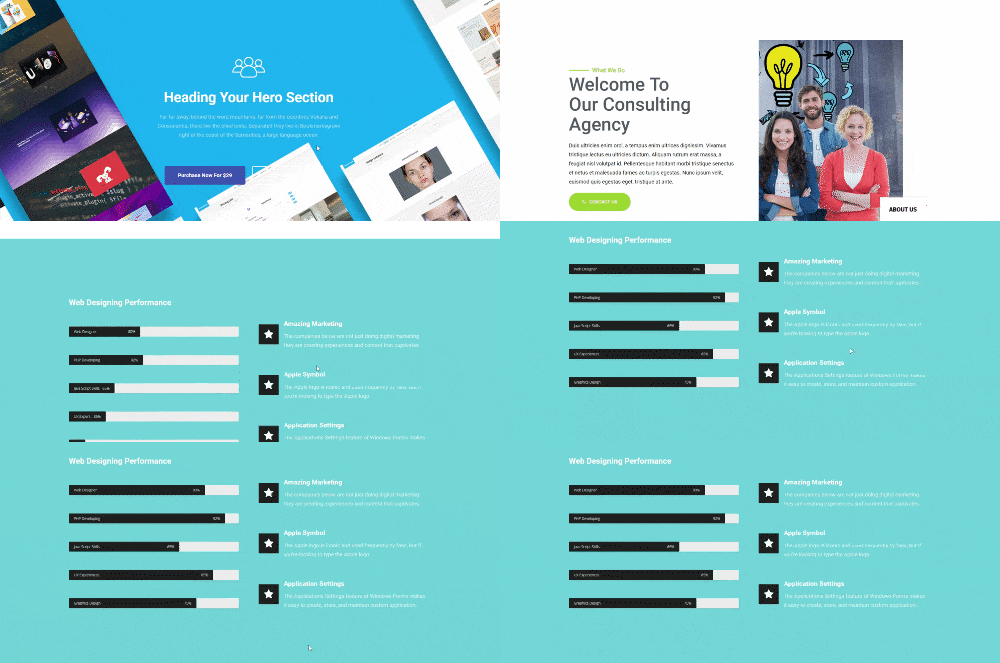
This design along with some other cool attractive ready blocks are available in Element Pack Pro ready blocks. Get it now. Look at the demo here:
We will have a heading before the actual testimonial begins. Our testimonials section will contain 2 columns. Each column will have a picture and description. This will be an advanced box design
We will take a section with 2 columns 50/50
Our final design will look like the following:
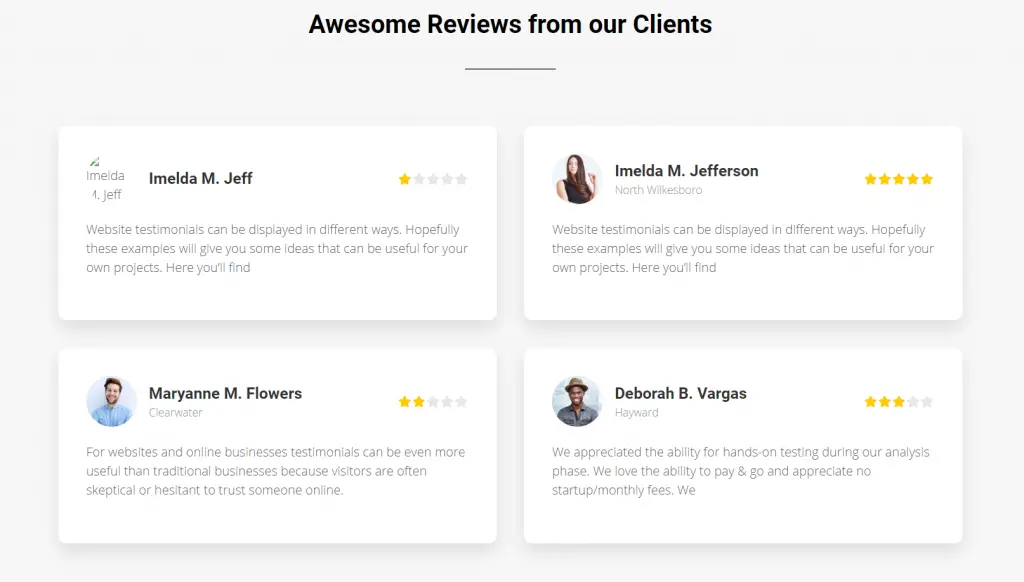
Find out some other awesome ready pages and ready blocks offered by Element Pack – Ultimate addons that you will need. Look at the demo here:
In our pricing section, we will have 2 plans. For that, we will select the pricing table module. We will first import the design from the element pack pro demo content. From there we will design the pricing plan according to our needs.
Please go to the demo content page of your Element Pack Pro downloads that you got from the account manager. Then import the template and add it into a section.
Our final design will look like the following:
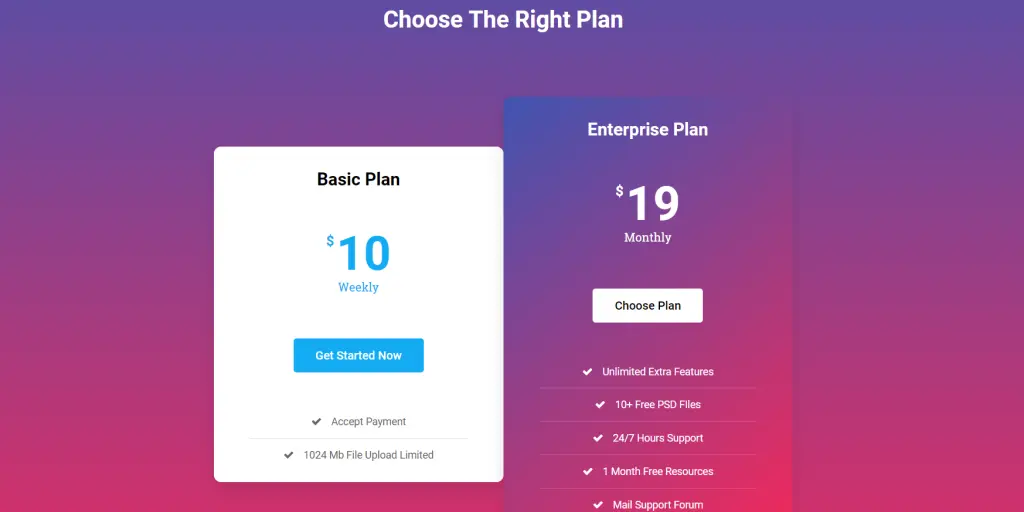
Find out some other awesome ready pages and ready blocks for pricing plans offered by Element Pack – Ultimate addons that you will need. Look at the demo here:
The lead portion is very important. We have put a contact form in this section. You can put any lead magnet like a MailChimp or others.
Please go to the demo content page of your Element Pack Pro downloads that you got from the account manager. Then import the template Contact form template and add it into a section. Once imported, please add the Element Pack Pro Contact form widget on the right column.
And update the writings on the left column. Oh forgot to mention, we have added a background image on the parent section.
Our final design will look like the following:
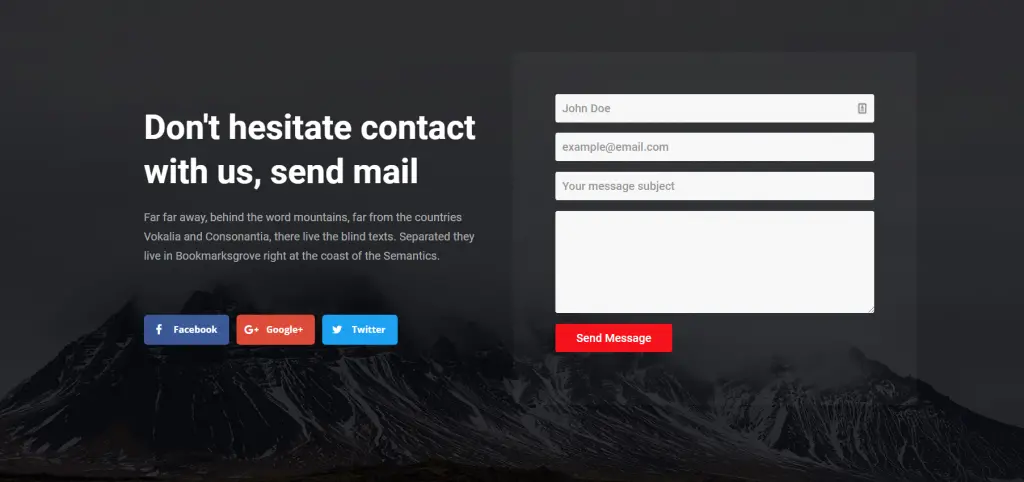
Find out some other awesome ready pages and ready blocks for Contact Form and Lead pages offered by Element Pack – Ultimate addons that you will need. Look at the demo here:
Here is our Final Design.
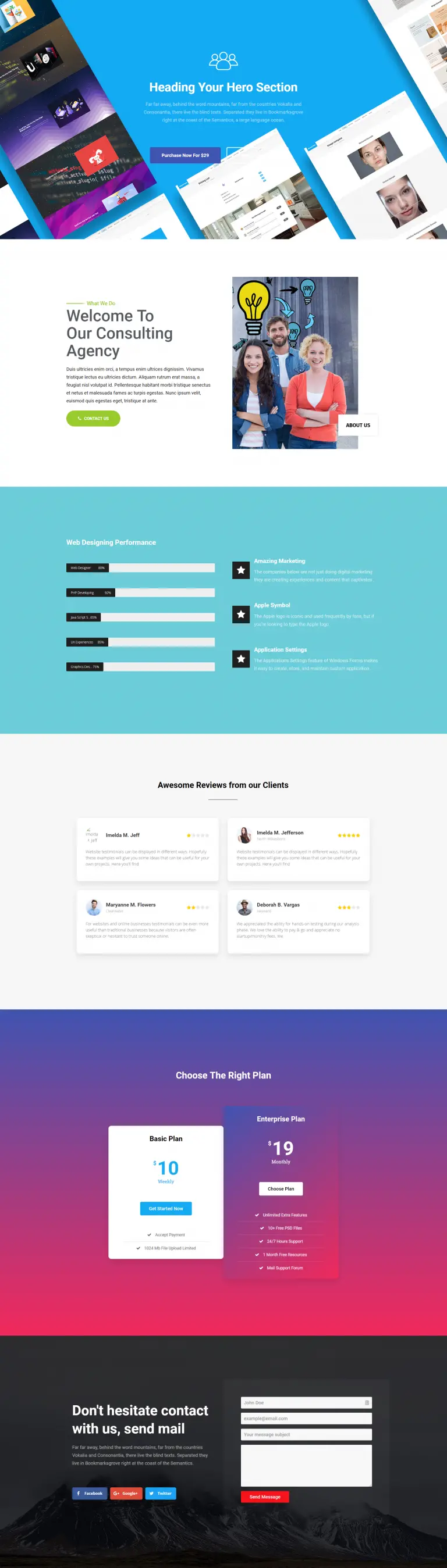
We have just shown a few of our ready-made blocks in this article. We have plenty! We have a huge collection of ready pages that contains landing pages too.
Please check out them in our Element Pack Demo pages. Have blast with your creative ideas through landing pages.

最大のElementorテンプレートパックは、最もユーザーフレンドリーなUIと 300+ 便利なElementorウィジェット。ゼロからウェブサイトを構築 100% あっという間に完璧になる。
このウェブサイトは Element Pack Pro そして ルーテンのテーマ
Copyright © 2026 Bdテーマ. 無断複写・転載を禁じます。










