
Navigazione agevole grazie a menu ricchi di opzioni
Le scelte visive dei prodotti aumentano rapidamente le vendite
I contenuti personalizzati si adattano in tempo reale
Scorrimento senza soluzione di continuità per un flusso UX migliore
La duplicazione istantanea dei contenuti fa risparmiare tempo
Accesso rapido a potenti elementi di design
I modelli pronti per l'uso velocizzano la progettazione
Campi personalizzati avanzati per dati flessibili
Clonare siti in modo semplice e senza problemi
Grafica nitida e scalabile per tutti gli schermi
Rebranding degli strumenti per un look professionale
Mostrare o nascondere i contenuti con precisione
Profondità coinvolgente con movimenti fluidi
Aggiungere facilmente note e annotazioni chiare
I suggerimenti utili migliorano l'interazione con l'utente
Animate gli elementi con stile
Mantenere sempre visibili le sezioni importanti
Pieno controllo con modifiche personalizzate del codice
Ottimizzare i file per aumentare la velocità del sito
Modelli di pagina realizzati per aiutarvi a iniziare la vostra pagina di destinazione con un semplice design iniziale
Ready Blocks è dotato di una varietà di layout ed elementi di design, come intestazioni, piè di pagina, widget ecc.
Intestazioni pre-progettate con stili vantaggiosi, adatte a vari siti web di nicchia e ai gusti di design.
Un'utile raccolta di design di piè di pagina per aiutarvi a creare un piè di pagina immediatamente attraente sulla vostra pagina di destinazione.
Siamo a vostra disposizione 24 ore su 24, 7 giorni su 7. Siamo lieti di aiutarvi.
Linee guida dettagliate disponibili per ogni caratteristica su BdThemes
Imparate qualcosa di nuovo, rimanete informati su WordPress, Web Design e molto altro.
Ecco alcune delle tappe fondamentali del mio sviluppo:
Imparate l'uso dei prodotti, i suggerimenti e i trucchi di WordPress grazie ai nostri video.
Guadagnate ingenti commissioni unendovi a noi nella promozione
Widget Idea Share è un ottimo modo per trovare widget simili che si possono migliorare.
Certamente! Se avete bisogno di mettervi in contatto con noi, non esitate a contattarci.
Costruite qualsiasi modulo WordPress in pochi minuti con Sigma Forms.
Plugin Page Builder in modalità Coming Soon e Maintenance
Rendete facilmente accessibili i siti web con One Accessibility
Mostrate le testimonianze dei clienti per aumentare la fiducia e la credibilità.
Zoloblocks aiuta a creare siti web straordinari basati su Gutenberg.
Il cursore più avanzato nell'era del cursore Elementor
Gli unici widget di blogging compatibili in Elementor per qualsiasi blog
Costruite un sito eCommerce WordPress di ultima generazione per le imprese
Organizzate le vostre foto in un angelo diverso ogni volta con Elementor
Aumentate il coinvolgimento e le vendite con Spin Wheel.
Potente plugin generatore di immagini AI per WordPress di ChatGPT
Ottenete la realtà aumentata a 360° per WooCommerce oggi stesso!
Copiate e incollate qualsiasi design web che vi piace con soli 2 clic!
Un tema completamente funzionante per elementor con opzioni illimitate
Tema a blocchi intelligente, pulito e flessibile per Gutenberg
Il plugin Dark Reader garantisce una lettura del web rispettosa degli occhi.
WooCommerce one-page checkout per aumentare le conversioni.
Find Nearby Stores Instantly with Sigma Store Locator
The Ultimate WordPress Media Library Organizer

Accesso a 100+ plugin premium per WordPress con aggiornamenti a vita e supporto dedicato.
 Italian

Navigazione agevole grazie a menu ricchi di opzioni
Le scelte visive dei prodotti aumentano rapidamente le vendite
I contenuti personalizzati si adattano in tempo reale
Scorrimento senza soluzione di continuità per un flusso UX migliore
La duplicazione istantanea dei contenuti fa risparmiare tempo
Accesso rapido a potenti elementi di design
I modelli pronti per l'uso velocizzano la progettazione
Campi personalizzati avanzati per dati flessibili
Clonare siti in modo semplice e senza problemi
Grafica nitida e scalabile per tutti gli schermi
Rebranding degli strumenti per un look professionale
Mostrare o nascondere i contenuti con precisione
Profondità coinvolgente con movimenti fluidi
Aggiungere facilmente note e annotazioni chiare
I suggerimenti utili migliorano l'interazione con l'utente
Animate gli elementi con stile
Mantenere sempre visibili le sezioni importanti
Pieno controllo con modifiche personalizzate del codice
Ottimizzare i file per aumentare la velocità del sito
Modelli di pagina realizzati per aiutarvi a iniziare la vostra pagina di destinazione con un semplice design iniziale
Ready Blocks è dotato di una varietà di layout ed elementi di design, come intestazioni, piè di pagina, widget ecc.
Intestazioni pre-progettate con stili vantaggiosi, adatte a vari siti web di nicchia e ai gusti di design.
Un'utile raccolta di design di piè di pagina per aiutarvi a creare un piè di pagina immediatamente attraente sulla vostra pagina di destinazione.
Siamo a vostra disposizione 24 ore su 24, 7 giorni su 7. Siamo lieti di aiutarvi.
Linee guida dettagliate disponibili per ogni caratteristica su BdThemes
Imparate qualcosa di nuovo, rimanete informati su WordPress, Web Design e molto altro.
Ecco alcune delle tappe fondamentali del mio sviluppo:
Imparate l'uso dei prodotti, i suggerimenti e i trucchi di WordPress grazie ai nostri video.
Guadagnate ingenti commissioni unendovi a noi nella promozione
Widget Idea Share è un ottimo modo per trovare widget simili che si possono migliorare.
Certamente! Se avete bisogno di mettervi in contatto con noi, non esitate a contattarci.
Costruite qualsiasi modulo WordPress in pochi minuti con Sigma Forms.
Plugin Page Builder in modalità Coming Soon e Maintenance
Rendete facilmente accessibili i siti web con One Accessibility
Mostrate le testimonianze dei clienti per aumentare la fiducia e la credibilità.
Zoloblocks aiuta a creare siti web straordinari basati su Gutenberg.
Il cursore più avanzato nell'era del cursore Elementor
Gli unici widget di blogging compatibili in Elementor per qualsiasi blog
Costruite un sito eCommerce WordPress di ultima generazione per le imprese
Organizzate le vostre foto in un angelo diverso ogni volta con Elementor
Aumentate il coinvolgimento e le vendite con Spin Wheel.
Potente plugin generatore di immagini AI per WordPress di ChatGPT
Ottenete la realtà aumentata a 360° per WooCommerce oggi stesso!
Copiate e incollate qualsiasi design web che vi piace con soli 2 clic!
Un tema completamente funzionante per elementor con opzioni illimitate
Tema a blocchi intelligente, pulito e flessibile per Gutenberg
Il plugin Dark Reader garantisce una lettura del web rispettosa degli occhi.
WooCommerce one-page checkout per aumentare le conversioni.
Find Nearby Stores Instantly with Sigma Store Locator
The Ultimate WordPress Media Library Organizer
Accesso a 100+ plugin premium per WordPress con aggiornamenti a vita e supporto dedicato.
Italian
Hello everyone, in this piece of article, we are going to learn about how to create a landing page in WordPress using Element Pack and Elementor Page builder. This is not about examples but a walk-through with tips and tricks to build the perfect page of your desire.
There are several ways you can create a landing page. Such as:
One extra plugin means extra overhead while elementor with Element Pack can bring the feature of 100’s of the plugin just in 2 plugins. The third-party solution can bring some extra features yet again can limit you with unlimited possibilities that can be achieved through Element Pack and Elementor. In this article, we are going to describe the easiest way to create landing pages, extra design from element pack that makes a landing page even better. We will walk you through the process.
Nothing is better, to start building your Landing Page than quickly review its main objectives and features.
Landing Page: the key element for conversion on your website
The landing page is a web page that the user lands to enter a website. In terms of action, this is different from a website, a blog or an article because these pages are normally linked from external sites and are almost never the home page of a website.
Landing pages clearly differ in their function from other types of web pages, since they have a very simple objective, usually oriented to a single action. When a user notices the home page or home page of a website, they can see that there are too many links and there are different actions to perform on the page. The home pages of the websites are not designed for the user to perform a single specific action. Even many corporate websites are more like a brochure focused on one-way communication. On the other hand, blogs are designed to give information on various topics that interest users. Blogs also have different links and there are different ways by which a user can move through it.
The landing pages usually have a goal: to achieve a conversion or lead. These pages are usually effective when traffic is conducted from ads or specific areas of a web page or blog related to what the user is looking for.
It could be defined simply as a single web page that appears in response to clicking on an optimized search result in a search engine or an online ad.
When you get the traffic on your landing page, you can promote:
In fact, the goal of the landing page is to convert your visitors, providing them with proof that your offer presents value to them. If your website is working well, your visitors will leave information about them by filling out the form there.
Even though all the Landing Pages are different, we still notice some elements that appear in an inevitable way. A landing page, most cases, don’t have any navigation bar or footer. The purpose of this page is to keep your visitor on it, without distracting it from the rest of the site, to fill out your form or click on your call to action. In some cases, we may have a header or footer or both of them. It depends upon the requirement/objectives of the website.
A landing page also presents a clearly established value proposition. In the form of blocks of text, and possibly tables that present their prices, you explain to your visitors what is in the key if they fill out your form or buy your offer.
Another key element of a Landing Page: the presence of a form or a call to action, depending on the format of the promoted offer.
So, the landing page we will build will have the following segments.
The landing page that we are going to create will have:
To make the landing page successfully, you will need:
Let’s build the Landing Page using Element Pack and Elementor
Prior to the actual design of our landing page, we need to set up the defaults for our landing page. By default, I mean the primary and secondary colors, fonts, etc.
To do so, we have to choose the elementor canvas page layout.
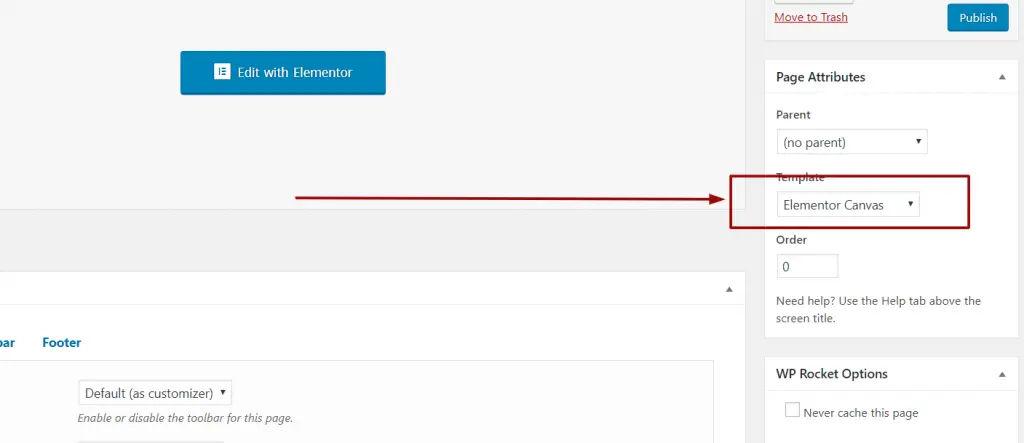
Canvas layout gives us a very clean structure for our content. Once selecting the canvas, click on the save draft button. Then click on the “Edit with Elementor” button.
Now from the primary settings, we will set up the colors and fonts for our landing page. You can select whatever fonts and color that suits your requirements.
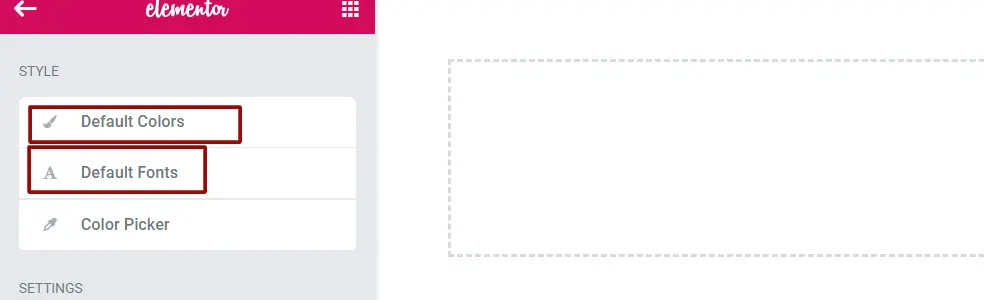
You can select your desired color through the Color Picker settings. By doing so, you can quickly select your desired color whenever you need it on your landing page.
Our top hero section will contain background image, text, icons and buttons to attract visitor’s attention.
The specialty of this section will be a full section background image, SVG icons/image for the section with a heading. And a nice description with 2 call-to-action buttons.
We will take a section with 3 columns 25/50/25
Then we will give a background to the section.
In the middle column, we will put some inner columns to match our design as follows.
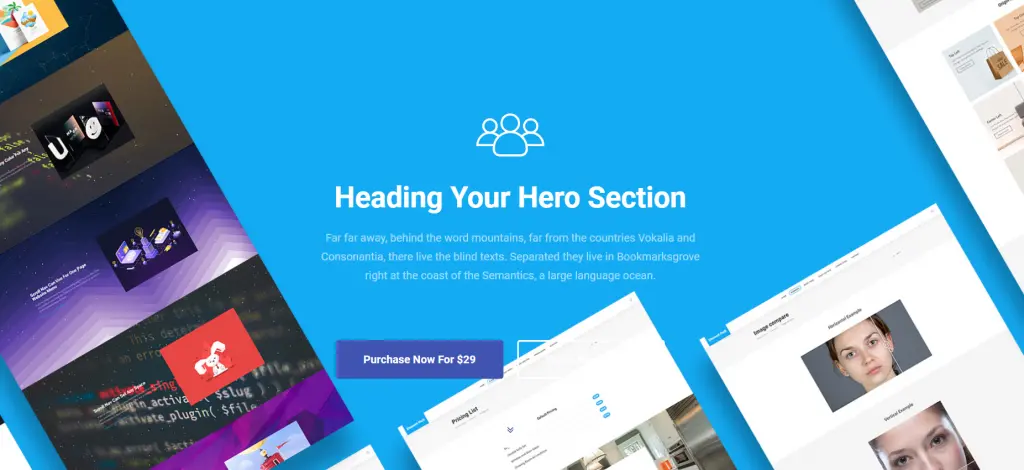
This whole design is available as a ready block in element pack pro plugin. Have a look at here:
Once you have purchased and downloaded. Check the demo content folder. Then go to the ready blocks folder. Go to the hero block and import the desired block into our elementor template.
If you don’t know how to import a template, please watch this video.
Our About us section will contain 2 columns. One of them will have a heading with a paragraph and button to the contact form. The next column will have an image.
We will take a section with 2 columns 50/50
In the first column, we will take a heading and a content block.
In the final column, we will put an image to make it look nice. The image should reflect teamwork.
Our final design will look like the following:
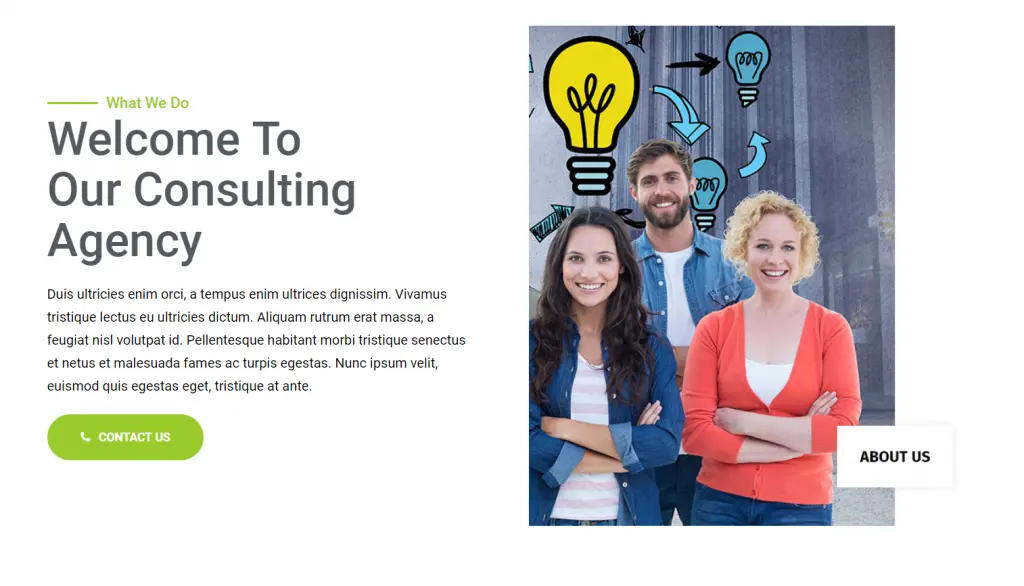
This design along with some other cool attractive design is available in Element Pack Pro ready blocks. Get it now. Look at the demo here:
Our feature section will contain 2 columns. First Column will have progress bar based design and the next Colum will have features with icons and simple description
We will take a section with 24 columns 50/50
Our final design will look like the following:
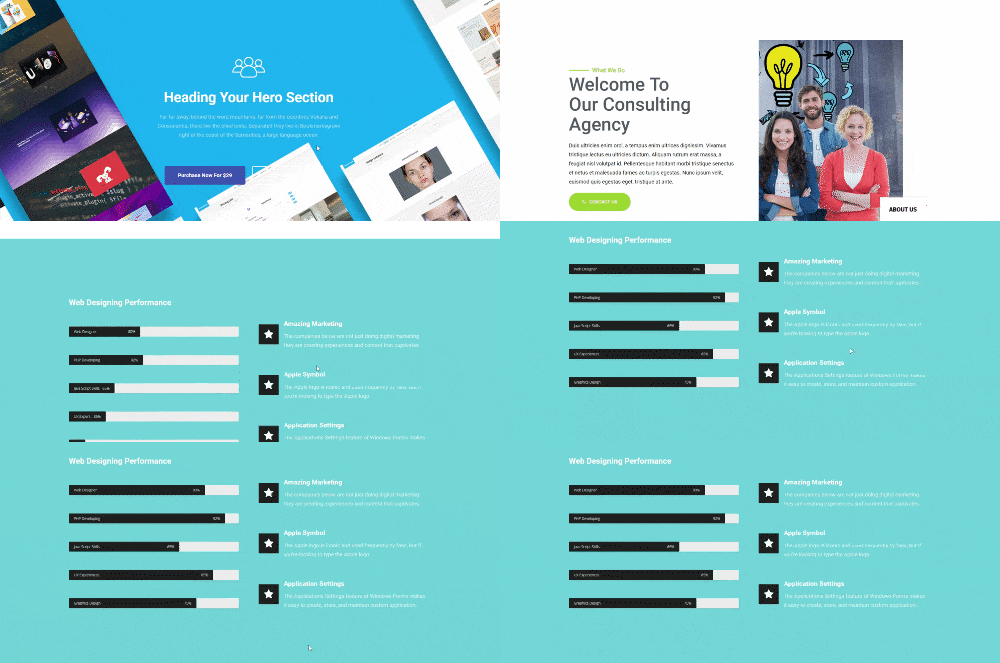
This design along with some other cool attractive ready blocks are available in Element Pack Pro ready blocks. Get it now. Look at the demo here:
We will have a heading before the actual testimonial begins. Our testimonials section will contain 2 columns. Each column will have a picture and description. This will be an advanced box design
We will take a section with 2 columns 50/50
Our final design will look like the following:
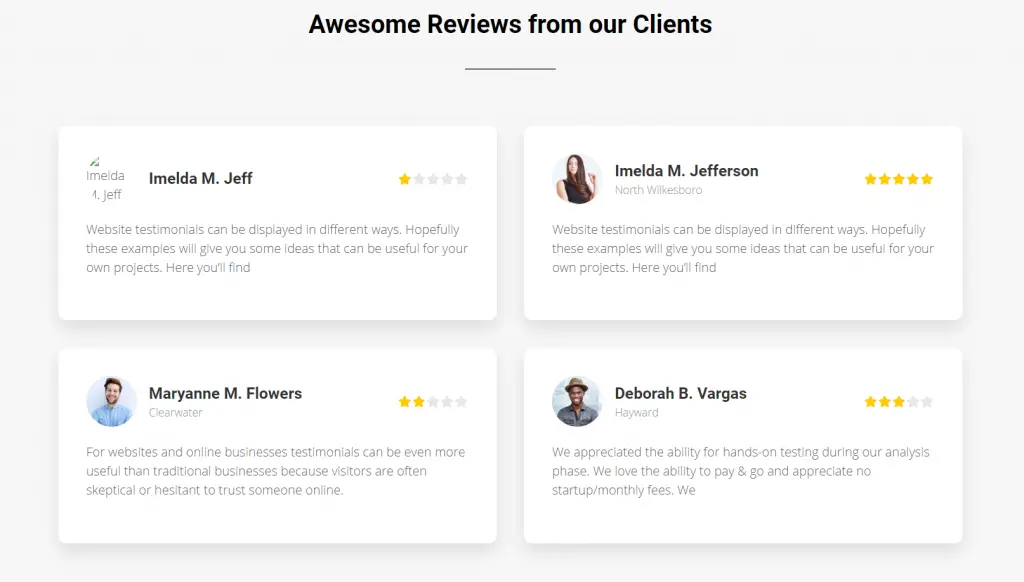
Find out some other awesome ready pages and ready blocks offered by Element Pack – Ultimate addons that you will need. Look at the demo here:
In our pricing section, we will have 2 plans. For that, we will select the pricing table module. We will first import the design from the element pack pro demo content. From there we will design the pricing plan according to our needs.
Please go to the demo content page of your Element Pack Pro downloads that you got from the account manager. Then import the template and add it into a section.
Our final design will look like the following:
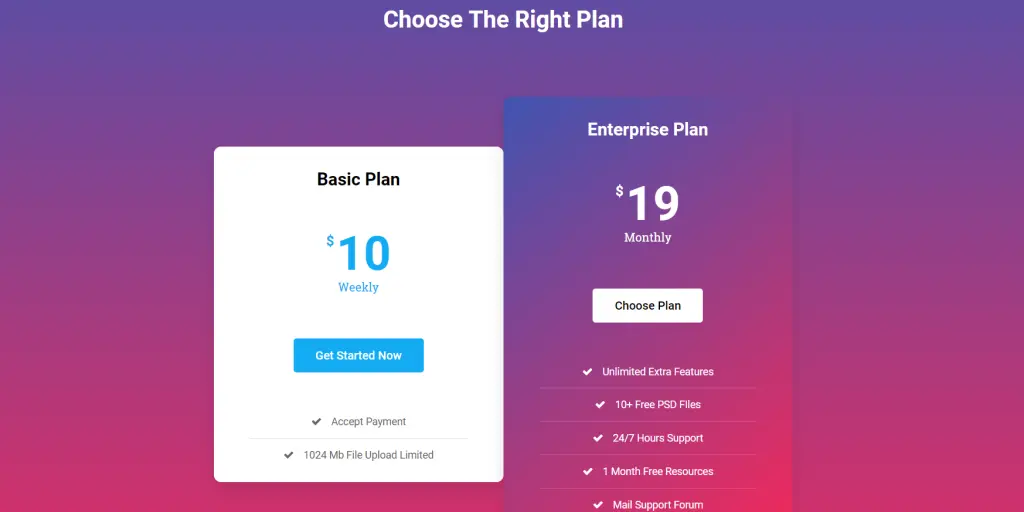
Find out some other awesome ready pages and ready blocks for pricing plans offered by Element Pack – Ultimate addons that you will need. Look at the demo here:
The lead portion is very important. We have put a contact form in this section. You can put any lead magnet like a MailChimp or others.
Please go to the demo content page of your Element Pack Pro downloads that you got from the account manager. Then import the template Contact form template and add it into a section. Once imported, please add the Element Pack Pro Contact form widget on the right column.
And update the writings on the left column. Oh forgot to mention, we have added a background image on the parent section.
Our final design will look like the following:
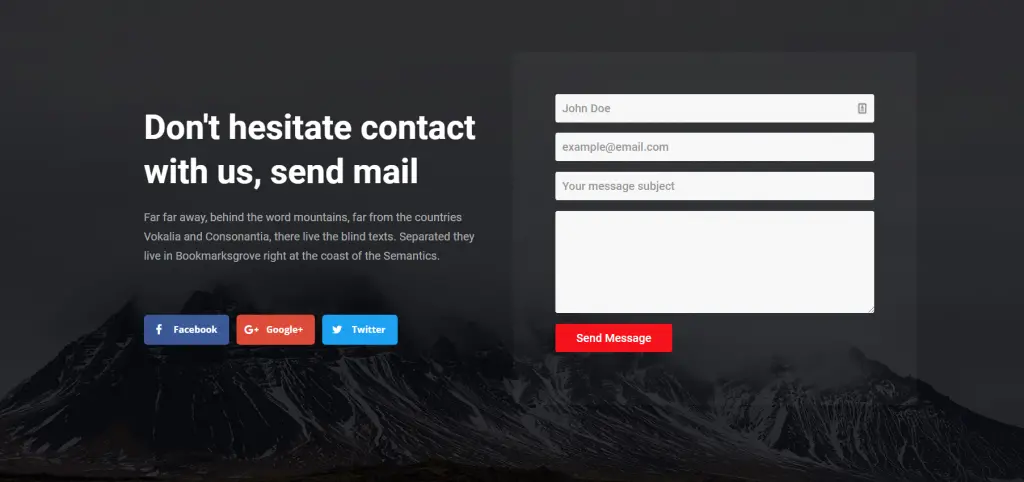
Find out some other awesome ready pages and ready blocks for Contact Form and Lead pages offered by Element Pack – Ultimate addons that you will need. Look at the demo here:
Here is our Final Design.
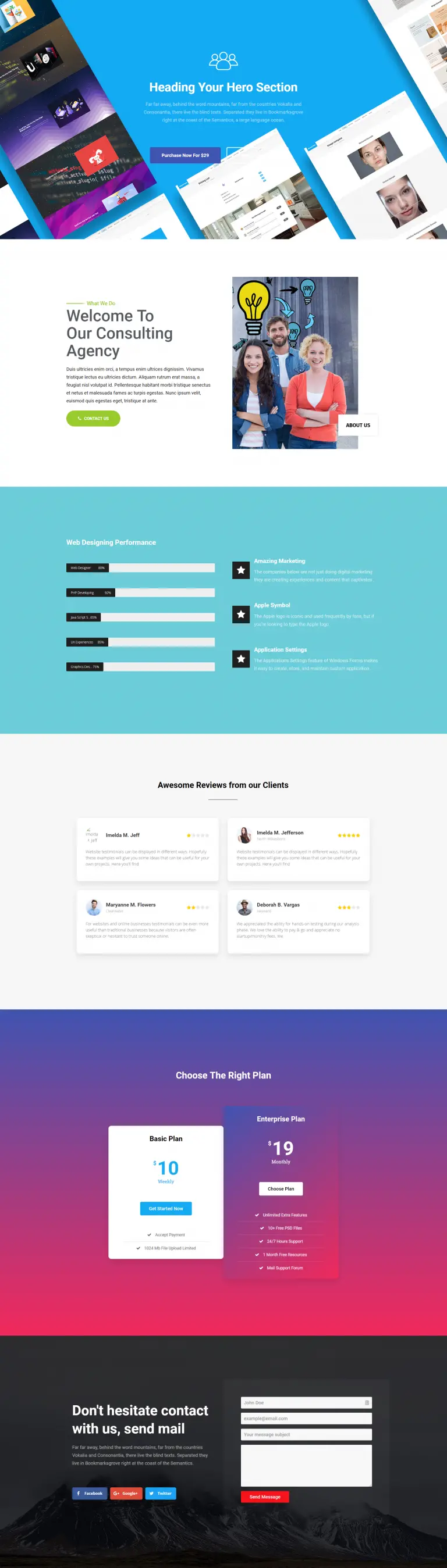
We have just shown a few of our ready-made blocks in this article. We have plenty! We have a huge collection of ready pages that contains landing pages too.
Please check out them in our Demo Element Pack pages. Have blast with your creative ideas through landing pages.

Il più grande pacchetto di modelli Elementor con l'interfaccia utente più facile da utilizzare e 300+ utili widget Elementor. Costruire siti web da zero a 100% perfezione in pochissimo tempo.
Questo sito web è alimentato da Element Pack Pro e Tema di Rooten.
Copyright © 2026 BdThemes. Tutti i diritti riservati.









