

Imagine a peaceful morning for you to get up with the desire to write an entry in WordPress or make any changes on the web and, suddenly, you see absolutely nothing! Only a completely white screen that does not offer any information about the error that is occurring. What has happened to your website? How can you solve it? Well, this particular phenomenon is known as the WordPress White Screen of Death!
In fact, it is easier to fix like when we encounter another common problem due to the database server error or wrong wp-config.php file settings. That is because it through a message in the screen as “Error Establishing Database Connection”. We will write an article to fix that in the near future also. But now in this article, we will be discussing all the possible way of how to fix WordPress white screen of that. Let’s get started:
WordPress white screen of death fix
The white screen of death is one of the most frequent problems faced by WordPress website developers. It is the most common, although it is not the most difficult to solve. It is difficult because you don’t get any clue what has happened due to the blank white page website. Let’s talk about the reason behind it.
Reasons for the WordPress white screen of death
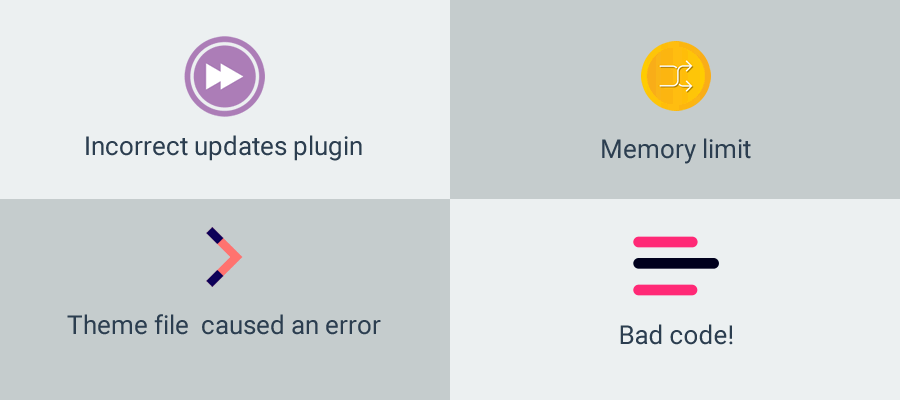
There might be a lot of reason behind it. But in most cases, the error is caused by some modification by the WordPress site administrator. Some of the most common reasons are:
- Incorrect update of a plugin
- Changes in your theme file that have caused an error
- WordPress has reached the memory limit
- You have edited code on your website and oops! Something you have written wrong. Bad code!
How to solve the blank WordPress screen or the WordPress white screen of death
As we have mentioned, unlike other errors, this does not show the cause that is causing it. Therefore, unless you remember that you have made a specific change that could have caused this, we recommend that you follow the following steps to solve it.
Follow the next steps:
Disable WordPress Plugins:
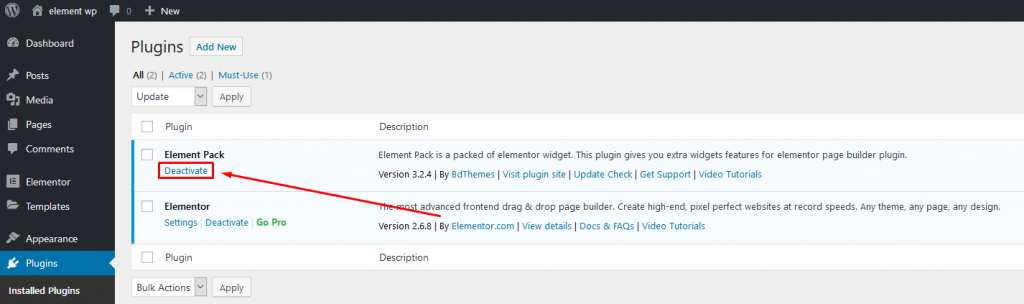
The first thing is to identify if that error is caused by one of our plugins or not.
To identify which is the cause, it is advisable to deactivate all the plugins. If you see the site is working now then the reason is a plugin malfunctioning. So now, let’s activate one plugin at a time and check if it breaks the site or not.
Active a plugin and go to the main site to see if the WordPress white screen of death appears. If it appears then voila, remove that plugin or modify the code accordingly to figure out the error.
For code-based error, you need to debug which we will explain in a moment. Now, what if you can’t visit your dashboard? That means WordPress white screen of death in wp-admin, right? Well, I will talk about that also. Just bear with me.
Learn more about WordPress
		<div class="bdt-ep-button-text">

			<span class="avdbtn-text">
				Click me				</span>

						</div>


	</div>
				</a>
	</div>
					</div>
				</div>
	</div>
				</div>
	</section>
			<div class="elementor-element elementor-element-3c90421 elementor-widget elementor-widget-heading" data-id="3c90421" data-element_type="widget" data-e-type="widget" data-widget_type="heading.default">
				<h3 class="elementor-heading-title elementor-size-default">Disable WordPress Themes:</h3>				</div>
			<div class="elementor-element elementor-element-5ed4e3c elementor-widget elementor-widget-image" data-id="5ed4e3c" data-element_type="widget" data-e-type="widget" data-widget_type="image.default">
														<img width="1024" height="246" src="/blog-media/wordpress-white-screen-of-death-fix-all-covered/Disable_WordPress_theme-1024x246.png" class="attachment-large size-large wp-image-4570" alt="WordPress White Screen of Death fix (All Fixes!)"  title="WordPress White Screen of Death fix (All Fixes!)"/>															</div>
			<div class="elementor-element elementor-element-595919b elementor-widget elementor-widget-text-editor" data-id="595919b" data-element_type="widget" data-e-type="widget" data-widget_type="text-editor.default">
								<p>If your Plugin check didn’t bring the site alive, then check the same steps for your theme.</p>
Go to the dashboard and activated a default theme like Twenty Nineteen. If the site works, then the problem is in the theme code. Please check the theme compatibility or purchase a new one. We highly recommend using our premium WordPress theme from BD Themes. If you need custom theme development and customization service, you can consult with our friend at TechnoCrews.
Now you have done everything with theme and plugin but still, the problem appears. Okay, now it’s time to play dirty. Go to the next step. Oh if you couldn’t able to even login into the dashboard ( i.e Your-domain/wp-admin) wait for the step after the next step!
define (‘WP_DEBUG’, true) :
In the wp-config.php file, we will set the value of WP_DEBUG to true. In this way, we will activate the error messages, and it should be shown on the screen which error is causing the WordPress white screen of death. So now we can go to that line and fix accordingly. Again if you find the coding as a hard job, ping our friend at TechnoCrews!
So, you have done all the step above still but failed to log into the wp-admin to change the plugin or theme name. How to do it?
Use FTP / Hosting Control Panel File Manager.
- Go to your website hosting control panel or log in using FTP. Now, navigate to the wp-content folder.
- Rename wp-content/themes/YOURTHEME folder to something else. Like ‘ YOURTHEME-DUMB’.
- Now go and check if you can log into wp-admin. If you can, then it is a theme issue. Login and dump that piece of code or fix it.
If you still can’t, now the work become a bit harder. Go to,
- wp-content/plugins and rename it to wp-content/plugins-old
- Now make another wp-plugins folder (don’t forget to set the permission as 755 only for this directory nor for files). And bring one plugin from “plugins-old” into the new wp-plugin folder.
- Now go to your website and check if it is working. If not, you found the culprit. If it works, then bring the next one.
- And repeat the process until you find the culprit.
Insufficient memory:
If the error is caused by insufficient memory, we can try to increase the memory limit, through wp-config.php or .htaccess.
define (‘WP_MEMORY_LIMIT’, ’64M’);
If you prefer to make the change through the .htaccess file, you can also. If you choose this path, you must modify the file by adding:
php_value memory_limit 64M
If still a problem this problem exist, you need to switch hosting to a higher plan. Consult to your web host to check the issue. If you have server administrators, you can ask them to investigate.
Permissions:
Verify that the files and folders have the correct permissions. Rules of thumb for WordPress:
Set all the directory permission as “755”
And File permission as “644”.
Logs:
It is also recommended that you verify the error logs. There you will probably find what file is causing the error and why.
Final Note
This error may scare you at first because you do not have any information. But as you have seen, in principle it is easy to detect and solve the problem. Please let us know if your thought about this article in the comment below. Until next time, stay safe and secure! Adios!
Spread in the world:
</div>
</div>
</div>
</div>
</section>
<section class="elementor-section elementor-top-section elementor-element elementor-element-e603a24 elementor-section-boxed elementor-section-height-default elementor-section-height-default magic-button-disabled-no" data-id="e603a24" data-element_type="section" data-e-type="section">
<div class="elementor-container elementor-column-gap-default">
<div class="elementor-column elementor-col-100 elementor-top-column elementor-element elementor-element-86e6ae0" data-id="86e6ae0" data-element_type="column" data-e-type="column">
<div class="elementor-widget-wrap elementor-element-populated">
<div class="elementor-element elementor-element-9eba122 bdt-icon-type-icon elementor-position-top bdt-icon-effect-none elementor-widget elementor-widget-bdt-advanced-icon-box" data-id="9eba122" data-element_type="widget" data-e-type="widget" data-widget_type="bdt-advanced-icon-box.default">
<div class="bdt-ep-advanced-icon-box">
<div class="bdt-ep-advanced-icon-box-icon">
<span class="bdt-ep-advanced-icon-box-icon-wrap">
<i class="fas fa-star fa-solid" aria-hidden="true"></i>
</span>
</div>
<div class="bdt-ep-advanced-icon-box-content">
<h3 class="bdt-ep-advanced-icon-box-title ep-title-">
<span >
Want to know about the best premium elementor addons for blogger and affiliate marketers? </span>
</h3>
<div class="bdt-ep-advanced-icon-box-description">
We have written an article about what feature your blog site should have in this <a href="/10-premium-elementor-addons-for-blogger-and-affiliate-marketers" rel="follow noopener" target="_blank">“10 premium elementor addons for blogger and affiliate marketers “</a> post. Have a read. </div>
</div>
</div>
</div>
</div>
</div>
</div>
</section>
<section class="elementor-section elementor-top-section elementor-element elementor-element-0eb4763 elementor-section-boxed elementor-section-height-default elementor-section-height-default magic-button-disabled-no" data-id="0eb4763" data-element_type="section" data-e-type="section" data-settings="{"background_background":"gradient"}">
<div class="elementor-container elementor-column-gap-default">
<div class="elementor-column elementor-col-100 elementor-top-column elementor-element elementor-element-94b452a" data-id="94b452a" data-element_type="column" data-e-type="column" data-settings="{"background_background":"classic"}">
<div class="elementor-widget-wrap elementor-element-populated">
<div class="elementor-element elementor-element-ec5d18e bdt-icon-type-icon elementor-position-top bdt-icon-effect-none elementor-widget elementor-widget-bdt-advanced-icon-box" data-id="ec5d18e" data-element_type="widget" data-e-type="widget" data-widget_type="bdt-advanced-icon-box.default">
<div class="bdt-ep-advanced-icon-box">
<div class="bdt-ep-advanced-icon-box-icon">
<span class="bdt-ep-advanced-icon-box-icon-wrap">
<svg aria-hidden="true" class="e-font-icon-svg e-fas-store" viewBox="0 0 616 512" xmlns="http://www.w3.org/2000/svg"><path d="M602 118.6L537.1 15C531.3 5.7 521 0 510 0H106C95 0 84.7 5.7 78.9 15L14 118.6c-33.5 53.5-3.8 127.9 58.8 136.4 4.5.6 9.1.9 13.7.9 29.6 0 55.8-13 73.8-33.1 18 20.1 44.3 33.1 73.8 33.1 29.6 0 55.8-13 73.8-33.1 18 20.1 44.3 33.1 73.8 33.1 29.6 0 55.8-13 73.8-33.1 18.1 20.1 44.3 33.1 73.8 33.1 4.7 0 9.2-.3 13.7-.9 62.8-8.4 92.6-82.8 59-136.4zM529.5 288c-10 0-19.9-1.5-29.5-3.8V384H116v-99.8c-9.6 2.2-19.5 3.8-29.5 3.8-6 0-12.1-.4-18-1.2-5.6-.8-11.1-2.1-16.4-3.6V480c0 17.7 14.3 32 32 32h448c17.7 0 32-14.3 32-32V283.2c-5.4 1.6-10.8 2.9-16.4 3.6-6.1.8-12.1 1.2-18.2 1.2z"></path></svg>
</span>
</div>
<div class="bdt-ep-advanced-icon-box-content">
<h3 class="bdt-ep-advanced-icon-box-title ep-title-">
<span >
Get a free EP & PS license (Lifetime) </span>
</h3>
<div class="bdt-ep-advanced-icon-box-description">
<p>We are running a give-away program to our beloved consumers & subscribers who are connected to our official website <a href="http://bdthemes.com" target="_blank" rel="noopener">BDthemes.com</a></p>
Visit Element Pack or Prime Slider and share with us your thoughts. Lucky winners will receive a lifetime license worth $100. It will only take a minute to take part in.
								<a class="bdt-ep-advanced-icon-box-readmore bdt-ep-attention-button" href="https://bdthemes.com/giveaway/" target="_blank" rel="noopener">

					Join Give Away Program
										</a>
						</div>
	</div>


			</div>
				</div>
	</div>
				</div>
	</section>
			</div>
Selim Rana
The BdThemes team builds WordPress plugins trusted by 3M+ users worldwide. We write about web accessibility, WCAG compliance, and inclusive design.